This Appendix describes how to install a rack that already has your system modules rack-mounted and cabled together. The following information is provided:
After you have completed installing your rack, return to “Positioning and Power for Your Silicon Graphics Prism” in Chapter 1 to continue your installation.
Perform the following pre-installation activities:
Perform site verifications (see “Site Plan Verification ”)
Gather appropriate tools to complete the installation (see “Tools Required”)
Ensure that the correct power receptacle is installed and properly wired (see “Power Receptacle Verification ”)

Note: You can perform the pre-installation activities days or weeks before you receive your system.
Ensure that all site requirements are met before your system arrives. If you have questions about the site requirements or you would like to order full-size floor templates for your site, contact a site planning representative by e-mail ([email protected]) or by telephone (+1 715 726 2820).
Table C-1 lists the tools that you need in order to complete the installation.
Tool | Part Number | Purpose |
|---|---|---|
13-mm wrench | 7260744 | Adjust the leveling pads. |
13-mm socket (3/8-in. drive) | 7260726 | Remove bracket bolts from tall rack shipping crate. |
19-mm socket (3/8-in. drive) | 9470618 | Remove bolts from short rack shipping crate. |
Extension, 6-in. (3/8-in. drive) | 7260655 | Used with ratchet and sockets. |
Ratchet, reversible (3/8-in. drive) | 7260755 | Used with extension and sockets. |
Level, 9-in. | 9470556 | Level the rack. |
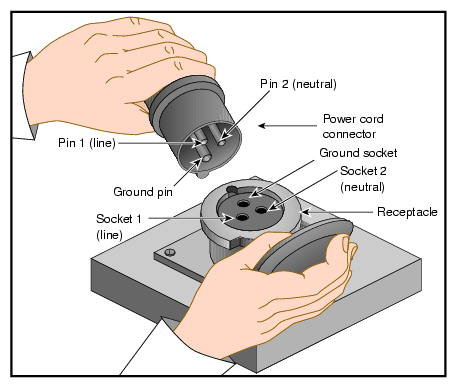
Ensure that a qualified technician installs the correct power receptacles. Your Silicon Graphics Prism system uses one or two single-phase power receptacles. For North American sites, the single-phase receptacle is a 30-amp, 200- to 240-volt receptacle that has two phase sockets and one ground socket. For international sites, the single-phase receptacle is a 32-amp, 200-volt receptacle that has one phase socket, one neutral socket, and one ground socket. Note that the ground pin is slightly longer than the other two pins on the North American plug.
For North American sites, follow these steps to ensure that a single-phase power receptacle is properly wired:
Set the voltmeter to a high AC voltage range.
Check the voltage between socket X and socket Y (see Figure C-1). The meter should read between 200 and 240 VAC.
Check the voltage between socket X and the ground socket. The meter should read approximately 120 VAC.
Check the voltage between socket Y and the ground socket. The meter should read approximately 120 VAC.
Check the voltage between the ground socket and an earth-ground location. The meter should read 0 VAC.
Change the voltmeter to a low-resistance setting.
Measure between the ground socket and an appropriate earth-ground location and ensure that resistance is less than 1 ohm.
Repeat steps 1 through 7 for any additional single-phase power receptacles.

Caution: If a voltage reading is incorrect, or if the resistance measured in step 7 is more than 1 ohm, contact a site-approved electrician. Do not proceed with the installation.

For international sites, follow these steps to ensure that a single-phase power receptacle is properly wired:
Set the voltmeter to a high AC voltage range.
Check the voltage between socket 1 and socket 2 (see Figure C-2). The meter should read between 200 and 240 VAC.
Check the voltage between socket 1 (line) and the ground socket. The meter should read between 200 and 240 VAC.
Note: The ground pin is slightly larger in diameter than the other two pins. Check the voltage between socket 2 (neutral) and the ground socket. The meter should read approximately 0 VAC.
Check the voltage between the ground socket and an earth-ground location. The meter should read 0 VAC.
Change the voltmeter to a low-resistance setting.
Measure between the ground socket and an appropriate earth-ground location and ensure that resistance is less than 1 ohm.
Repeat steps 1 through 7 for any additional single-phase power receptacles.
Caution: If a voltage reading is incorrect, or if the resistance measured in step 7 is more than 1 ohm, contact a site-approved electrician. Do not proceed with the installation.
Your Silicon Graphics Prism rack system arrives at the site in cardboard shipping crates.
For a short rack system, the documentation carton and the accessories carton are packed with the system. The documentation carton contains the system manuals as well as warranty and licensing information. The accessories carton contains the I/O, peripheral, and system cables, and any additional connectors or tools that are required for a specific configuration. Any PC, workstation, or terminal is shipped in a separate carton.
For a tall rack system, the system documentation; accessories; and any PC, workstation, or terminal arrive in separate cartons.
This section describes how to unload and transport the system to its designated location, as follows:
If your loading dock is the same height as the transportation vehicle, use a pallet jack to unload the system from the transportation vehicle. The pallet jack should have 48-in. tines or forks. Follow any instructions that are printed on the packing crates.
If the loading dock is not the same height as the vehicle, you must provide a forklift or another approved method to unload the system. You can use a platform or ramp to obtain the desired level as long as the ramp incline does not exceed a ratio of one unit vertical to six units horizontal. For more information on site requirements, contact site planning by e-mail ([email protected]) or by telephone (+1 715 726 2820).
 | Warning: Use two or more people to prevent computer equipment from rolling off the transportation vehicle. Failure to do so could result in serious damage to the computer equipment. |
If your site does not have a loading dock, arrange for a forklift to unload the system from the transportation vehicle. Ensure that two or three people are available to help unload the equipment. Move all crates slowly and carefully.
Figure C-3 shows the lift openings and dimensions of a tall rack shipping crate. This figure also shows where to position the pallet jack.
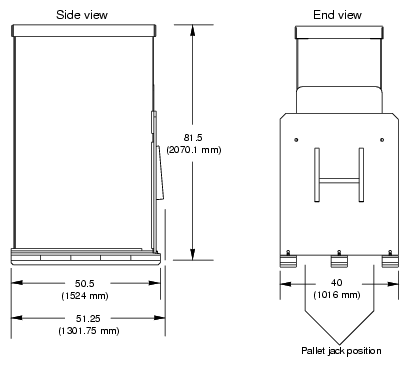
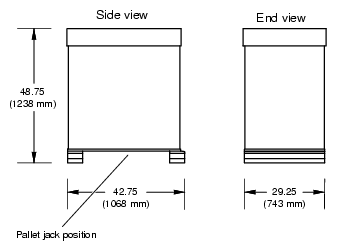
Figure C-4 shows the lift openings and dimensions of a short rack shipping crate. This figure also shows where to position the pallet jack.
After the system is unloaded from the truck, follow these steps before you unpack it:
Ensure that the crates and cartons arrive unopened.
Inspect the shipping crate for signs of external damage such as dents, holes, crushed corners, and water marks.
Ensure that the tilt watch has not been tripped.
If the crate is damaged, file a damage claim with the carrier immediately. In addition, notify your local Customer Support Center (CSC) for any missing, incorrect, or damaged items. For CSC contact information, see http://www.sgi.com/support/supportcenters.html.
Use a pallet jack with forks that are 48 in. (122 cm) long or longer to transport the shipping crate to the designated location. See Figure C-3 and Figure C-4 for the crate dimensions and location to position the pallet jack. For system weight and dimensions, contact site planning by e-mail ([email protected]) or by telephone (+1 715 726 2820).
If the crate does not fit through all access doors, you may need to partially disassemble the crate.
| Caution: If the system shipping or storage environment is significantly colder than the environment in which it will be installed [40 ºF (22 ºC) or greater disparity], leave the rack in its shipping crate for at least 24 hours at room temperature before you start the installation. This acclimation prevents damage to the equipment that could result from thermal shock and condensation. |
| Warning: Be careful when you unpack and move the short rack system. Ensure that the rack remains on a level surface and that the rack weight remains evenly distributed across the four casters. If you must lift the casters over an obstacle, such as a door threshold, use proper lifting techniques and employ a minimum of two people. |
| Caution: Do not subject the rack to any unnecessary shocks or vibration while you unpack and install the system. |
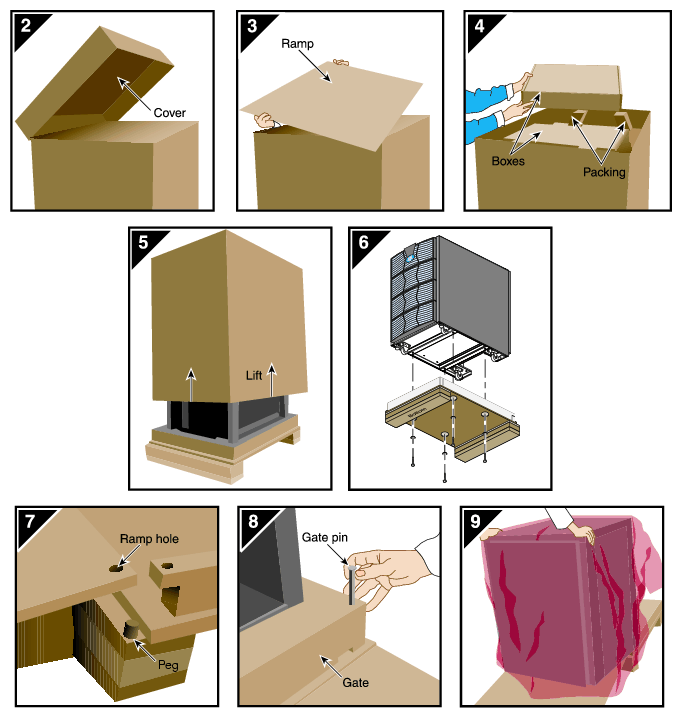
See Figure C-5 as you follow these steps; the numbered illustrations correspond to the numbered steps.
Ensure that the temperature of the rack is acclimated to the environment in which you are installing it.
Remove the crate cover.
Lift the ramp out of the crate and set it aside.
Remove the documentation carton, accessories carton, and cardboard packing material.
Lift the sidewalls of the crate up and over the system.
Remove the four bolts that secure the rack to the crate. You must reach underneath the crate and feel for the bolts.
Align the holes in the edge of the ramp with the pegs in the base of the crate. Ensure that the ramp is secure.
Remove the gate pins from the left and right ends of the gate. Then remove the gate.
Pull the rack down the ramp.
Warning: The maximum weight of the short rack is 610 lbs (277 kg). Use caution when you roll the rack down the ramp.
| Warning: In its maximum configuration, a tall rack system weighs approximately 1,366 lb (620 kg). Use caution when you unpack and move this rack. Ensure that the rack remains on a level surface and that the rack weight remains evenly distributed across the four casters. |
To unpack a tall rack, you will need the following tools:
Extension, 6-inch, 3/8-in. drive
13-mm standard 3/8-in. drive socket
Ratchet, reversible, 3/8-in. drive
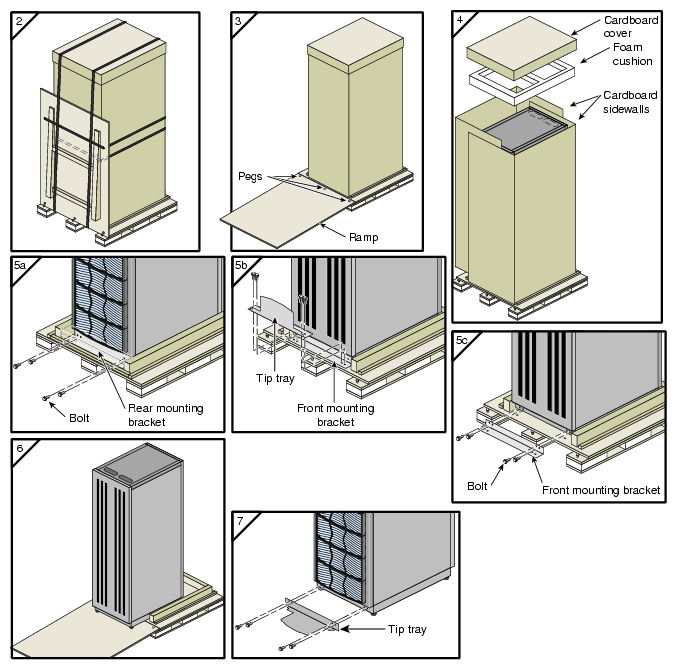
See Figure C-6 as you follow these steps; the numbered illustrations correspond to the numbered steps.
Ensure that the temperature of the rack is acclimated to the environment in which you are installing it and that the system crate is in a stable, upright position.
Remove the bands that secure the crate.
Note: Brace the wooden ramp as you remove the horizontal band that surrounds the crate and the wooden ramp. The ramp moves freely after you remove this band. Place the ramp so that the three holes in the edge of the ramp align with the pegs in the base of the pallet deck.
Remove the cardboard cover, the two cardboard sidewalls, and the foam cushion.
Remove the bolts that secure the rack to the pallet deck, as follows:
Remove the top four bolts from the rear mounting bracket; do not remove the bottom bolts.
Remove the four bolts that secure the front mounting bracket and tip tray to the bottom of the pallet deck. Set the tip tray aside.
Remove the top four bolts from the front mounting bracket. Set the mounting bracket aside.
Use two people to roll the rack out of the crate and down the ramp.
Warning: Use extreme caution when you roll the tall rack down the ramp. Personal injury and system damage could result if the rack becomes unbalanced or gains too much momentum when it rolls down the ramp. Bolt the tip tray to the front of the rack before you move the rack to its designated location. This tray prevents the rack from tipping while you move the rack.
| Caution: To avoid ESD damage to the electronic components, be sure to position the rack before you remove the ESD bag that covers the rack assembly. |
To position and level a single-rack system, follow these steps:
Grasp the rear of the rack and roll the rack to its designated location.
Remove the ESD bag.
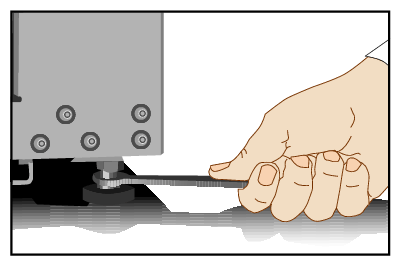
If you are installing a tall rack, adjust the leveling bolts, as shown in Figure C-7, until the rack is level.
Ensure that the circuit breaker on the power distribution unit is in the OFF (O) position. Then connect the power cord to a grounded power outlet. Plugging in the power cord grounds the rack.
Secure the rack with seismic tie-downs if you are installing the system in an earthquake zone.
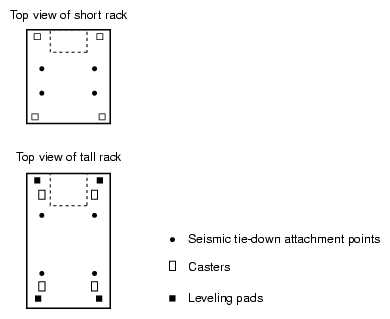
Note: Tall and short racks have four threaded holes that are located at the bottom of the rack (see Figure C-8). Use these holes to secure the seismic tie-downs. SGI does not supply the seismic tie-downs.
| Caution: To avoid ESD damage to the electronic components, be sure to position the racks before you remove the ESD bags that cover the rack assemblies. |
To position and level multiple racks, follow these steps:
Grasp the rear of each rack and roll the rack to its designated location.
Remove the ESD bags.
Adjust the leveling bolts of rack 001, as shown in Figure C-9, until the rack is level.
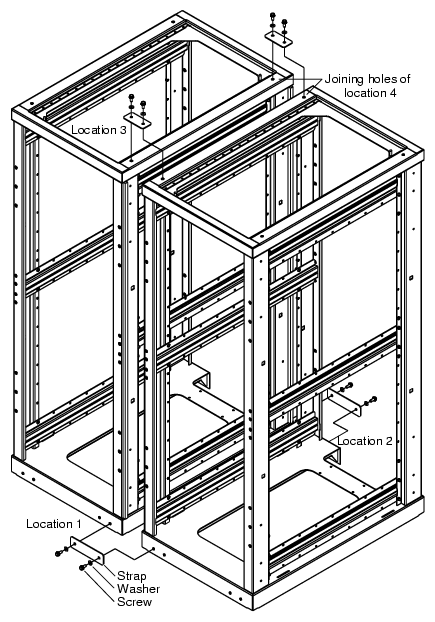
Using the leveling bolts of rack 002, adjust rack 002 so that the joining holes of rack 002 align with the joining holes of rack 001. See Figure C-10.
Using the provided straps, screws, and washers, bolt the racks together in the four designated locations shown in Figure C-10.
If your system has additional racks, repeat steps 4 and 5 until all of the racks are bolted together.
Ensure that the circuit breakers on the power distribution units are in the OFF (O) position. Then connect the power cords to grounded power outlets. Plugging in the power cords grounds the racks.
Secure the racks with seismic tie-downs if you are installing the system in an earthquake zone.
Note: Tall racks have four threaded holes that are located at the bottom of the rack (see Figure C-8). Use these holes to secure the seismic tie-downs. SGI does not supply the seismic tie-downs.