Before installing an SGIconsole system, it is helpful to plan the details of that installation. This Chapter provides information necessary to create such a plan.
SGIconsole 2.0 will manage a maximum of 64 systems of types that connect directly via serial port and a maximum of 19 systems of types that connect directly via Ethernet (note that certain configurations reduce these maximums slightly).
SGIconsole 2.0 is recommended for use with a maximum of 64 partitions. Most server and graphics systems contain exactly one partition. Certain systems, however, such as some Origin 3000-series systems, some Altix 3000-series systems, and some Origin 300 systems, may be configured to contain more than one partition. When you connect SGIconsole to multi-partition systems, the total number of partitions in all connected systems should not exceed this maximum of 64.
Depending on your configuration, SGIconsole may require one or more Silicon Graphics EL-16 serial port servers, one or more Ethernet hubs, or a combination of both serial port servers and Ethernet hubs. To determine which hardware is required for your configuration, follow the steps in this section.
Though this section allows you to calculate the exact number of serial and Ethernet connections your particular configuration will require, SGI recommends installing additional capacity for future expansion.
Follow these steps to determine the number of Silicon Graphics EL-16 serial port servers and Ethernet hubs you will need for your configuration:
Determine the number of serial connections needed for your configuration using Table 2-1.
Table 2-1. Number of Serial Connections Required for Each Managed System Type
For Each System of Type:
You Need This Many Serial Connections:
Selected unlisted systems (RS-232 console only)
1 serial connection
SGI Origin 200 server
2 serial connections
SGI Origin 300 server
1 serial connection
SGI Onyx 300 system
1 serial connection
SGI Origin 300 server with NUMAlink Module
no serial connections (uses Ethernet)
SGI Origin 350 server
1 serial connection
SGI Onyx 350 system
1 serial connection
SGI Origin 350 server with NUMAlink Module
no serial connections (uses Ethernet)
SGI Origin 2100 server (deskside)
2 serial connections
SGI Origin 2200 server (deskside)
2 serial connections
SGI Origin 2400 server (rack)
1 serial connection
SGI Origin 2800 server (rack)
1 serial connection
SGI Onyx2 graphics system (deskside)
2 serial connections
SGI Onyx2 graphics system (rack)
1 serial connection
SGI Origin 3200 server (short rack, without L2)
1 serial connection
SGI Origin 3200 server (short rack, with L2)
no serial connections (uses Ethernet)
SGI Origin 3400 server (rack)
no serial connections (uses Ethernet)
SGI Origin 3800 server (rack)
no serial connections (uses Ethernet)
SGI Origin 3900 server (rack)
no serial connections (uses Ethernet)
SGI Altix 3300 server (rack)
no serial connections (uses Ethernet)
SGI Altix 3700 server (rack)
no serial connections (uses Ethernet)
Based on the number of serial connections you will need, use Table 2-2 to determine the quantity of Silicon Graphics EL-16 serial port servers you will need.
Table 2-2. Quantity of Serial Port Servers Required for Various Configurations
For This Quantity of Serial Connections:
You Need This Many EL-16 Serial Port Servers:
No serial connections
No EL-16 serial port servers required (see Table 2-3
for Ethernet connections)
1 to 16 serial connections
One EL-16 serial port server
17 to 32 serial connections
Two EL-16 serial port servers
33 to 48 serial connections
Three EL-16 serial port servers
49 to 64 serial connections
Four EL-16 serial port servers
Each EL-16 serial port server connects to the SGIconsole (or to an Ethernet hub) via Ethernet. Each EL-16 therefore requires one Ethernet connection. Note the number of EL-16 serial port servers (and thus the number of Ethernet connections required), as this information will be used in step 5.
Determine the number of direct Ethernet connections required for your configuration using Table 2-3.
Table 2-3. Number of Ethernet Connections Required for Each System Type
For Each System of Type:
You Need This Many Direct Ethernet Connections:
Selected unlisted systems (RS-232 console only)
no direct Ethernet connections (uses serial)
SGI Origin 200 server
no direct Ethernet connections (uses serial)
SGI Origin 300 server
no direct Ethernet connections (uses serial)
SGI Onyx 300 system
no direct Ethernet connections (uses serial)
SGI Origin 300 server with NUMAlink Module
1 Ethernet connection
SGI Origin 350 server
no direct Ethernet connections (uses serial)
SGI Onyx 350 system
no direct Ethernet connections (uses serial)
SGI Origin 350 server with NUMAlink Module
no serial connections (uses Ethernet)
SGI Origin 2100 server (deskside)
no direct Ethernet connections (uses serial)
SGI Origin 2200 server (deskside)
no direct Ethernet connections (uses serial)
SGI Origin 2400 server (rack)
no direct Ethernet connections (uses serial)
SGI Origin 2800 server (rack)
no direct Ethernet connections (uses serial)
SGI Onyx2 graphics system (deskside)
no direct Ethernet connections (uses serial)
SGI Onyx2 graphics system (rack)
no direct Ethernet connections (uses serial)
SGI Origin 3200 server (short rack, without L2)
no direct Ethernet connections (uses serial)
SGI Origin 3200 server (short rack, with L2)
1 Ethernet connection
SGI Origin 3400 server (rack)
1 Ethernet connection
SGI Origin 3800 server (rack)
1 Ethernet connection
SGI Origin 3900 server (rack)
1 Ethernet connection
SGI Altix 3300 server (rack)
1 Ethernet connection
SGI Altix 3700 server (rack)
1 Ethernet connection
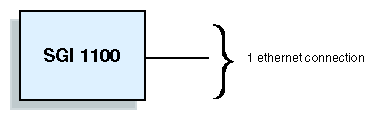
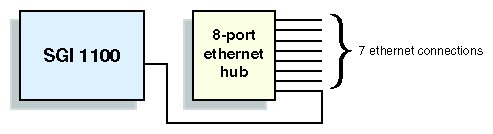
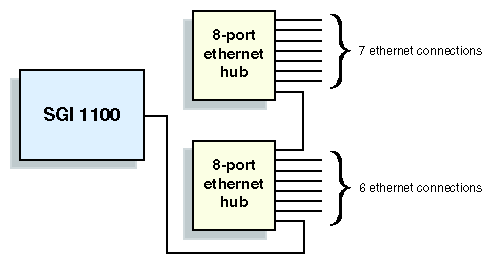
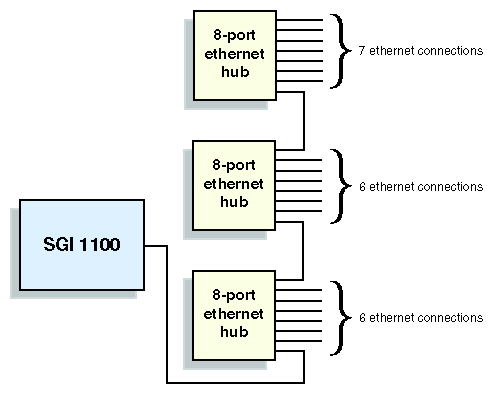
Calculate the total number of Ethernet connections required by adding the number of ethernet connections required for serial port servers determined in steps 3 plus the number of direct Ethernet connections determined in step 4. Using this total, determine the quantity of Ethernet hubs required by using Table 2-4
Table 2-4. Quantity of Ethernet Hubs Required for Various Configurations
For This Quantity of Ethernet Connections:
You Need This Many Ethernet Hubs:
1 ethernet connection
No Ethernet hubs (connects directly to SGIconsole)
2 to 7 Ethernet connections
One 8-port Ethernet hub
8 to 13 Ethernet connections
Two 8-port Ethernet hubs
14 to 19 Ethernet connections
Three 8-port Ethernet hubs

Note: Although the host system (on which the SGIconsole software runs) will have two Ethernet ports, only one of those ports (port 2) is used for the connection of managed systems. The other port (port 1) is used to connect the SGIconsole system to the general Ethernet network. Any configuration of managed systems that requires more than one Ethernet connection will therefore also require at least one Ethernet hub.
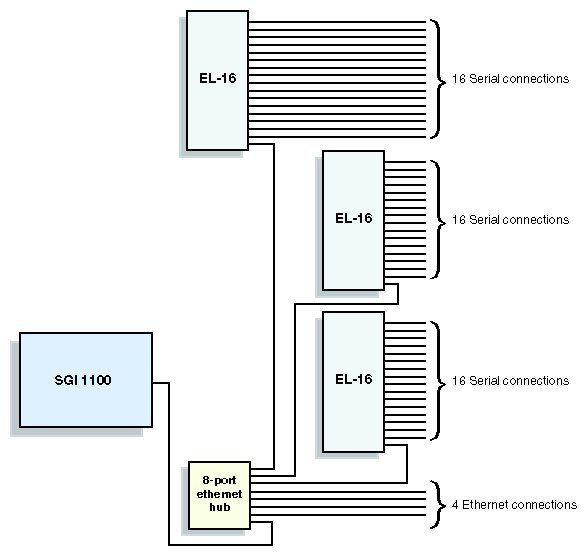
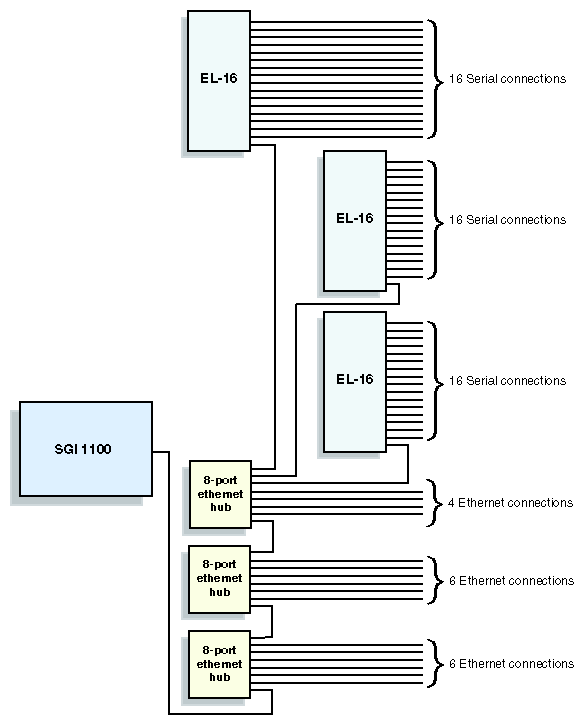
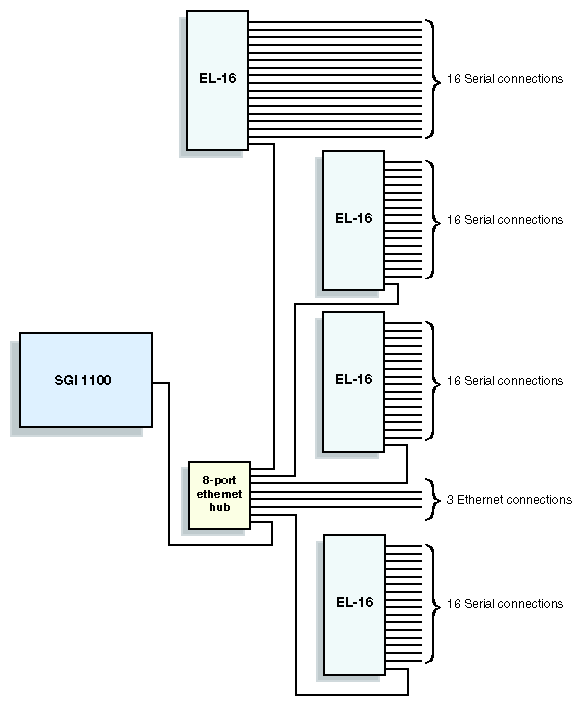
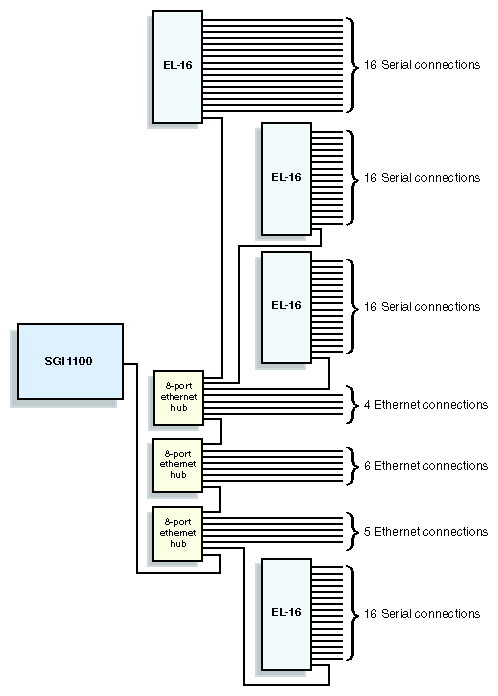
Once you have determined the number of EL-16 serial port servers and Ethernet hubs required for your configuration, as described above, the illustrations in this section (Figure 2-1 through Figure 2-17) show how those EL-16 serial port servers and Ethernet hubs may be cabled together. The figures included here are intended to provide examples of possible cabling arrangements. Depending on your particular configuration, there may also be other valid arrangements.
As part of your planning process, SGI recommends that you make a drawing similar to the ones in this section, but reflecting your particular configuration.