The SGIconsole 1.0 contains a rackmountable SGI 1100 server running SGI proprietary software used to monitor and manage SGI Origin 200 servers, SGI Origin 300 servers, the SGI Origin 2000 series of servers, the SGI Origin 3000 series of servers, Silicon Graphics Onyx2 deskside workstations, Silicon Graphics Onyx2 rackmount graphics systems, and SGI Onyx 3000 graphics systems. Consult the following guides:
SGI 1100 Server User's Guide describes how to install and use the SGI 1100 server.
SGIconsole Start Here introduces the SGIconsole, describes the software tools and functionality, describes how to configure, install and make the SGIconsole operable. It also describes how to use the SGIconsole website to operate the SGIconsole.
The SGIconsole is used with a Silicon Graphics EL serial port server model EL-16-1.0 ( EL [EtherLite] serial port server), to manage and monitor the various hardware configurations that contain the SGI Origin 200 servers, SGI Origin 300 servers, SGI Origin 2000 series servers, SGI Origin 3200 servers without L2 controllers, Silicon Graphics Onyx2 deskside workstations, and Silicon Graphics Onyx2 rackmount graphics systems.
The SGIconsole is used with an Ethernet hub to monitor and manage SGI Origin 3000 series servers that have an L2 controller.
 | Note: The SGI Onyx 3000 series graphics system is actually a brick in the SGI Origin 3000 series server and is managed and monitored through an SGIconsole connected to the SGI Origin 3000 series server. |
Figure 1-1 shows the SGIconsole connected to an Ethernet hub to which are connected SGI Origin 3000 series servers and an SGI Origin 300 server with NUMAlink Module. To this Ethernet hub are also connected three Silicon Graphics EL serial port servers. To these serial port servers are connected SGI Origin 200 servers, SGI 2000 series servers (SGI 2100, SGI 2200, SGI 2400, and SGI 2800 servers), an SGI 3200 server without L2 controller, a Silicon Graphics Onyx2 deskside workstation, and a Silicon Graphics Onyx2 rackmount graphics system. A second SGIconsole at another location is connected to the first SGIconsole through the general Ethernet. A remote workstation is connected to these two SGIconsoles via the general Ethernet.
The Silicon Graphics 02 visual workstation, the Silicon Graphics Indy workstation, the Silicon Graphics 230 visual workstation, or another workstation running the IRIX or Linux operating system or running one of the many commercially-available X-display software packages may be used as a remote workstation for SGIconsole.
| Note: While the SGIconsole remote-display feature should work with any remote workstation that meets these requirements, compatibility can only be assured with the SGI systems listed. |
A monitor, keyboard, and mouse may also be connected directly to the SGIconsole at the local site.

This section describes the various devices to which SGIconsole may be connected. This section is intended only to provide an overview. For the details of the connections, refer to the appropriate sections of Chapter 2, “Connecting SGIconsole to SGI Servers and Graphics Systems”.
SGIconsole is designed to connect to systems with MSCs (module system controllers), MMSCs (multi-module system controllers), L1s (level 1 system controllers), and L2s (level 2 system controllers). Each controller type is outlined below.
The MSC (module system controller) is used in all SGI Origin 200, SGI Origin 2000-series, and Onyx2 systems. The following systems contain one MSC, but do not contain any MMSCs:
SGI Origin 200 systems,
SGI Origin 2100 deskside systems,
SGI Origin 2200 deskside systems,
Onyx2 deskside systems
In all such systems, SGIconsole connects to the MSC with a serial cable, and connects to the console port with a second serial cable.
All systems with an MSC but with no MMSCs therefore require two serial connections to SGIconsole.
The MMSC (multi-module system controller) is used in systems that contain more than one MSC[1] . The MMSCs connect to a console port on one of the modules in the system, connect to the MSCs in both the upper and lower bays in each rack, and connect to MMSCs in other racks, if any.
The following systems contain one or more MMSCs:
SGI Origin 2400 rack systems,
SGI Origin 2800 rack systems,
Onyx2 rack systems.
In all such systems, SGIconsole connects to one of the MMSCs via a single serial cable. Through the MMSC, SGIconsole is able to communicate with any other MMSCs in the system, with the system console, and with the MSCs in every module in the system.
All systems with at least one MMSC therefore require one serial connection to SGIconsole.
The L1 (level 1 system controller) is used in SGI Origin 300, SGI Origin 3000-series, and Onyx 3000 systems. The following systems contain one L1, but do not contain any L2s:
SGI Origin 300 systems without NUMAlink module,
SGI Origin 3200 systems without L2.
In all such systems, SGIconsole connects to the L1 with a single serial cable.
All systems with an L1 but with no L2s therefore require one serial connection to SGIconsole.
The L2 (level 2 system controller) is used in systems that contain more than one L1[2] . The L2s connect to each of the L1s in their rack and connect to any L2s in other racks.
The following systems contain one or more L2s:
SGI Origin 300 with NUMAlink Module,
SGI Origin 3000-series systems (except SGI Origin 3200 system without L2),
SGI Onyx 3000 systems.
In all such systems, SGIconsole connects to the L2 dedicated Ethernet subnet via a single Ethernet cable. Through this connection, SGIconsole is able to communicate with all L2s in the system, and through those L2s, with all L1s in the system.
All systems with at least one L2 therefore require one Ethernet connection to SGIconsole.
Before installing an SGIconsole system, it is helpful to plan the details of that installation. This section provides information necessary to create such a plan.
SGIconsole 1.0 will manage a maximum of 16 systems of types that connect directly via serial port and a maximum of 13 systems of types that connect directly via Ethernet (note that certain configurations reduce these maximums slightly). Only the system types shown in Table 1-1 are supported by SGIconsole 1.0. SGIconsole 1.0 does not manage non-SGI systems.
SGIconsole 1.0 is recommended for use with a maximum of 32 partitions. Most server and graphics systems contain exactly one partition. Certain systems, however, such as some Origin 3000-series systems and some Origin 300 systems, may be configured to contain more than one partition. When you connect SGIconsole to multi-partition systems, the total number of partitions in all connected systems should not exceed this maximum of 32.
Depending on your configuration, SGIconsole may require one or more Silicon Graphics EL serial port servers (EL-16-1.0), one or more Ethernet hubs, or a combination of both serial port servers and Ethernet hubs. To determine which hardware is required for your configuration, follow the steps in this section.
Though this section allows you to calculate the exact number of serial and Ethernet connections your particular configuration will require, SGI recommends installing additional capacity for future expansion.
Follow these steps to determine the number of Silicon Graphics EL serial port servers (EL-16-1.0) and Ethernet hubs you will need for your configuration:
Determine the number of serial connections needed for your configuration using Table 1-1.
Table 1-1. Number of Serial Connections Required for Each System Type
For Each System of Type:
You Need This Many Serial Connections:
SGI Origin 200 server
2 serial connections
SGI Origin 300 server
1 serial connection
SGI Origin 300 server with NUMAlink Module
no serial connections (uses Ethernet)
SGI Origin 2100 server (deskside)
2 serial connections
SGI Origin 2200 server (deskside)
2 serial connections
SGI Origin 2400 server (rack)
1 serial connection
SGI Origin 2800 server (rack)
1 serial connection
SGI Onyx2 graphics system (deskside)
2 serial connections
SGI Onyx2 graphics system (rack)
1 serial connection
SGI Origin 3200 server (short rack, without L2)
1 serial connection
SGI Origin 3200 server (short rack, with L2)
no serial connections (uses Ethernet)
SGI Origin 3400 server (rack)
no serial connections (uses Ethernet)
SGI Origin 3800 server (rack)
no serial connections (uses Ethernet)
Based on the number of serial connections you will need, use Table 1-2 to determine the quantity of Silicon Graphics EL serial port servers (EL-16-1.0) you will need.
Table 1-2. Quantity of Serial Port Servers Required for Various Configurations
For This Quantity of Serial Connections:
You Need This Many EL-16 Serial Port Servers:
No serial connections
No EL-16 serial port servers required (see Table 1-3
for Ethernet connections)
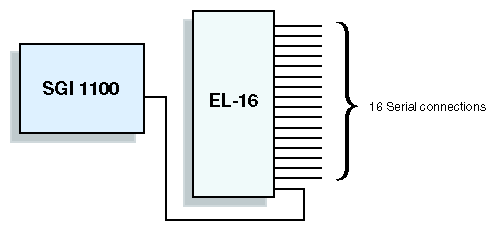
1 to 16 serial connections
One EL-16 serial port server
17 to 32 serial connections
Two EL-16 serial port servers
Each EL serial port server connects to the SGIconsole (or to an Ethernet hub) via Ethernet. Each EL-16 therefore requires one Ethernet connection. Note the number of EL serial port servers (and thus the number of Ethernet connections required), as this information will be used in step 5.
Determine the number of direct Ethernet connections required for your configuration using Table 1-3.
Table 1-3. Number of Ethernet Connections Required for Each System Type
For Each System of Type:
You Need This Many Direct Ethernet Connections:
SGI Origin 200 server
no direct Ethernet connections (uses serial)
SGI Origin 300 server
no direct Ethernet connections (uses serial)
SGI Origin 300 server with NUMAlink Module
1 Ethernet connection
SGI Origin 2100 server (deskside)
no direct Ethernet connections (uses serial)
SGI Origin 2200 server (deskside)
no direct Ethernet connections (uses serial)
SGI Origin 2400 server (rack)
no direct Ethernet connections (uses serial)
SGI Origin 2800 server (rack)
no direct Ethernet connections (uses serial)
SGI Onyx2 graphics system (deskside)
no direct Ethernet connections (uses serial)
SGI Onyx2 graphics system (rack)
no direct Ethernet connections (uses serial)
SGI Origin 3200 server (short rack, without L2)
no direct Ethernet connections (uses serial)
SGI Origin 3200 server (short rack, with L2)
1 Ethernet connection
SGI Origin 3400 server (rack)
1 Ethernet connection
SGI Origin 3800 server (rack)
1 Ethernet connection
Calculate the total number of Ethernet connections required by adding the number of ethernet connections required for serial port servers determined in steps 3 plus the number of direct Ethernet connections determined in step 4. Using this total, determine the quantity of Ethernet hubs required by using Table 1-4
Table 1-4. Quantity of Ethernet Hubs Required for Various Configurations
For This Quantity of Ethernet Connections:
You Need This Many Ethernet Hubs:
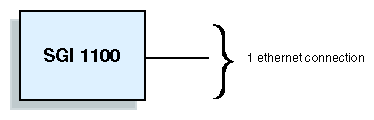
1 ethernet connection
No Ethernet hubs (connects directly to SGIconsole)
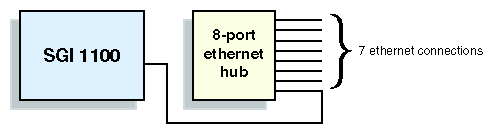
2 to 7 Ethernet connections
One 8-port Ethernet hub
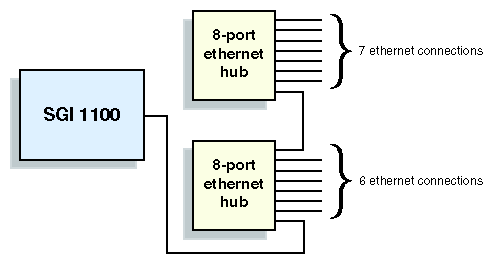
8 to 13 Ethernet connections
Two 8-port Ethernet hubs
Note: Although the SGI 1100 Server (on which the SGIconsole software runs) has two Ethernet ports, only one of those ports (port 2) is used for the connection of managed systems. The other port (port 1) is used to connect the SGIconsole system to the general Ethernet network. Any configuration of managed systems that requires more than one Ethernet connection will therefore also require at least one Ethernet hub.
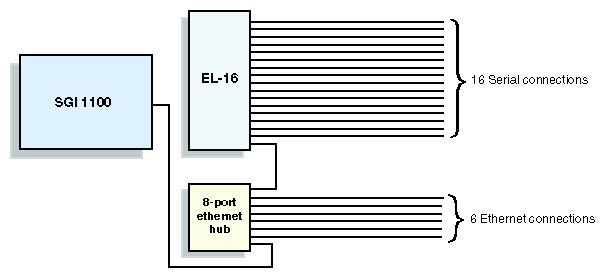
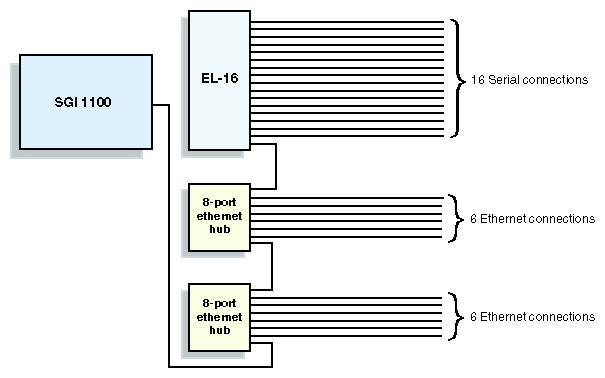
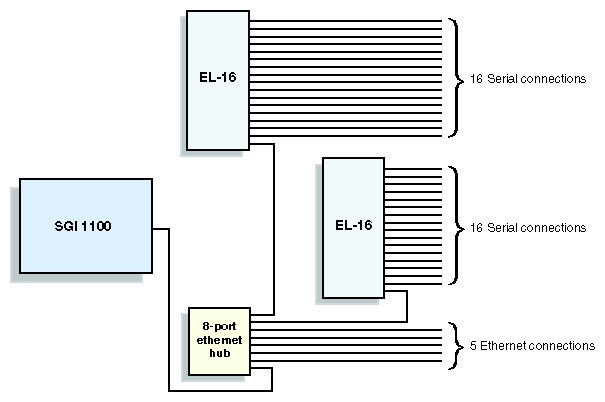
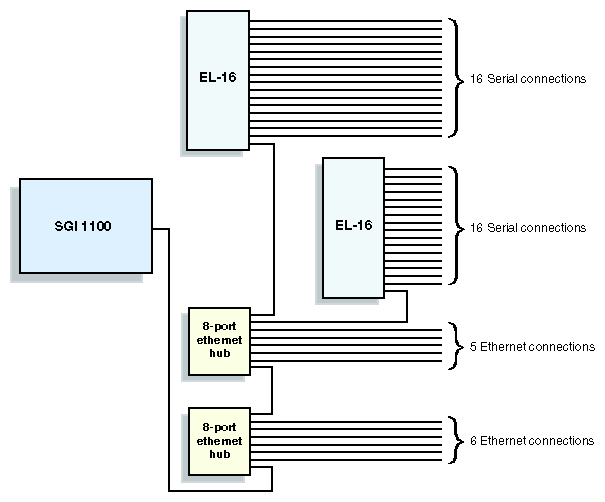
Once you have determined the number of EL serial port servers and Ethernet hubs required for your configuration, as described above, the figures in this section (Figure 1-2 through Figure 1-9) show how those EL serial port servers and Ethernet hubs may be cabled together. The figures included here are intended to provide examples of possible cabling arrangements. Depending on your particular configuration, there may also be other valid arrangements.
As part of your planning process, SGI recommends that you make a drawing similar to the ones in this section, but reflecting your particular configuration.
This section provides a cross reference among marketing codes, part numbers, and descriptions.
Table 1-5. SGIconsole, Ethernet Hub, & Serial Port Server Marketing Codes & Descriptions
Marketing Code | Description |
|---|---|
SGIconsole-1.0 | SGIconsole base system & software. |
SGIconsole-1.0-SU | Standalone upgrade: SGIconsole base system & software. |
EL-16-1.0 | 16 port serial server. |
EL-16-1.0-SU | Standalone upgrade: 16 port serial server. |
EHUB-console | 8-Port 10/100 Ethernet Hub, including Ethernet cable to connect to SGIconsole. |
EHUB-console-SU | Standalone upgrade: 8-Port 10/100 Ethernet Hub, including Ethernet cable to connect to SGIconsole. |
Table 1-6. Cable Marketing Codes, Part Numbers, & Descriptions
Marketing Code | Part Number | Description |
|---|---|---|
DM-KBD-EXT-025-SU | 018-1014-001 | 25 ft (7.5m) DB9HD extension cable (for VGA monitor). |
| 018-0592-001 | 25 ft (7.5m) dual PS/2 extension cable (for keyboard & mouse). |
XVIE-EL-CONSOLE | 018-0625-001 | 6 ft (1.8m) RJ-45 to RJ-45 crossover Ethernet cable, connects EL-16 to SGIconsole. |
XVIE-EL-CONSOLE-SU | 018-0625-001 | Standalone upgrade: 6 ft (2m) RJ-45 to RJ-45 crossover Ethernet cable, connects EL-16 to SGIconsole. |
XVIE25-O200 | 9290165 | 25 ft (7.5m) RJ45 to DB9 serial cable, connects Origin 200 systems to EL-16. |
| 9290166 | 25 ft (7.5m) RJ45 to MiniDIN8 serial cable, connects Origin 200 systems to EL-16. |
XVIE25-3200/300 | 7261215 | 25 ft (7.5m) RJ45 to DB9 serial cable, connects Origin 3200 (without L2) or Origin 300 (without L2) systems to EL-16. |
XVIE25-3200/300-SU | 7261215 | Standalone upgrade: 25 ft (7.5m) RJ45 to DB9 serial cable, connects Origin 3200 (without L2) or Origin 300 (without L2) systems to EL-16. |
XVIE25-O2K-RM1-SU | 9290166 | Standalone Upgrade: 25 ft (7.5m) RJ45 to MiniDIN8 serial cable, connects Origin 2000/Onyx2 rack MMSC to EL-16. |
XVIE25-O2000-DS | 9290165 | 25 ft (7.5m) RJ45 to DB9 serial cable, connects Origin 2000/Onyx2 deskside MSC to EL-16. |
| 9290165 | 25 ft (7.5m) RJ45 to DB9 serial cable, connects Origin 2000/Onyx2 deskside BaseIO console port to EL-16. |
XVIE10-O3000 | 018-0830-001 | 10 ft (3m) RJ45 to RJ45 Ethernet cable, connects L2 controller on Origin 3000-series (with L2) or Origin 300 (with L2) to Ethernet hub. This cable may also be used to connect SGIconsole to the general Ethernet. |
XVIE10-O3000-SU | 018-0830-001 | Standalone upgrade: 10 ft (3m) RJ45 to RJ45 Ethernet cable, connects L2 controller on Origin 3000-series (with L2) or Origin 300 (with L2) to Ethernet hub. This cable may also be used to connect SGIconsole to the general Ethernet. |
[1] SGI Origin 200 systems configured in a dual-chassis (master/slave) arrangement actually contain two MSCs, but do not contain an MMSC. They therefore require two serial connections, as described in “MSC (Module System Controller)” on page 5, just as a single-chassis SGI Origin 200 does.
[2] SGI Origin 300 systems configured in a dual-chassis (master/slave) arrangement actually contain two L1s, but do not contain an L2. They therefore require a single serial connection, as described in “L1 (Level 1 System Controller)” on page 6, just as a single-chassis SGI Origin 300 does.