This chapter locates and describes major components on the system board. The chapter also provides information on the integrated controllers and hardware monitoring.
 | Warning: Before touching the system board or its components, disconnect the system's power cord from its AC power outlet. |
| Warning: System board components may be at high temperatures. Allow time for them to cool before handling them. |
| Warning: System board components can be damaged by static electricity. Use an antistatic wrist strap connected to the bare metal of the system's chassis to protect against electrostatic discharge. |
The system board contains two Intel SC242 (Slot 1) processor sockets. Each socket has an associated voltage regulator integrated on the system board.

Each processor socket accepts an Intel Pentium III processor (133 MHz front-side bus). The processor is secured to its socket by retention clips on both sides. The retention clips are secured by nuts to screws attached to the system board.

The system can function with one or two processors installed. For a single-processor system, a processor bus terminator card must be installed in the unused processor socket. For a dual-processor system, both processors must be the same speed.

The system board includes sockets for up to six PC133 dual inline memory modules (DIMMs). The memory speed matches the system board's front-side bus speed.
Memory module sockets are organized into four banks (Bank 0 through Bank 3) of two sockets each that use two-way memory interleaving.

Each socket accepts a 168-pin registered Synchronous Dynamic RAM (SDRAM) DIMM. Each DIMM has a 128-bit memory width and 16-bit error correcting code (ECC) protection.
Each socket is keyed for proper DIMM insertion. Release tabs on each end of the socket capture the DIMM and secure it in the socket.

DIMM terminator modules (similar to the one shown in the following figure) are installed in Bank 1 instead of standard DIMMs.

To avoid damaging a DIMM and voiding its warranty, take the following precautions:
Do not remove the DIMM from its antistatic package until you are ready to install it.
Do not touch the metallic finger contacts.
Do not bend, twist, drop, or otherwise handle the DIMM carelessly.
Do not expose the DIMM to moisture or extreme temperatures.
When adding or replacing system memory on all system boards:
Install DIMMs first in Bank 3, then in Bank 2, and finally in Bank 0.
Do not replace DIMM terminator modules in Bank 1 with standard DIMMs.
Ensure all installed DIMMs are PC133 (133 MHz). Do not mix DIMMs of different speeds.
Use only registered DIMMs. Do not use unbuffered DIMMs.
Install DIMMs in both sockets of a bank. Do not install only one DIMM in a bank.
Install the same size DIMM in both sockets of a bank. You can vary DIMM sizes from bank to bank, but not within a bank.
A system board can have up to 6,144 MB of system memory, in increments of 256 MB, 512 MB, and 1,024 MB. The following are common configurations.
Table 2-1. Memory Configurations
Memory | Bank 3 | Bank 2 | Bank 0 |
|---|---|---|---|
256 MB | 2 x 128 MB |
|
|
512 MB | 2 x 128 MB | 2 x 128 MB |
|
| 2 x 256 MB |
|
|
768 MB | 2 x 128 MB | 2 x 128 MB | 2 x 128 MB |
| 2 x 128 MB | 2 x 256 MB |
|
1,024 MB | 2 x 128 MB | 2 x 128 MB | 2 x 256 MB |
| 2 x 256 MB | 2 x 256 MB |
|
| 2 x 512 MB |
|
|
2,048 MB | 2 x 256 MB | 2 x 256 MB | 2 x 512 MB |
| 2 x 512 MB | 2 x 512 MB |
|
| 2 x 1,024 MB |
|
|
3,072 MB | 2 x 512 MB | 2 x 512 MB | 2 x 512 MB |
| 2 x 512 MB | 2 x 1,024 MB |
|
4,096 MB | 2 x 512 MB | 2 x 512 MB | 2 x 1,024 MB |
| 2 x 1,024 MB | 2 x 1,024 MB |
|
5,120 MB | 2 x 1,024 MB | 2 x 512 MB |
|
6,144 MB | 2 x 1,024 MB | 2 x 1,024 MB | 2 x 1,024 MB |
The system board includes sockets for up to seven expansion cards, as follows:
One full-length Accelerated Graphics Port (AGP) Pro socket
Two full-length fast/wide Peripheral Component Interconnect (PCI) socket (64 bits, 66 MHz/33 MHz, 3.3 V)
Four full-length wide PCI socket (64 bits, 33 MHz, 5 V)
One full-length Industry Standard Architecture (ISA) socket (16 bits)
When installing expansion cards, note the following:

The system board contains two 20-pin ATX power connectors. These connectors accept power cables (P1 and P2) from the system's power supply. The connectors are keyed for proper connection.
The system board contains five data connectors, immediately below the power connectors. These connectors accept data cables from the system's peripheral devices. The connectors are keyed for proper connection.
| Warning: For continued protection against fire and energy hazards, do not connect an external SCSI port to SCSI Channel B. Connect an external SCSI port only to SCSI Channel A. |

The system's rear fan connects to one of the 3-pin CPU FAN connectors (shown in the following figure). The connectors are keyed for proper connection. The rear fan in a tower chassis connects to the FAN4 connector to the left of and between the processor sockets. The rear fan in a rack-mount chassis connects to the FAN3 connector below and to the right of the lower processor socket.


Fans in the front of the chassis connect to one of the 3-pin FAN1 or FAN2 connectors in the lower-right corner of the system board.

The system board has four 4-pin Advanced Technology Attachment Packet Interface (ATAPI) connectors. The connectors are keyed for proper connection.
ATAPI Connector | Function |
|---|---|
CD IN | Connects to the audio cable from the system's CD-ROM drive. Pin 1=CD In Left, Pins 2 and 3=Ground, Pin 4=CD In Right |
VIDEO IN | Connects to the audio cable from an internal device such as a TV tuner expansion card. Pin 1=Left Line In, Pins 2 and 3=Ground, Pin 4=Right Line In |
MONO IN | Connects to the mono audio signal cable from a modem or other telephony device. Pin 1=Audio Out, Pins 2 and 3=Ground, Pin 4=Audio In |
MPEG IN | Connects to the cable carrying the decoded audio signal from a DVD player or similar device. Pin 1=Left Line In, Pins 2 and 3=Ground, Pin 4=Right Line In |

Jumper connectors on the system board connect to system components or provide essential system functions.
Jumper Connector | Function |
|---|---|
J22 | Connects to chassis intruder alert switch. |
J24 | Connects to power switch, power LED, and disk drive LED. Cable connects to top eight pins. |
J29 | Causes CMOS reset. Instructs basic input/output system (BIOS) to use factory settings, clears BIOS Setup password, and forces BIOS Setup at each system boot. See Chapter 3, "BIOS Setup," for instructions to use CMOS reset. |
JP3 | Spread spectrum control. If factory installed, do not remove. (See figure on following page.) |


The input/output (I/O) port connectors are stacked on the system board adjacent to the processor sockets.
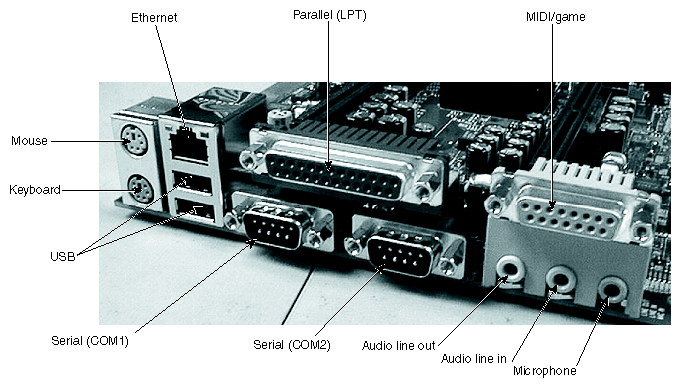
Keyboard and mouse ports are PS/2-style 6-pin male min-DIN connectors. The functionality of the two ports is not interchangeable. The keyboard is powered by standby power. The keyboard port color is purple; the mouse port color is green.
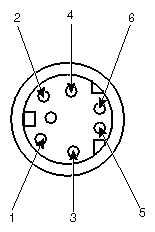
Table 2-4. Keyboard/Mouse Ports
Pin | Signal |
|---|---|
1 | KDATA (keyboard) MDATA (mouse) |
2 | Spare |
3 | Ground |
4 | VCC |
5 | KCLK |
6 | Spare |
The parallel port is a 25-pin female D-sub connector. The port color is burgundy.
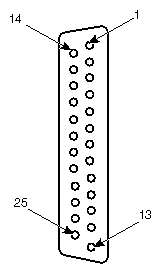
Pin | Signal | Pin | Signal |
|---|---|---|---|
1 | Strobe | 10 | Acknowledge (-ACK) |
2 | Data 0 | 11 | Busy |
3 | Data 1 | 12 | Paper Empty (PE) |
4 | Data 2 | 13 | +Select |
5 | Data 3 | 14 | Auto Feed (-Auto FDXT) |
6 | Data 4 | 15 | -Error |
7 | Data 5 | 16 | Start (-Init) |
8 | Data 6 | 17 | Select (-SLCTIN) |
9 | Data 7 | 18-25 | Ground |
Serial (COM) ports are 9-pin male D-sub connectors. The port color is teal.
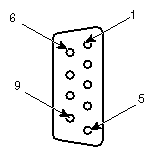
Pin | Signal | Pin | Signal |
|---|---|---|---|
1 | Data Carrier Detect (DCD) | 6 | Data Set Ready (DSR) |
2 | Receive Data (RD) | 7 | Request to Send (RTS) |
3 | Transmit Data (TD) | 8 | Clear to Send (CTS) |
4 | Data Terminal Ready (DTR) | 9 | Ring Indicator (RI) |
5 | Ground |
|
|
Universal Serial Bus (USB) ports are 8-pin female USB connectors.
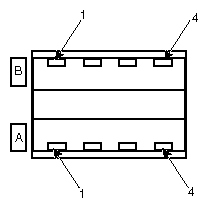
Table 2-7. Universal Serial Bus (USB) Port
Pin | Signal | Pin | Signal |
|---|---|---|---|
A1 | Power | B1 | Power |
A2 | - | B2 | - |
A3 | + | B3 | + |
A4 | Ground | B4 | Ground |
The Ethernet Network port is an 8-pin RJ45 connector.
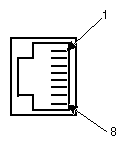
Table 2-8. Ethernet Network Port
Pin | Signal | Pin | Signal |
|---|---|---|---|
1 | Transmit (TD+) | 5 | Reserved |
2 | Transmit (TD-) | 6 | Receive (RD-) |
3 | Receive (RD+) | 7 | Reserved |
4 | Reserved | 8 | Reserved |
The external Wide Ultra2 SCSI (LVDS) port is a 68-pin female SCSI connector. Pins not listed are connected to ground.
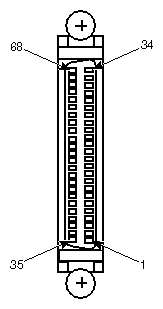
Table 2-9. External Wide Ultra2 SCSI (LVDS) Port
Pin | Signal | Pin | Signal |
|---|---|---|---|
17 | TERMPWR | 50 | Ground |
18 | TERMPWR | 52 | TERMPWR |
35 | SD-(12) | 53 | No connection |
36 | SD-(13) | 54 | Ground |
37 | SD-(14) | 55 | SATII- |
38 | SD-(15) | 56 | Ground |
39 | SDP1- | 57 | SBSY- |
40 | SD-(0) | 58 | SACK- |
41 | SD-(1) | 59 | SRSI- |
42 | SD-(2) | 60 | SMSG- |
43 | SD-(3) | 61 | SSEL- |
44 | SD-(4) | 62 | SCD- |
45 | SD-(5) | 63 | SREQ- |
46 | SD-(6) | 64 | SIO- |
47 | SD-(7) | 65 | SD-(8) |
48 | SDP0- | 66 | SD-(9) |
49 | Ground | 67 | SD-(10) |
51 | TERMPWR | 68 | SD-(11) |
The Audio Line Out, Line In, and Microphone ports are PC-standard 1/8-inch female phone jacks. The Audio Line Out port color is lime; the Audio Line In port color is light blue; and the Microphone port color is pink.

Table 2-10. Audio Line Out, Line In, and Microphone Ports
Pin | Signal |
|---|---|
Shield | Ground |
Tip | Left (line) / Mic (microphone) |
Ring | Right (line) / Bias (microphone) |
The MIDI/Game port is a 15-pin female D-sub connector. The port color is gold.
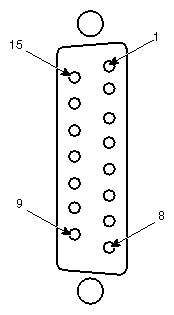
Pin | Signal | Pin | Signal |
|---|---|---|---|
1 | =5 V | 9 | =5 V |
2 | Fire button 0 | 10 | Fire button 2 |
3 | X-axis, joystick 1 | 11 | X-axis, joystick 2 |
4 | Ground | 12 | MIDI out |
5 | Ground | 13 | Y-axis, joystick 2 |
6 | Y-axis, joystick 1 | 14 | Fire button 3 |
7 | Fire button 1 | 15 | MIDI in |
8 | +5 V |
|
|
The system board has three integrated controllers. Each controller can be disabled if needed using the BIOS Setup program. For more information, see Chapter 2, “ Components”.
The system board includes an integrated LSI 53C1010 SCSI controller. The controller provides the system with a dual-channel Ultra3 SCSI bus.
Channel A connects to an external SCSI port and (on some systems) to internal SCSI devices. Channel B connects (on some systems) to internal SCSI devices. Both channels use 68-pin SCSI connectors located on the system board.
| Warning: For continued protection against fire and energy hazards, do not connect an external SCSI port to SCSI Channel B. Connect an external SCSI port only to SCSI Channel A. |
Controller features include:
Low-Voltage Differential (LVD) bus
2 16-bit 80 MHz channels
160 MB/sec transfer rate per channel for Ultra3 devices
Ultra2 and Ultra3 devices connected to the controller operate at their respective transfer rates
PCI bus interface
Advanced Configuration and Power Interface (ACPI) support
You may need to use the SCSI Configuration Utility to configure the operation of SCSI peripherals connected to the controller. This utility lets you configure SCSI controllers, perform a low-level format on a SCSI hard disk drive, select boot order, and verify media. To run the SCSI Configuration Utility, press ctrl+c when prompted during system boot. See SCSI Configuration Utility Help for more information on using the utility.
The system board includes an integrated Intel 82559 10/100 Mb/sec Fast Ethernet controller. The controller provides support for the Advanced Configuration and Power Interface (ACPI), Wake-on-LAN, System Management Bus, and Wired for Management compliance.
 | Note: The Zx10 system board supports Wake-On-LAN through a PCI 2.2-compliant power-management event (PME) on the PCI bus. The system board does not support expansion cards that require a Wake-On-LAN header for wake events. |
The controller's Ethernet port is located on the input/output (I/O) panel.
Controller features include:
IEEE 802.3 10BASE-T and 100BASE-TX compatibility
Full-duplex support at both speeds
3 Kb Transmit and Receive FIFO
IEEE 802.3x 100BASE-TX flow control support
PCI bus interface
RJ45 Ethernet port
The system board includes a Creative Technologies ES1373 AudioPCI controller. The controller provides support for the Advanced Configuration and Power Interface (ACPI), DirectSound, DirectSound 3D, MIDI, Sound Blaster, Roland MPU401, and Audio Codec '97 (AC97).
The controller's jacks and its MIDI/game port are located on the input/output (I/O) panel. The ATAPI connectors are located on the system board adjacent to the I/O panel ports.
Controller features include:
64 voices and 128 general MIDI wavetable instruments
8-bit and 16-bit, mono and stereo recording and playback
Sampling rates up to 48 kHz
16 MIDI channels
Full-duplex operation
Line in, line out, and microphone in jacks
MIDI/game port
ATAPI connectors for CD-ROM input, video input, and monaural audio (telephony) input
PCI bus interface
The system board features advanced hardware monitoring capabilities. These features help save energy, prolong system life, and provide for functionality such as remote system wakeup.
When used with the hardware monitoring software on a system, these features enable you to monitor:
Major system voltages, including +1.5 V, +2.5 V, +3.3 V, +3.3 V standby, +5 V, +5 V standby, -5 V, +12 V, -12 V, processor (CPU) cores, and AGP input/output (I/O)
Temperature of processor (CPU) cores, and ambient temperature near the processors and in the chassis
Presence and location of fans – front (Fan 1 and Fan 2) and rear (Fan 3 and Fan 4); presence varies by system
Chassis intrusion
The system board includes integrated temperature sensors. These sensors provide signals for reporting temperature readout data and for controlling cooling fan speed.
The Power LED on the front of the system base unit indicates the system's normal power states:
Table 2-12. Base Unit Power LED
LED | Power State | Explanation |
|---|---|---|
Unlit | Off | Auxiliary power is off (fans are not running) or there is a system failure (fans are running) |
Amber | Auxiliary | Auxiliary power is on; power consumption is reduced |
Blinking Green | Managed Power | The system is in an ACPI-compliant power conservation state managed by the operating system; power consumption is reduced |
Steady Green | Full | Full power is on; power conservation is per device |
The Power/Status LED on the system board indicates the system's operational status:
Table 2-13. System Board Power/Status LED
LED | Status |
|---|---|
Unlit | Auxiliary power is off (fans are not running) |
Bright | System failure (fans are running) |
Amber | Auxiliary power is on |
Green | Full power is on |

The CMOS/clock lithium battery is located at the bottom of the system board, next to the lowest expansion sockets. The battery may be hidden under installed expansion cards.
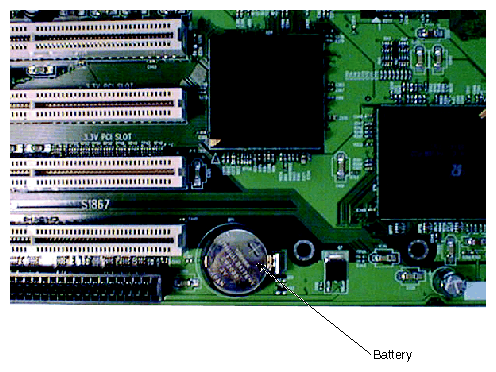
Battery replacement is not normally required. The battery has a life expectancy of 10 years with no line power applied to the system. When line power is present, there is no drain on the battery.
If you must remove the battery, the system loses its operating parameters stored in CMOS memory. As a result, the system BIOS parameter settings are lost. After you install a new battery, you must reset the date and time and reconfigure the BIOS parameter settings. See Chapter 3, "BIOS Setup," for more information on configuring BIOS parameter settings.
| Warning: Turn off the system and disconnect it from AC power before changing the battery. Damage to components can occur if the battery is shorted while AC power is applied. |
To remove the battery, push out the clip on the side of the battery holder to release the battery. Ensure that the new battery is properly oriented before installing it (positive side facing up). Replace the battery only with the same or equivalent type as recommended by the manufacturer. Dispose of used batteries according to the manufacturer's instructions.