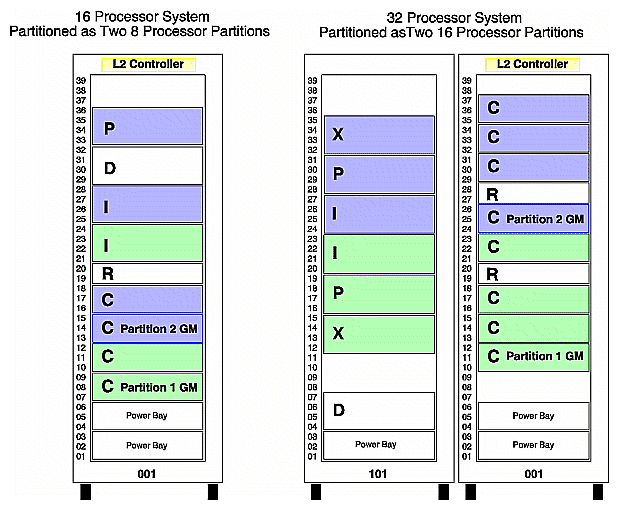
Partitioning is defined as the ability to take a multinode distributed shared memory (DSM) system, such as an SGI Origin 3000 series system, and divide it into a collection of smaller systems.
The two primary characteristics of partitioning are:
The ability to run individual partitions. Each partition runs its own operating system kernel and behaves as a standalone system, without having to physically recable the system. A partition can be booted, powered down/up, and rebooted without affecting the normal operation of other partitions.
The partitions are tightly coupled through the system's interconnection network (NUMAlink) as a low latency/ high bandwidth interconnect. A failure that causes a kernel in one partition to crash will not cause a kernel in another partition to crash.
Partitioning can be thought of as "clustering in a box", or a tightly coupled cluster.
There has been much discussion on the terminology used to described the different divisions of a system. The following definitions are not final, but are used as a starting point.
TERM | DESCRIPTION |
|---|---|
array | One or more "hosts" linked together using the array software. It may be used to link together one or more partitions, but this is TBD. |
array node | An element known to the array management software. Currently an array node is a "host". |
domain | A host which is a subset of a system. |
host | A single IRIX image running on a partition. |
partition | A subset of a system that runs an IRIX kernel and is protected by hardware barriers. A partition is identified by a Partition ID. The terms partition, host, and domain all have the same meaning, and can be used interchangeably in this context. |
partitioning | Breaking a large physical machine into two or more smaller machines. |
partition ID | A 16-bit quantity that identifies a particular partition. It is essentially a new name space. |
system | A collection of hardware that supports shared memory running one or more partitions. |
Partitioning rules define the set of valid configurations for a partitioned system.
Fault isolation is one of the major reasons for partitioning a system. A software or hardware failure in one partition should not cause a failure in another partition. To accomplish this, the following restrictions are placed on partitions:
The minimum granularity for a partition is one C-brick (with its own power supply setup). On SGI Origin 3000 series systems, this means four processors (assuming fully populated modules) is the minimum level of hardware isolation. There is no requirement for a module to be fully populated with processors.
Each partition must have the infrastructure to run as a standalone system. This infrastructure includes a system disk and console connection.
An I/O brick belongs to the partition that the attached C-brick belongs to. If an I/O brick is attached to two C-bricks, both C-bricks must be in the same partition. I/O bricks cannot be shared by two partitions. Peripherals, such as dual-ported disks, can be shared the same way two nodes in a cluster can share peripherals.
Partitions must be contiguous in the topology (for example, the route between any two nodes in the same partition must be contained within that partition - and not route through any other partition). This allows intra-partition communication to be independent of other partitions.
Partitions should not divide metarouters that are only connected to other metarouters.
Partitions must be fully interconnected. That is to say, for any two partitions, there is a direct route between those partitions without passing through a third. This is required to fulfill true isolation of a hardware or software fault to the partition in which it occurs.
When the full system is greater than 64 C-bricks (256 processors), it runs in coarse mode. In coarse mode the minimum partition size is four C-bricks (16 processors).
Table 6-1 lists the valid system partitions for the SGI Origin 3000 systems.
Table 6-1. Valid System Partitioning
Number of C bricks in the System | Number of Partitions | Number of Partitions | Number of C bricks in each Partition | Maximum Number of Processors in each Partition |
|---|---|---|---|---|
1 | 1 partition | with | 1 C-brick | 4 processors |
2 | 1 partition | with | 2 C-bricks | 8 processors |
| 2 partitions | with | 1 C-brick | 4 processors |
4 | 1 partition | with | 4 C-bricks | 16 processors |
| 2 partitions | with | 2 C-bricks | 8 processors |
| 1 partition 2 partitions | with with | 2 C-bricks 1 C-brick | 8 processors 4 processors |
8 | 1 partition | with | 8 C-bricks | 32 processors |
| 2 partitions | with | 4 C-bricks | 16 processors |
| 4 partitions | with | 2 C-bricks | 8 processors |
| 8 partitions | with | 1 C-brick | 4 processors |
| 1 partition 2 partitions | with with | 4 C-bricks 2 C-bricks | 16 processors 8 processors |
| 1 partition 1 partition 2 partitions | with with with | 4 C-bricks 2 C-bricks 1 C-brick | 16 processors 8 processors 4 processors |
| 1 partition 4 partitions | with with | 4 C-bricks 1 C-brick | 16 processors 4 processors |
16 | 1 partition | with | 16 C-bricks | 64 processors |
| 2 partitions | with | 8 C-bricks | 32 processors |
| 4 partitions | with | 4 C-bricks | 16 processors |
| 8 partitions | with | 2 C-bricks | 8 processors |
| 1 partition 2 partitions | with with | 8 C-bricks 4 C-bricks | 32 processors 16 processors |
| 1 partition 1 partition 2 partitions | with with with | 8 C-bricks 4 C-bricks 2 C-bricks | 32 processors 16 processors 8 processors |
| 1 partition 4 partitions | with with | 8 C-bricks 2 C-bricks | 32 processors 8 processors |
32 | 1 partition | with | 32 C-bricks | 128 processors |
| 2 partitions | with | 16 C-bricks | 64 processors |
| 4 partitions | with | 8 C-bricks | 32 processors |
| 8 partitions | with | 4 C-bricks | 16 processors |
| 1 partition 2 partitions | with with | 16 C-bricks 8 C-bricks | 64 processors 32 processors |
| 1 partition 1 partition 2 partitions | with with with | 16 C-bricks 8 C-bricks 4 C-bricks | 64 processors 32 processors 16 processors |
| 1 partition 4 partitions | with with | 16 C-bricks 4 C-bricks | 64 processors 16 processors |
64 | 1 partition | with | 64 C-bricks | 256 processors |
| 2 partitions | with | 32 C-bricks | 128 processors |
| 4 partitions | with | 16 C-bricks | 64 processors |
| 8 partitions | with | 8 C-bricks | 32 processors |
| 16 partitions | with | 4 C-bricks | 16 processors |
| 32 partitions | with | 2 C-bricks | 8 processors |
| 1 partition 2 partitions | with with | 32 C-bricks 16 C-bricks | 128 processors 64 processors |
| 1 partition 1 partition 2 partitions | with with with | 32 C-bricks 16 C-bricks 8 C-bricks | 128 processors 64 processors 32 processors |
| 1 partition 4 partitions | with with | 32 C-bricks 8 C-bricks | 128 processors 32 processors |
128 | 1 partition | with | 128 C-bricks | 512 processors |
| 2 partitions | with | 64 C-bricks | 256 processors |
| 4 partitions | with | 32 C-bricks | 128 processors |
| 8 partitions | with | 16 C-bricks | 64 processors |
| 16 partitions | with | 8 C-bricks | 32 processors |
| 32 partitions | with | 4 C-bricks | 16 processors |
| 1 partition 2 partitions | with with | 64 C-bricks 32 C-bricks | 256 processors 128 processors |
| 1 partition 1 partition 2 partitions | with with with | 64 C-bricks 32 C-bricks 16 C-bricks | 256 processors 128 processors 64 processors |
| 1 partition 1 partition 1 partition 2 partitions | with with with with | 64 C-bricks 32 C-bricks 16 C-bricks 8 C-bricks | 256 processors 128 processors 64 processors 32 processors |
| 1 partition 1 partition 1 partition 1 partition 2 partitions | with with with with with | 64 C-bricks 32 C-bricks 16 C-bricks 8 C-bricks 4 C-bricks | 256 processors 128 processors 64 processors 32 processors 16 processors |
 | Note: A single entry in a table row defines a legal configuration where all partitions are the same size. Multiple entries in a table row defines a legal configuration of mixed partition sizes. |
Shaded partitions are special order only.