This chapter provides information about the components that are added to the base IRIS FailSafe 2.1 product by the IRIS FailSafe 2.1 DMF option. It assumes that you are familiar with the basic components of IRIS FailSafe described in Chapter 1 of the IRIS FailSafe Version 2 Administrator's Guide. This chapter also lists the steps you must take to add DMF to the highly available services that are failed over on an IRIS FailSafe cluster.
The major sections in this chapter are as follows:
The IRIS FailSafe DMF option adds DMF daemon monitoring support to the IRIS FailSafe base software. The DMF monitor script monitors the DMF daemon ( dmdaemon). The script periodically makes status requests to the daemon to verify that it is up and running. If the monitor script detects a failure, it reports a local monitoring failure to FailSafe and FailSafe will take the appropriate action. If the host that is running FailSafe DMF crashes, DMF fails over to another host along with its filesystems.
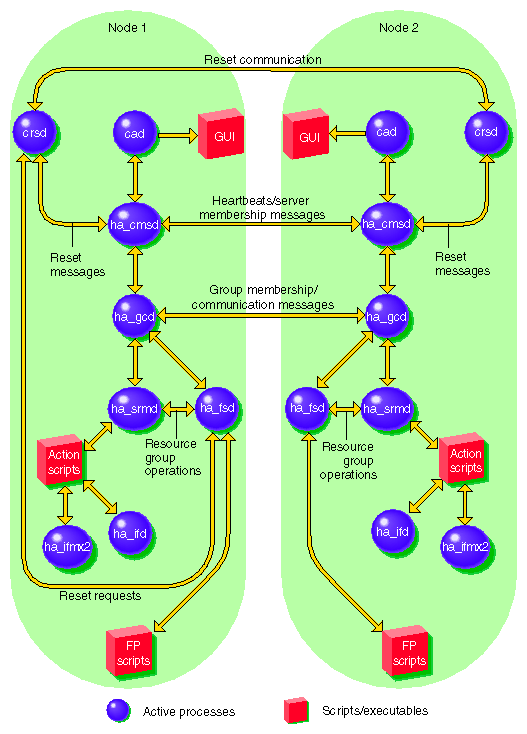
IRIS FailSafe supports up to eight nodes in a cluster. Figure 1-1 shows an example of the message paths in IRIS FailSafe in a two-node cluster. Figure 1-1 also shows the interaction between the resource action scripts and the FailSafe agents (ha_ifd, ha_ifmx2). The DMF resource action scripts do not interact with any FailSafe agent directly, except for the ha_srmd process.