This chapter provides a summary of MineSet tools as well as a tool execution scenario that helps you better understand how MineSet tools can be used in combination. This chapter contains the following sections:
The MineSet suite of tools lets you mine and graphically display quantitative information so you can better visualize, explore, and understand your data. These tools provide a highly interactive, three-dimensional (3D) visual interface that lets you manipulate visual objects on the screen, as well as search, filter and perform animations.
The MineSet suite consists of three basic components:
A centralized control module, consisting of a graphical user interface tool called the Tool Manager, and a process called the DataMover, which runs on the server part of MineSet's client/server architecture.
Analytical data mining, with nine data mining tools:
Association Rules Generator
Automatic Binning
Cluster Generator
Column Importance
Decision Table Inducer and Classifier
Decision Tree Inducer and Classifier
Evidence Inducer and Classifier
Option Tree Inducer and Classifier
Regression Tree Inducer and Regressor
Visualization tools, which let you view your data using ten different visual metaphors:
Cluster Visualizer
Decision Table Visualizer
Evidence Visualizer
Map Visualizer
Record Viewer
Scatter Visualizer
Splat Visualizer
Statistics Visualizer
Tree Visualizer
For complete descriptions and directions for using the tools see the MineSet Enterprise Edition User's Guide for Windows or for IRIX, the MineSet Enterprise Edition Reference Guide or the MineSet Enterprise Edition Tutorial for Windows or for IRIX.
Each of the mining and visualization tools can be configured and started using the Tool Manager, which does the following:
Connects you to the server on which the analytical mining and transformations are performed.
Lets you access, query and transform data.
Creates configuration files for each tool.
The Tool Manager is installed on the MineSet client.
DataMover is a process that runs on the server. The server performs the following actions:
Connects to databases, or flat files (ASCII or binary), and retrieves the data.
Invokes the mining tools.
Performs additional data manipulation such as binning and aggregation.
Returns the data to the Tool Manager for distribution to the visualization tools.
Stores the data in files on the server or client for future operations.
You can run MineSet in client-only mode with limited functionality, provided you have access to the server.
MineSet supports a plug-in architecture that allows you to add new mining tools, functions, and data transformations to MineSet. These plug-ins are installed and executed on the MineSet server, and any user interface for the plug-ins is downloaded by the Mineset client. The MineSet plug-in API is identical on IRIX, Linux, and Windows, so plug-ins can be installed on any MineSet server.
Plug-in functions are added to the list of available functions when forming Add Column or Filter expressions. You can implement them by writing and implementing a C function with a particular prototype, compiling that into a shared library, and putting the shared library on the MineSet server computer.
You can access plug-in transformations are from the “Plug-in Ops” button in the Data Transformations pane of the Tool Manager. They are also visible in the View History panel. A plug-in transformation is implemented with a standalone executable that is given a data set as input, and produces a data set as output. The MineSet plug-in SDK ships with a library of functions that will assist you in reading and writing MineSet data sets. Plug-in transformations also require a Java GUI that will be sent to the MineSet client, and incorporated into the Tool Manager.
Plug-in mining tools are added as new tabs in the “Mining Tools” tabbed deck in the Tool Manager. They are implemented as standalone executables on the MineSet server that are given data sets or model files as input, and produce data sets or model files as output. Like plug-in transformations, plug-in mining tools also include a Java GUI that will be added to the Tool Manager.
Each of the MineSet tools is started, configured, and run in a consistent manner. The sequence of actions followed by the MineSet client and the MineSet server is shown in Figure 1-1.
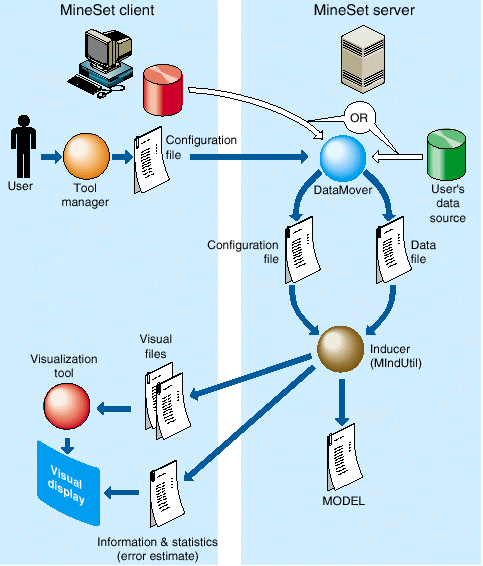
The following steps describe a typical interaction with a MineSet tool, and the sequence of the tool's actions. Depending on your requirements, you might skip some steps (for example, if the data and configuration files were already generated in a previous work session).
Start the Tool Manager, which is the graphical interface for generating and specifying the configuration file, data file, and tools to be used. The Tool Manager runs on your MineSet client.
The Tool Manager opens a network connection to the DataMover, which runs on the MineSet server, which in some cases may be the same as your client workstation, and in others is a separate machine.
Use the Tool Manager to specify the following:
The database and table, or a binary or ASCII flat file containing the data on either the client or the server.
Which mining or visualization tools are to be applied.
How that data is to be displayed, through tool options.
A session file in which to save the history of your work.
Information retrieved using the DataMover guides this interaction. As a result, the Tool Manager generates a configuration file. This file contains the user-defined parameters that determine the execution of the following steps.
The Tool Manager transmits a copy of the configuration file from step 3 to the DataMover. The DataMover processes the file by:
Accessing the database or flat file.
Performing the specified data transformations.
Running the mining tools when requested.
Generating the visualization files when requested.
These visualization files consist of your data in a specific format readable by the MineSet tool. Then a copy of these visualization files is transferred to the MineSet client.
The Tool Manager invokes the appropriate MineSet visualization tool.
The tool accesses the visualization files and displays the data.
If you generated a model, that model can be applied to additional data.
 | Note: The MineSet client and server can run on different machines, using a network to communicate. Because network bandwidth is often scarce, you should be cautious about regularly transferring large files between client and server. If you are mining a large database or file, you can achieve greater efficiency by storing that file on the server where the DataMover runs, rather than on the client. |