This chapter provides information about the components that are added to the base IRIS FailSafe 2.0 product by the IRIS FailSafe 2.0 Netscape server option. It assumes that you are familiar with the basic components of IRIS FailSafe described in Chapter 1 of the IRIS FailSafe 2.0 Administrator's Guide . This chapter also lists the steps you must take to add Netscape servers to the highly available services that are failed over on an IRIS FailSafe cluster.
The major sections in this chapter are as follows:
The IRIS FailSafe Netscape server option adds server support to the IRIS FailSafe base software. The server monitoring scripts monitor the Netscape servers. If the monitor script detects a failure, it will report a local monitoring failure to FailSafe, and FailSafe will take the appropriate action. Figure 1-1 shows an example of the message paths in IRIS FailSafe.
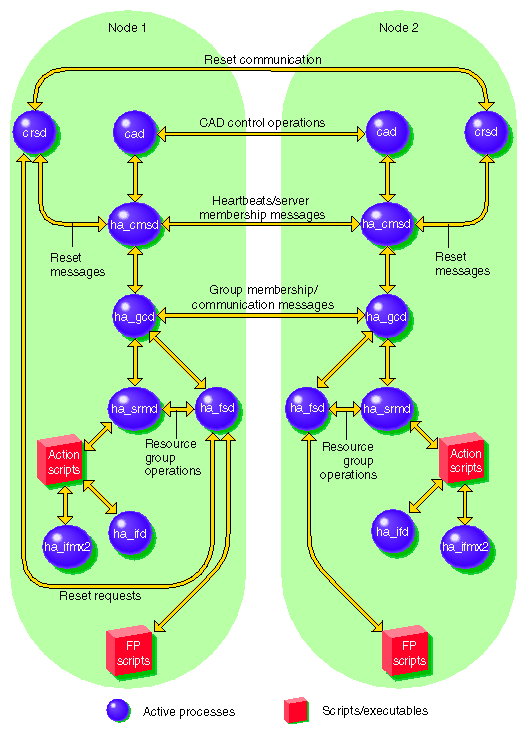
The standard Netscape server startup and shutdown scripts, /etc/init.d/ns_enterprise or /etc/init.d/ns_fasttrack, cannot be used with IRIS FailSafe 2.0 as these scripts start and stop all configured servers.
A key difference between the standard scripts and IRIS FailSafe scripts is that the standard scripts start up and shut down all Netscape servers. IRIS FailSafe scripts start up or shut down just one Netscape server instance (one FailSafe resource controlling one Netscape server).
To configure an IRIS FailSafe cluster for failover of Netscape servers, follow these steps:
Install, configure, and test the base IRIS FailSafe software as described in the IRIS FailSafe 2.0 Administrator's Guide .
Install additional software if required. See the section “Required Software” in Chapter 2.
Choose how to configure the Netscape server software and databases on the disks. See the section “Planning the Netscape Server Configuration” in Chapter 2.
Prepare the Netscape server startup and shutdown scripts. See the section “Configuring a Netscape Server” in Chapter 2.
Add the Netscape server resource type, resource attribute, and resource information to the configuration database (CDB) file, /var/cluster/cdb/CDB. See the section “Adding Netscape Server Resource Information to the Configuration Database (CDB)” in Chapter 2.
Test the Netscape server failover. See the section “Testing the Netscape Server Resource” in Chapter 2.