You can use the following procedure to configure the NFS filesystems that will be failed over. There are no entries in /etc/exports that are required for these filesystems; FailSafe software exports the NFS filesystems.
Create or identify the filesystems to be failed over. They must follow the guidelines in “Planning NFS Filesystems” in Chapter 1.
For each exported filesystem, create a directory named statmon beneath the export point. This directory will hold the NFS file-locking information using the NFS client interface IP addresses.
The directory must have the following characteristics:
Owner: root
Group: sys
Minimum permission: 0700 (at least read/write/execute for owner root)

Note: The NFS clients mount the highly available (HA) NFS filesystem using the HA IP address (not the hostname of the server). On each node, edit the /etc/config/statd.options file and put -h on the first line of the file.
If you must create the /etc/config/statd.options file, set the permissions as follows :
# chown root.sys /etc/config/statd.options
# chmod 644 /etc/config/statd.options
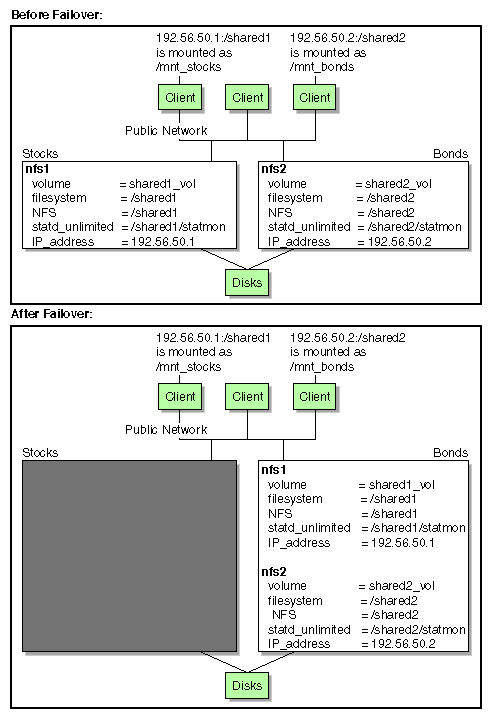
Suppose you have the following configuration:
A node named Stocks (IP address 192.56.50.1) that exports the /shared1 NFS filesystem
A node named Bonds (IP address 192.56.51.2) that exports the /shared2 NFS filesystem
To make these filesystem highly available with FailSafe, you must create the following directories, giving them the appropriate permissions (644):
/shared1/statmon on the node Stocks. This directory stores NFS lock information that lets the node Bonds recover the NFS locks for the filesystem /shared1 if Stocks fails.
/shared2/statmon on the node Bonds. This directory stores NFS lock information that lets the node stocks recover NFS locks for the filesystem /shared2 if Bonds fails.
Figure 2-1 shows an example failover for a resource group named nfs1 from the node named Stocks to the node named Bonds.