This chapter contains the following sections:
The script in this section configures an SGI File Server 850 cluster, which has two Origin 300 nodes in a FailSafe configuration attached to an SGI TP9100 RAID. Figure 7-1 shows an example of this configuration.
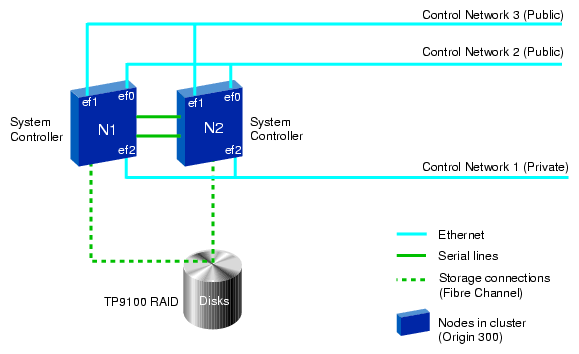
All highly available (HA) services run on one node and the other node is the backup node. After failover, the services run on the backup node. In this case, the backup node is a hot standby for failover purposes only. The backup node can run other applications that are not HA services.
This configuration uses the following component names:
Nodes names:
N1
N2
Cluster name: fileserver850cluster
Resource groups:
RG1
RG2
Table 7-1. SGI File Server 850 Resources and Failover Policies for RG1 and RG2
Resources and Failover Policy | RG1 | RG2 | |
|---|---|---|---|
Resources | |||
| IP_address | 192.26.50.1 | 192.26.50.2 |
| filesystem | /ha1 | /ha2 |
| volume | ha1_vol | ha2_vol |
| NFS | /ha1/export | /ha2/export |
Failover policy | |||
| Name | fp1 | fp2 |
| Script | ordered | ordered |
| Attributes | Auto_Failback, Auto_Recovery | Auto_Failback, Auto_Recovery |
| Failover domain | N1, N2 | N1, N2 |
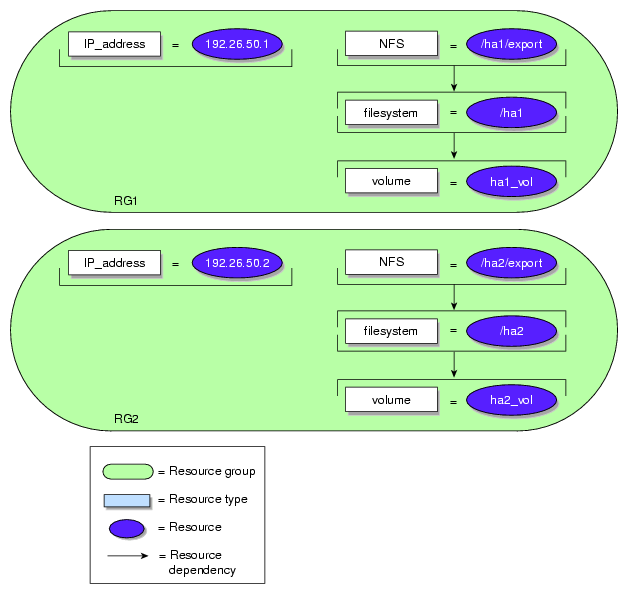
Figure 7-2 describes the resource dependencies.
The cmgr script used to define this configuration is as follows:
#!/usr/cluster/bin/cmgr -f
define node N1
          set hostname to N1
          set is_failsafe to true
          set sysctrl_type to l1
          set sysctrl_status to enabled
          set sysctrl_password to none
          set sysctrl_owner to N2
          set sysctrl_device to /dev/ttyd2
          set sysctrl_owner_type to tty
          add nic ef0-N1
                  set heartbeat to true
                  set ctrl_msgs to true
                  set priority to 1
          done
          add nic ef1-N1
                  set heartbeat to true
                  set ctrl_msgs to true
                  set priority to 2
          done
done


define node N2
        set hostname to N2
        set is_failsafe to true
        set sysctrl_type to l1
        set sysctrl_status to enabled
        set sysctrl_password to none
        set sysctrl_owner to N1
        set sysctrl_device to /dev/ttyd2
        set sysctrl_owner_type to tty
        add nic ef0-N2
                  set heartbeat to true
                  set ctrl_msgs to true
                  set priority to 1
        done
        add nic ef1-N2
                  set heartbeat to true
                  set ctrl_msgs to true
                  set priority to 2
        done
done


define cluster fileserver850cluster
        set is_failsafe to true
        set notify_cmd to /usr/bin/mail
        set notify_addr to [email protected]
        add node N1
        add node N2
done

define failover_policy fp1
        set attribute to Auto_Failback
        set attribute to Auto_Recovery
        set script to ordered
        set domain to N1 N2
done


define failover_policy fp2
        set attribute to Auto_Failback
        set attribute to Auto_Recovery
        set script to ordered
        set domain to N2 N1
done

set cluster fileserver850cluster

define resource 192.26.50.1 of resource_type IP_address
          set NetworkMask to 0xffffff00
          set interfaces to ef0,ef1
          set BroadcastAddress to 192.26.50.255
done

define resource ha1_vol of resource_type volume
          set devname-owner to root
          set devname-group to sys
          set devname-mode to 600
done

define resource /ha1 of resource_type filesystem
          set volume-name to ha1_vol
          set mount-options to rw,noauto
          set monitor-level to 2
done

modify resource /ha1 of resource_type filesystem
          add dependency ha1_vol of type volume
done

define resource /ha1/export of resource_type NFS
          set export-info to rw,wsync
          set filesystem to /ha1
done

modify resource /ha1/export of resource_type NFS
          add dependency /ha1 of type filesystem
done

define resource_group RG1
          set failover_policy to fp1
          add resource 192.26.50.1 of resource_type IP_address
          add resource ha1_vol of resource_type volume
          add resource /ha1 of resource_type filesystem
          add resource /ha1/export of resource_type NFS
done


define resource 192.26.50.2 of resource_type IP_address
          set NetworkMask to 0xffffff00
          set interfaces to ef0
          set BroadcastAddress to 192.26.50.255
done

define resource ha2_vol of resource_type volume
          set devname-owner to root
          set devname-group to sys
          set devname-mode to 600
done

define resource /ha2 of resource_type filesystem
          set volume-name to ha2_vol
          set mount-options to rw,noauto
          set monitor-level to 2
done

modify resource /ha2 of resource_type filesystem
          add dependency ha2_vol of type volume
done

define resource /ha2/export of resource_type NFS
          set export-info to rw,wsync
          set filesystem to /ha2
done

modify resource /ha2/export of resource_type NFS
          add dependency /ha2 of type filesystem
done

define resource_group RG2
          set failover_policy to fp2
          add resource 192.26.50.2 of resource_type IP_address
          add resource ha2_vol of resource_type volume
          add resource /ha2 of resource_type filesystem
          add resource /ha2/export of resource_type NFS
done

quit |
The script in this section configures an SGI SAN Server 1000 cluster, which has two Origin 300 nodes in a FailSafe configuration, shown in Figure 7-3. Both Origin 300 nodes are attached to a SGI TP9400 RAID using a Brocade Fibre Channel switch. Both nodes act as CXFS metadata servers. There can be one or more CXFS metadata clients.

All HA services run on one node and the other node is the backup node. After failover, the services run on the backup node. In this case, the backup node is a hot standby for failover purposes only. The backup node can run other applications that are not HA services.
The resource groups contain a CXFS filesystem, NFS export point, and an IP address. The /ha_cxfs1 and /ha_cxfs2 CXFS filesystems use metadata servers named N1 and N2.
This configuration uses the following component names:
Node names:
N1
N2
Cluster name: sanserver1000cluster
Resource groups:
RG1
RG2
Table 7-2. SGI SAN Server Resources and Failover Policies for RG1 and RG2
Resources and Failover Policy | RG1 | RG2 | |
|---|---|---|---|
Resources | |||
| IP_address | 192.26.50.1 | 192.26.50.2 |
| CXFS | /ha_cxfs1 | /ha_cxfs2 |
| NFS | /ha_cxfs1/export | /ha_cxfs2/export |
Failover policy | |||
| Name | fp1 | fp2 |
| Script | ordered | ordered |
| Attributes | Auto_Failback, Auto_Recovery | Auto_Failback, Auto_Recovery |
| Failover domain | N1, N2 | N1, N2 |
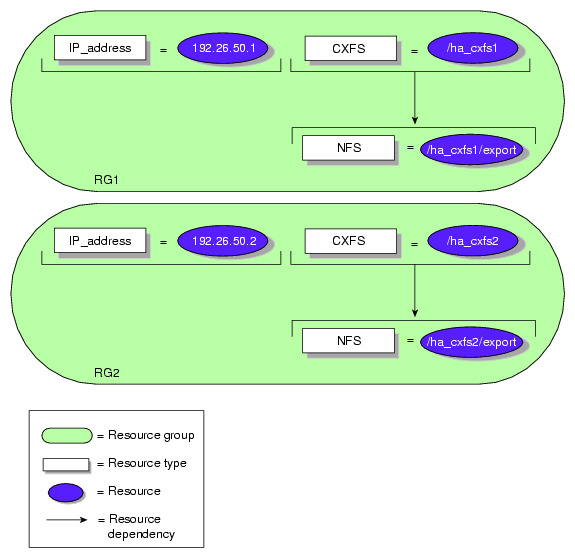
Figure 7-4 describes the resource dependencies.
The cmgr script used to define this configuration is as follows:
#!/usr/cluster/bin/cmgr -f

define node N1
          set hostname to N1
          set is_failsafe to true
          set is_cxfs to true
          set sysctrl_type to l1
          set sysctrl_status to enabled
          set sysctrl_password to none
          set sysctrl_owner to N2
          set sysctrl_device to /dev/ttyd2
          set sysctrl_owner_type to tty
          set operating_system to IRIX
          set weight to 1
          set hierarchy to Reset

          add nic ef0-N1
                  set heartbeat to true
                  set ctrl_msgs to true
                  set priority to 1
          done
          add nic ef1-N1
                  set heartbeat to true
                  set ctrl_msgs to true
                  set priority to 2
          done
done


define node N2
        set hostname to N2
        set is_failsafe to true
        set is_cxfs to true
        set sysctrl_type to l1
        set sysctrl_status to enabled
        set sysctrl_password to none
        set sysctrl_owner to N1
        set sysctrl_device to /dev/ttyd2
        set sysctrl_owner_type to tty
        set operating_system to IRIX
        set weight to 1
        set hierarchy to Reset

        add nic ef0-N2
                  set heartbeat to true
                  set ctrl_msgs to true
                  set priority to 1
        done
        add nic ef1-N2
                  set heartbeat to true
                  set ctrl_msgs to true
                  set priority to 2
        done
done


define cluster sanserver1000cluster
        set is_failsafe to true
        set is_cxfs to true
        set clusterid to 1
        set notify_cmd to /usr/bin/mail
        set notify_addr to [email protected]
        add node N1
        add node N2
done

define failover_policy fp1
        set attribute to Auto_Failback
        set attribute to Auto_Recovery
        set script to ordered
        set domain to N1 N2
done


define failover_policy fp2
        set attribute to Auto_Failback
        set attribute to Auto_Recovery
        set script to ordered
        set domain to N2 N1
done

set cluster sanserver1000cluster

define resource 192.26.50.1 of resource_type IP_address
          set NetworkMask to 0xffffff00
          set interfaces to ef0,ef1
          set BroadcastAddress to 192.26.50.255
done

define resource /ha_cxfs1 of resource_type CXFS
          set relocate-mds to true
done

define resource /ha_cxfs1/export of resource_type NFS
          set export-info to rw,wsync
          set filesystem to /ha_cxfs1
done

modify resource /ha_cxfs1/export of resource_type NFS
          add dependency /ha_cxfs1 of type CXFS
done

define resource_group RG1
          set failover_policy to fp1
          add resource 192.26.50.1 of resource_type IP_address
          add resource /ha_cxfs1 of resource_type CXFS
          add resource /ha_cxfs1/export of resource_type NFS
done


define resource 192.26.50.2 of resource_type IP_address
          set NetworkMask to 0xffffff00
          set interfaces to ef0
          set BroadcastAddress to 192.26.50.255
done

define resource /ha_cxfs2 of resource_type CXFS
          set relocate-mds to true
done

define resource /ha_cxfs2/export of resource_type NFS
          set export-info to rw,wsync
          set filesystem to /ha_cxfs2
done

modify resource /ha_cxfs2/export of resource_type NFS
          add dependency /ha_cxfs2 of type CXFS
done

define resource_group RG2
          set failover_policy to fp2
          add resource 192.26.50.2 of resource_type IP_address
          add resource /ha_cxfs2 of resource_type CXFS
          add resource /ha_cxfs2/export of resource_type NFS
done

quit |
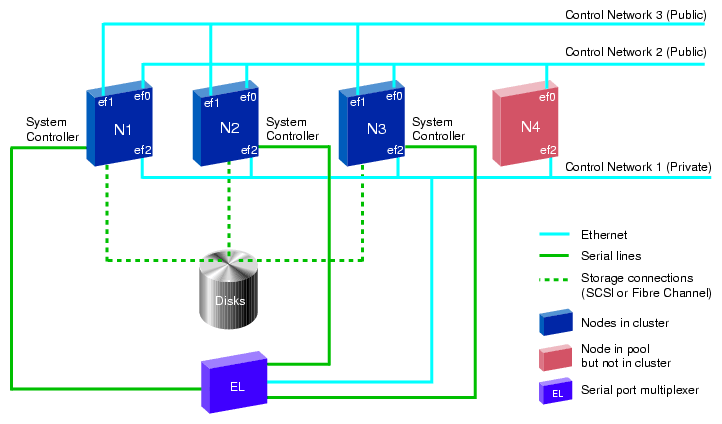
This section provides an example cmgr script that defines a FailSafe three-node cluster as shown in Figure 7-5. This configuration consists of a pool containing nodes N1, N2, N3, and N4. Nodes N1, N2, and N3 make up the FailSafe cluster. The nodes in this cluster share disks, and are connected to an Etherlite network-based serial port multiplexer, which is also connected to the private control network.
For general information on cmgr scripts see “Using Script Files” in Chapter 5. For information on the template files that you can use to create your own configuration script, see “Template Scripts” in Chapter 5.
This cluster has two resource groups, RG1 and RG2, as shown in Table 7-3.
Table 7-3. Resources and Failover Policies for RG1 and RG2
Resources and Failover Policy | RG1 | RG2 | |
|---|---|---|---|
Resources | |||
| IP_address | 192.26.50.1 | 192.26.50.2 |
| filesystem | /ha1 | /ha2 |
| volume | ha1_vol | ha2_vol |
| NFS | /ha1/export | /ha2/export |
Failover policy | |||
| Name | fp1 | fp2 |
| Script | ordered | round-robin |
| Attributes | Auto_Failback, Auto_Recovery | Controlled_Failback, InPlace_Recovery |
| Failover domain | N1, N2, N3 | N2, N3 |
The cmgr script used to define this configuration is as follows:
#!/usr/cluster/bin/cmgr -f
define node N1
        set hostname to N1
        set is_failsafe to true
        set sysctrl_type to msc
        set sysctrl_status to enabled
        set sysctrl_password to none
        set sysctrl_owner to N4
        set sysctrl_device to /dev/ttydn001
        set sysctrl_owner_type to tty
        add nic ef2-N1
                set heartbeat to true
                set ctrl_msgs to true
                set priority to 1
        done
        add nic ef0-N1
                set heartbeat to true
                set ctrl_msgs to true
                set priority to 2
        done
        add nic ef1-N1
                set heartbeat to true
                set ctrl_msgs to true
                set priority to 3
        done
done


define node N2
        set hostname to N2
        set is_failsafe to true
        set sysctrl_type to msc
        set sysctrl_status to enabled
        set sysctrl_password to none
        set sysctrl_owner to N4
        set sysctrl_device to /dev/ttydn002
        set sysctrl_owner_type to tty
        add nic ef2-N2
                set heartbeat to true
                set ctrl_msgs to true
                set priority to 1
        done
        add nic ef0-N2
                set heartbeat to true
                set ctrl_msgs to true
                set priority to 2
        done
        add nic ef1-N2
                set heartbeat to true
                set ctrl_msgs to true
                set priority to 3
        done
done

define node N3
        set hostname to N3
        set is_failsafe to true
        set sysctrl_type to msc
        set sysctrl_status to enabled
        set sysctrl_password to none
        set sysctrl_owner to N4
        set sysctrl_device to /dev/ttydn003
        set sysctrl_owner_type to tty
        add nic ef2-N3
                set heartbeat to true
                set ctrl_msgs to true
                set priority to 1
        done
        add nic ef0-N3
                set heartbeat to true
                set ctrl_msgs to true
                set priority to 2
        done
        add nic ef1-N3
                set heartbeat to true
                set ctrl_msgs to true
                set priority to 3
        done
done


define node N4
        set hostname to N4
        set is_failsafe to true
        add nic ef2-N4
                set heartbeat to true
                set ctrl_msgs to true
                set priority to 1
        done
        add nic ef0-N4
                set heartbeat to true
                set ctrl_msgs to true
                set priority to 2
        done
done
define cluster TEST
        set is_failsafe to true
        set notify_cmd to /usr/bin/mail
        set notify_addr to [email protected]
        add node N1
        add node N2
        add node N3
done

define failover_policy fp1
        set attribute to Auto_Failback
        set attribute to Auto_Recovery
        set script to ordered
        set domain to N1 N2 N3
done


define failover_policy fp2
        set attribute to Controlled_Failback
        set attribute to InPlace_Recovery
        set script to round-robin
        set domain to N2 N3
done

define resource 192.26.50.1 of resource_type IP_address in cluster TEST
        set NetworkMask to 0xffffff00
        set interfaces to ef0,ef1
        set BroadcastAddress to 192.26.50.255
done

define resource ha1_vol of resource_type volume in cluster TEST
        set devname-owner to root
        set devname-group to sys
        set devname-mode to 666
done

define resource /ha1 of resource_type filesystem in cluster TEST
        set volume-name to ha1_vol
        set mount-options to rw,noauto
        set monitor-level to 2
done

modify resource /ha1 of resource_type filesystem in cluster TEST
        add dependency ha1_vol of type volume
done

define resource /ha1/export of resource_type NFS in cluster TEST
        set export-info to rw,wsync
        set filesystem to /ha1
done

modify resource /ha1/export of resource_type NFS in cluster TEST
        add dependency /ha1 of type filesystem
done
define resource_group RG1 in cluster TEST
        set failover_policy to fp1
        add resource 192.26.50.1 of resource_type IP_address
        add resource ha1_vol of resource_type volume
        add resource /ha1 of resource_type filesystem
        add resource /ha1/export of resource_type NFS
done


define resource 192.26.50.2 of resource_type IP_address in cluster TEST
        set NetworkMask to 0xffffff00
        set interfaces to ef0
        set BroadcastAddress to 192.26.50.255
done

define resource ha2_vol of resource_type volume in cluster TEST
        set devname-owner to root
        set devname-group to sys
        set devname-mode to 666
done

define resource /ha2 of resource_type filesystem in cluster TEST
        set volume-name to ha2_vol
        set mount-options to rw,noauto
        set monitor-level to 2
done

modify resource /ha2 of resource_type filesystem in cluster TEST
        add dependency ha2_vol of type volume
done

define resource /ha2/export of resource_type NFS in cluster TEST
        set export-info to rw,wsync
        set filesystem to /ha2
done

modify resource /ha2/export of resource_type NFS in cluster TEST
        add dependency /ha2 of type filesystem
done

define resource_group RG2 in cluster TEST
        set failover_policy to fp2
        add resource 192.26.50.2 of resource_type IP_address
        add resource ha2_vol of resource_type volume
        add resource /ha2 of resource_type filesystem
        add resource /ha2/export of resource_type NFS
done


quit |
The following procedural example modifies the sample FailSafe configuration illustrated in Figure 7-5, so that it includes HA NFS services on a CXFS filesystem. However, the CXFS resource type does not mount a CXFS filesystem. You should mount CXFS filesystem using the CXFS GUI as described in the CXFS Administration Guide for SGI InfiniteStorage. The CXFS resource type monitors the CXFS filesystem for mount failures.
 | Note: Local XVM volumes use the XVM resource type. |
To modify the FailSafe configuration to include a CXFS filesystem, perform the following steps:
Convert the cluster TEST for CXFS use. For information on converting FailSafe clusters to CXFS, see the CXFS Administration Guide for SGI InfiniteStorage.
Convert the nodes N1 and N2 for CXFS use. For information on converting FailSafe nodes to CXFS, see the CXFS Administration Guide for SGI InfiniteStorage. Start CXFS services on the nodes.
Create a new resource type NFS1. This is the same as resource type NFS but without a filesystem dependency. To create this resource type you can perform the following steps:
Using cmgr, execute the following:
cmgr> show resource_type NFS in cluster TEST
The parameters of resource type NFS will be displayed.
Define resource type NFS1 using the same configuration information that was displayed for resource type NFS, but do not copy the filesystem dependency.
Define a new failover policy, FP3 , with the following attributes:
Failover domain: N1, N2
Script: ordered
Attribute: InPlace_Recovery
Create a resource named /cxfs of resource type CXFS. /cxfs is the mount point of the CXFS filesystem. You can decide to relocate the metadata server of the CXFS filesystem /cxfs when the resource group moves to another node.
Create a resource group named rg3 with failover policy fp3, resource ip3 of resource type IP_address, and resource /cxfs of resource type CXFS.
Mount /cxfs on nodes N1 and N2. For information on defining and mounting a CXFS filesystem with an XVM volume, see the CXFS Administration Guide for SGI InfiniteStorage.
Bring resource group RG3 online in cluster TEST.
Perform the following steps to export CXFS filesystems in a FailSafe configuration:
Ensure that the latest patches (if any) of the FailSafe NFS 2.2 release are installed on all FailSafe nodes in the cluster.
Perform all of the steps mentioned in “Example: Modify a Cluster to Include a CXFS Filesystem”.
If you are planning to export the /cxfs/share directory, create an NFS resource named /cxfs/share.
Add the NFS resource to the resource group rg3 in addition to the HA IP address resource and the CXFS resource, using the following commands:
define resource_group rg3 in cluster TEST
set failover_policy to fp3
add resource 99.92.99.99 of resource_type IP_address
add resource /cxfs of resource_type CXFS
add resource /cxfs/share of resource_type NFS
done
| Note: You cannot use this procedure to export the same CXFS filesystem or subdirectory from multiple nodes in the cluster. |
Use the following procedure to create a resource group using cmgr:
Determine the list of resources that belong to the resource group you are defining. The list of resources that belong to a resource group are the resources that move from one node to another as one unit.
A resource group that provides NFS services would contain a resource of each of the following types:
IP_address
volume
filesystem
NFS
All resource and resource-type dependencies must be satisfied. For example, the NFS resource type depends on the filesystem resource type, so a resource group containing a resource of NFS resource type must also contain a resource of filesystem resource type.
Determine the failover policy to be used by the resource group.
Use the template cluster_mgr script available in the /var/cluster/cmgr-templates/cmgr-create-resource_group file.
This example shows a script that creates a resource group with the following characteristics:
The resource group is named nfs-group.
The resource group is in cluster HA-cluster .
The resource group uses the failover policy.
The resource group contains IP_Address, volume, filesystem, and NFS resources.
The following example script can be used to create this resource group:
define resource_group nfs-group in cluster HA-cluster
        set failover_policy to n1_n2_ordered
        add resource 192.0.2.34 of resource_type IP_address
        add resource havol1 of resource_type volume
        add resource /hafs1 of resource_type filesystem
        add resource /hafs1 of resource_type NFS
done
Run this script using the -f option of the cmgr command.
FailSafe allows multiple network interfaces in a machine to be assigned to an HA IP address. FailSafe will attempt to failover the IP address to a backup network interface before attempting to failover the resource group containing the IP address to another node in the cluster. This local failover of IP address requires modification to the IP_address resource type start and restart scripts. Modifications involve changes to network routing table.This section provides a local IP failover procedure with modified start and restart scripts, allowing a correct local IP failover.
IRIX allows only one interface to be configured up in a subnet. One or more backup interfaces should be configured in dummy subnets that are not used at the site during machine boot up process. All the interfaces should be physically connected to the same subnet.
| Note: This configuration will send several routed messages into the SYSLOG. An option is to turn off warnings about messages received on unexpected interfaces. |
This local failover procedure will swap the base address of the failed interface with the base address of the backup interface and configure the HA IP address on the new network interface. The IP_address resource type scripts will update the network routing table.
| Note: The following modifications have been tested for configurations with one IP alias per HBA only. For configurations that use two or more IP aliases in the same network, the restart script should have a locking mechanism so that for one interface only one instance of restart can run at a time. |
The examples in this section show how to configure two interfaces for local IP failover. They use the configuration illustrated in Figure 7-5.
Define an HA IP_address resource with two interfaces:
define resource 192.26.50.1 of resource_type IP_address in cluster TEST
          set NetworkMask to 0xffffff00
          set BroadcastAddress to 192.26.50.255
          set interfaces to ef0,ef1
done
HA IP address 192.26.50.1 will be locally failed over from interface ef0 to interface ef1 when there is an ef0 interface failure. The base address of ef0 will be assigned to ef1 and the failed interface ef0 will get the dummy base address of ef1.
In nodes N1, N2, and N3, both ef0 and ef1 should configure up automatically, when the node boots up. Both ef0 and ef1 are physically connected to the same subnet 192.26.50. Only one network interface connected to the same network should be configured in the 192.26.50 subnet.
Modify the /etc/conf/netif.options file to configure the ef0 and ef1 interfaces:
if1name-ef0
if1addr=192.26.50.10

if2name=ef1
if2addr=10.1.1.1
The network used for ef1 is a dummy network and should not physically exist and should not be a reachable network from the cluster nodes.
In order to use this workaround, the start and restart scripts of the resource type IP_address must be modified. In the following example scripts, the modified sections are highlighted by comments and bold text.
The following shows a portion of the start script modified to support local HA IP failover.
#
# Configure IP address. The list of ipaddresses are in $HA_INFILE.
#
start_ipaddresses()
{
    # Obtain an interface, netmask and broadcast address for
    # all the ip addresses from the interface daemon.
    HA_CMD="${LOCAL_IFDADMIN} -g $HA_INFILE $LOCAL_TMPFILE"
    ha_execute_cmd "obtaining an interface for the ip addresses"

    if [ $? -ne 0 ]; then
        # Initialize $HA_RES_NAMES
        ha_read_infile;
        ha_write_status_for_all_resources $HA_CMD_FAILED;
        ${HA_LOG} "Check if ha_ifd process is running"
        ${HA_LOG} "ha_ifadmin command failed to obtain interface for ip address"
        exit_script $HA_CMD_FAILED;
    fi

    IPADDR_FAILED=false;

    # Read the information returned by ha_ifdadmin command and configure
    # the ip addresses
    while read IPADDR_ENTRY
    do
        set $IPADDR_ENTRY
        # $1 has IP address, $2 has interface name or "error"
        # $3 has netmask and $4 has broadcast address

        if [ $2 = "error" ]; then
            ${HA_LOG} "ip address $1 cannot be configured";
            ${HA_LOG} "Check ha_ifd logs on this node for more information"
            ha_write_status_for_resource $1 $HA_CMD_FAILED;
            continue;
        fi

        IP_ADDR=$1
        IF_NAME=$2
        IP_MASK=$3
        IP_BRDA=$4

        #### Local IP Failover modification Start

        # Checking if the IF_NAME is configured with the correct base address
        # If not it will be set to the one with the right base address

        IF_NAME=`/usr/etc/route get ${IP_ADDR}|/sbin/grep interface|/usr/bin/awk '{print $2}'`

        #### Local IP Failover modification End

        # Configure the interface up before adding the IP_ADDR. The interface
        # might be configured down
        echo $IF_NAME | /usr/bin/egrep "rns[0-9]+|xpi[0-9]+" > /dev/null
        if [ $? -eq 0 ]; then
            HA_CMD="/usr/etc/smtconfig $IF_NAME up"
        else
            HA_CMD="/usr/etc/ifconfig $IF_NAME up"
        fi
        ha_execute_cmd "configuring interface ${IF_NAME} up"

        if [ $? -ne 0 ]; then
            IPADDR_FAILED=true;
            ${HA_LOG} "ip address $1 cannot be configured";
            ha_write_status_for_resource $IP_ADDR $HA_CMD_FAILED;
            continue;
        fi

        HA_CMD="/usr/etc/ifconfig $IF_NAME alias $IP_ADDR netmask $IP_MASK"
        ha_execute_cmd "configuring ip address ${IP_ADDR}"

        if [ $? -ne 0 ]; then
            IPADDR_FAILED=true;
            ${HA_LOG} "${HA_CMD} failed"
            ha_write_status_for_resource $IP_ADDR $HA_CMD_FAILED;
            continue;
        fi

        #
        #  Do not send arp packet for GSN interfaces
        #
        echo ${IF_NAME} | /usr/bin/egrep "gsn[0-9]+|hip[0-9]+|lb[0-9]+" > /dev/null
        if [ $? -ne 0 ]; then
            echo ${IF_NAME} | /usr/bin/egrep "el[0-9]+" > /dev/null
            if [ $? -eq 0 ]; then
                sleep 5;
            fi
            HA_CMD="${HA_CMDSPATH}/ha_macconfig2 arp ${IF_NAME} ${IP_ADDR}"
            ha_execute_cmd "sending arp packet for ${IP_ADDR}"

            if [ $? -ne 0 ]; then
                IPADDR_FAILED=true;
                ${HA_LOG} "${HA_CMD} failed"
                ha_write_status_for_resource $IP_ADDR $HA_CMD_FAILED;
                continue;
            fi
        fi

        ha_write_status_for_resource $IP_ADDR $HA_SUCCESS;

    done < $LOCAL_TMPFILE
    #
    # If there is no failure, remove local tmp file.
    #
    if [ X${IPADDR_FAILED} = "Xfalse" ]; then
        /sbin/rm -f ${LOCAL_TMPFILE};
    fi

    #
    # Restart autofsd so that it can read new IP aliases configuration
    #
    /sbin/killall -HUP autofsd;
    /sbin/killall -USR1 ha_ifd;
} |
The following shows a portion of the restart script modified to support local HA IP failover.
#
# Local restart IP addresses. The list of ipaddresses are in $HA_INFILE.
#
restart_ipaddresses()
{

    IPADDR_FAILED=false;

    # Obtain the current interface, netmask and broadcast address for
    # all the ip addresses from the interface daemon.
    HA_CMD="${LOCAL_IFDADMIN} -i ${HA_INFILE} ${LOCAL_TMPFILE1_CURRENT}"
    ha_execute_cmd "obtaining current interface for the ip addresses"

    if [ $? -ne 0 ]; then
        # Initialize $HA_RES_NAMES
        ha_read_infile;
        ha_write_status_for_all_resources $HA_CMD_FAILED;
        ${HA_LOG} "Check if ha_ifd process is running"
        ${HA_LOG} "ha_ifadmin command failed to obtain current interface"
        exit_script $HA_CMD_FAILED;
    fi

    # Obtain new interface, netmask and broadcast address for ip
    # address from interface daemon.

    HA_CMD="${LOCAL_IFDADMIN} -g ${HA_INFILE} ${LOCAL_TMPFILE2_NEW}"
    ha_execute_cmd "obtaining a interface for the ip addresses"

    if [ $? -ne 0 ]; then
        # Initialize $HA_RES_NAMES. REVISIT: this is not correct. causes
        # duplicate entries in the files.
        ha_read_infile;
        ha_write_status_for_all_resources $HA_CMD_FAILED;
        ${HA_LOG} "Check if ha_ifd process is running"
        exit_script $HA_CMD_FAILED;
    fi


    # Read the new information returned by ha_ifdadmin command for the
    # ip addresses
    while read IPADDR_ENTRY
    do
        set $IPADDR_ENTRY
        # $1 has IP address, $2 has interface name or "error"
        # $3 has netmask and $4 has broadcast address

        if [ "X$2" = "Xerror" ]; then
            ${HA_LOG} "no interface found for ip address $1";
            ${HA_LOG} "Check ha_ifd logs on this node for more information"
            IPADDR_FAILED=true;
            ha_write_status_for_resource $1 $HA_CMD_FAILED;
            continue;
        fi

        IP_ADDR=$1
        NEW_IF_NAME=$2
        NEW_IP_MASK=$3
        NEW_IP_BRDA=$4

        # Determine the old interface name for the ip address
        OLD_IF_NAME=`/usr/bin/awk -v ip_addr=$IP_ADDR '{ if ($1 == ip_addr) print $2 }' ${LOCAL_TMPFILE1_CURRENT}`

        # If the old interface is not found, continue. Otherwise delete
        # ip address from the old interface.

        if [ "X${OLD_IF_NAME}" = "Xerror" ]; then
            ${HA_LOG} "ip address ${IP_ADDR} not configured";
        elif [ "X${OLD_IF_NAME}" = "X" ]; then
            ${HA_LOG} "Could not figure out ip address ${IP_ADDR} configuration";
        else
            # Remove the IP address from the old interface
            HA_CMD="/usr/etc/ifconfig ${OLD_IF_NAME} delete ${IP_ADDR}"
            ha_execute_cmd "deleting ip address ${IP_ADDR}"

            if [ $? -ne 0 ]; then
                ${HA_LOG} "${HA_CMD} failed"
                ha_write_status_for_resource $IP_ADDR $HA_CMD_FAILED;
                continue;
            fi

            # Configuring the interface down so that we can start the
            # IP address on another interface in the node.

            #### First Local IP Failover Modification Start

            # Defining some variables

            IFCONFIG=/usr/etc/ifconfig
            ROUTE=/usr/etc/route
            NSTAT="/usr/etc/netstat -nr"
            GREP=/sbin/grep
            AWK=/usr/bin/awk
            QUIET=-q
            CAP_NET="/sbin/suattr -C CAP_NETWORK_MGT+ip -c"
            ROUTEOPT=/etc/config/static-route.options
            ROUTEADD=/tmp/static_route_failsafe_add
            ROUTEDEL=/tmp/static_route_failsafe_delete

            # Saving gateways list for OLD_IF_NAME
            # Need to be done before the interface is configured down

            GWLIST="`$NSTAT|$GREP ${OLD_IF_NAME}|$AWK '{print $2}'|$GREP -v link`"

            #### First Local IP Failover Modification End

            echo $OLD_IF_NAME | /usr/bin/egrep "rns[0-9]+|xpi[0-9]+" > /dev/null
            if [ $? -eq 0 ]; then
                HA_CMD="/usr/etc/smtconfig ${OLD_IF_NAME} down"
            else
                HA_CMD="/usr/etc/ifconfig ${OLD_IF_NAME} down"
            fi
            ha_execute_cmd "Configuring interface ${OLD_IF_NAME} down"

            if [ $? -ne 0 ]; then
                IPADDR_FAILED=true;
                ${HA_LOG} "${HA_CMD} failed"
                ha_write_status_for_resource $IP_ADDR $HA_CMD_FAILED;
                continue;
            fi

            #### Second Local IP Failover Modification Start

            if [ "X${OLD_IF_NAME}" != "X${NEW_IF_NAME}" ]; then

                # Saving interfaces settings

                IFCONFIG_OPT_OLD=`$IFCONFIG ${OLD_IF_NAME}|$GREP inet| \
                                        /usr/bsd/head -1|/sbin/sed -e "s/inet//"`
                IFCONFIG_OPT_NEW=`$IFCONFIG ${NEW_IF_NAME}|$GREP inet| \
                                        /usr/bsd/head -1|/sbin/sed -e "s/inet//"`

                # Setting some variables:
                # PRIM_BCAST and MCAST are used only if the interface
                # OLD_IF_NAME is the primary interface

                PRIM_BCAST=`$NSTAT|$GREP 255.255.255.255| $AWK '{print $2}'`
                MCAST=`$NSTAT|$GREP 224|$GREP ${OLD_IF_NAME}|$AWK '{print $1}'`

                # Creating static add/delete tables

                for gateway in $GWLIST
                do
                        $GREP $gateway $ROUTEOPT >> $ROUTEADD
                done
                $GREP add $ROUTEADD |/sbin/sed -e "s/add/delete/" >> $ROUTEDEL

                # Setting NEW_IF_NAME down

                $IFCONFIG ${NEW_IF_NAME} down

                # Deleting static routes set in static-route.options

                . $ROUTEDEL

                # Deleting multicast route if defined over OLD_IF_NAME

                if [ X${MCAST} = "X224" ]; then
                        $ROUTE delete -net 224 -netmask 240.0.0.0
                fi

                # Starting the interfaces with the new configuration
                $IFCONFIG ${OLD_IF_NAME} ${IFCONFIG_OPT_NEW}
                $IFCONFIG ${NEW_IF_NAME} ${IFCONFIG_OPT_OLD}

                # Adding the static routes defined in static-route.options and
                # flushing the arp table

                . $ROUTEADD
                /usr/etc/arp -c
                /sbin/rm -f $ROUTEADD $ROUTEDEL

                # Setting multicast route if previously deleted

                if [ X${MCAST} = "X224" ]; then
                        $ROUTE add -net 224 -interface $IP_ADDR -netmask 240.0.0.0
                        $ROUTE change -ifa $IP_ADDR 255.255.255.255 $PRIM_BCAST
                fi
            fi

            #### Second Local IP Failover Modification End

        fi # Removed IP address from the old interface.

        # Configure the interface up before adding the IP_ADDR. The interface
        # might be configured down
        echo $NEW_IF_NAME | /usr/bin/egrep "rns[0-9]+|xpi[0-9]+" > /dev/null
        if [ $? -eq 0 ]; then
            HA_CMD="/usr/etc/smtconfig $NEW_IF_NAME up"
        else
            echo $NEW_IF_NAME | /usr/bin/egrep "eg[0-9]+" > /dev/null
            if [ $? -eq 0 ]; then
                HA_CMD="/usr/etc/egconfig ${NEW_IF_NAME} && /usr/etc/ifconfig ${NEW_IF_NAME} up"
            else
                HA_CMD="/usr/etc/ifconfig ${NEW_IF_NAME} up"
            fi
        fi
        ha_execute_cmd "configuring interface ${NEW_IF_NAME} up"

        if [ $? -ne 0 ]; then
            ha_write_status_for_resource $IP_ADDR $HA_CMD_FAILED;
            continue;
        fi

        HA_CMD="/usr/etc/ifconfig $NEW_IF_NAME alias $IP_ADDR netmask $NEW_IP_MASK"
        ha_execute_cmd "configuring ip address ${IP_ADDR}"

        if [ $? -ne 0 ]; then
            IPADDR_FAILED=true;
            ha_write_status_for_resource $IP_ADDR $HA_CMD_FAILED;
            continue;
        fi

        #
        #  Do not send arp packet for GSN interfaces
        #
        echo ${IF_NAME} | /usr/bin/egrep "gsn[0-9]+|hip[0-9]+|lb[0-9]+" > /dev/null
        if [ $? -ne 0 ]; then
            echo ${IF_NAME} | /usr/bin/egrep "el[0-9]+" > /dev/null
            if [ $? -eq 0 ]; then
                sleep 5;
            fi
            HA_CMD="${HA_CMDSPATH}/ha_macconfig2 arp ${NEW_IF_NAME} ${IP_ADDR}"
            ha_execute_cmd "sending arp packet for ${IP_ADDR}"

            if [ $? -ne 0 ]; then
                IPADDR_FAILED=true;
                ha_write_status_for_resource $IP_ADDR $HA_CMD_FAILED;
                continue;
            fi
        fi

        ha_write_status_for_resource $IP_ADDR $HA_SUCCESS;


    done < ${LOCAL_TMPFILE2_NEW}

    #
    # If there is no failure, remove local tmp files.
    #
    if [ X${IPADDR_FAILED} = "Xfalse" ]; then
        /sbin/rm -f ${LOCAL_TMPFILE1_CURRENT} ${LOCAL_TMPFILE2_NEW};
    fi

    #
    # Restart autofsd so that it can read new IP aliases configuration
    #
    /sbin/killall -HUP autofsd;
}
|