
![[Book Summary]](./ArtCF/booksum10.gif)
![[Hardware Catalog]](./ArtCF/hwcat10.gif)
Origin TM Systems
: Preparing for an Installation
(File 6 of 10) - Last Modified: August 1999
Use the information and guidelines in this section to plan an access route and to meet the environmental and power requirements for your system.
The standard dock height for freight trailers in the USA is 48.00 in. (1219 mm) from the ground. If your loading dock is 48.00 in. (1219 mm) from the ground, you may use a pallet jack to unload the system, in most cases. If not, you must provide a forklift or other means to unload the system. The maximum access incline should not exceed 10 degrees (height:length = 1:6). If you have concerns about your site access route, contact a site planning representative by telephone in the USA at 1 800 284 2729, extension 62820; at +1 715 726 2820; by fax at +1 715 726 2969; or by e-mail at [email protected].
Each Origin 2000 rack, Onyx2 InfiniteReality2 rack, MetaRouter, SCSI RAID rack, and Origin Fibre Channel rack ships in its own palletized container that includes an attached ramp for system removal from the pallet. You must provide a pallet jack to allow SGI personnel to move each container to the approximate system location.
Only authorized SGI personnel may move containers to their approximate system locations, remove racks from their shipping containers, and move the racks to their final destinations in the computer room. If a shipping container is too large for the planned access route to the computer room, authorized SGI personnel will remove the shipping containers and wheel the racks on their casters through your facility to the computer room.
NOTE: After the shipping container is removed, do not remove the ESD bag from the rack until a ground connection is made.
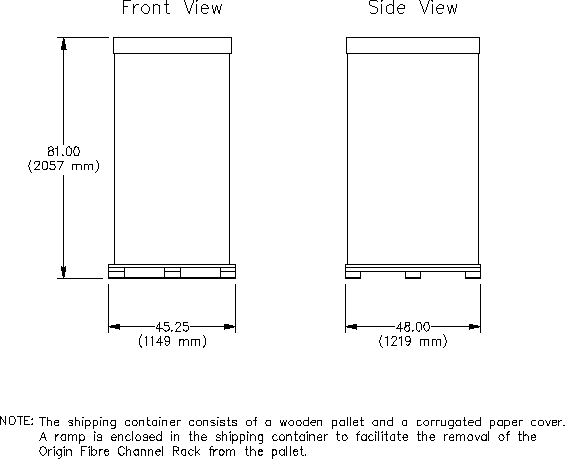
Figure 4 illustrates the shipping configuration of the Origin 2000 rack, Onyx2 InfiniteReality2 rack, and MetaRouter. Figure 5 illustrates the SCSI RAID rack shipping configurations. Figure 6 illustrates the Origin Fibre Channel rack shipping configuration.
Figure 4. Origin 2000 Rack, Onyx2 InfiniteReality2 Rack, and MetaRouter Shipping Configuration

Figure 5. SCSI RAID Rack Shipping Configuration
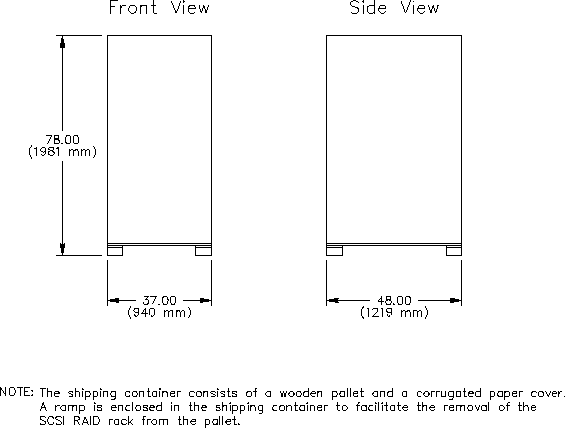
Figure 6. Origin Fibre Channel Rack Shipping Configuration
The design of your environmental control system (such as computer room air-conditioning units) must ensure that the intake air to each Origin 2000 rack, each Onyx2 InfiniteReality2 rack, each SCSI RAID rack, and each Origin Fibre Channel rack meets the requirements that Table 1 specifies. Each rack receives intake air through the front and top of the rack and exhausts heated air through the back of the rack. When you install the system, ensure that heated air from other equipment does not discharge toward the air intakes of any rack. The equipment can overheat if heated air enters the front or top intake of any rack.
When the racks arrive, if they are significantly colder (a difference of 40 ºF [22 ºC] or more) than the environment in which you will install them, leave the racks in their shipping containers (at the final destination) for 24 hours to prevent thermal shock and condensation.
Refer to Table 1 for the environmental requirements for each system.
Characteristic |
Specification |
|---|---|
Temperatures: |
|
Operating < 5,000 ft (1524 m) a |
41 to 95 ºF (5 to 35 ºC) |
Operating > 5,000 ft (1524 m) a |
41 to 86 ºF (5 to 30 ºC) |
Nonoperating |
-4 to 140 ºF (-20 to 60 ºC) |
Maximum thermal gradient |
18 ºF (10 ºC) per hour |
Relative Humidity: |
|
Operating a |
10% to 90% noncondensing |
Nonoperating |
10% to 95% noncondensing |
Maximum humidity gradient |
10% relative humidity per hour |
Altitude: |
|
Operating |
0 to 10,000 ft (0 to 3048 m) |
Nonoperating |
0 to 40,000 ft (0 to 12192 m) |
| a SGI recommends an operating temperature of 72 ºF (22 ºC) and a relative humidity of
50% noncondensing.
|
|
Table 2 lists the electrical specifications for Origin 2000 racks, Onyx2 InfiniteReality2 racks, SGI O2 workstations, monitors, SCSI RAID racks, and the Origin Fibre Channel racks.
NOTE: Table 2 lists the maximum requirements; other configurations might require significantly less power.
Calculated power consumption calculations for specific Origin 2000 systems and Onyx2 InfiniteReality2 systems are available from your local site planning representative. Refer to the "Summary" section on page 48 for contact information.
NOTE: In order to maintain a ground potential of less than 500 millivolts between interconnected Origin 2000 racks, Silicon Graphics requires that all power circuits that supply power to a Origin 2000 rack or Onyx2 InfiniteReality2 rack originate from the same electrical distribution panel. Electrical work and installations must comply with all applicable local, state, and national electrical codes.
SGI makes every effort to minimize the effects of power failures and interruptions to the system hardware. Studies indicate that computer systems that are subjected to repeated power interruptions and fluctuations experience higher component failure rates than systems with stable power sources.
SGI encourages you to install a stable power source, such as an uninterruptible power system (UPS), to minimize component failures.
Each Origin 2000 rack, each SCSI RAID rack, and each piece of support equipment requires its own customer-supplied receptacle. Each Onyx2 InfiniteReality2 rack, Origin Fibre Channel rack, and O2 workstation requires two power receptacles. If you have difficulty obtaining the correct receptacles as listed in Table 2, please contact your account manager.
NOTE: Power circuits for Origin 2000 racks, Onyx2 InfiniteReality2 racks, SCSI RAID racks, and Origin Fibre Channel racks must be dedicated circuits that feed only the receptacles for the racks.
In addition to the equipment that Table 2 lists, your system configuration might also include optional equipment such as modems, printers, and additional displays. Please plan your facility electrical and air-conditioning requirements accordingly.
Each Origin 2000 system may use the Remote Access Tool (RAT), which resides on the O2 workstation if the customer chooses to install this tool.
The RAT software application enables site engineers and users who purchase IRISconsole products to remotely monitor, configure, and control the computer system. RAT interfaces the Multi-Module System Controller (MMSC) in each rackmount cabinet, which interfaces the Module System Controller (MSC) in each module through a series of connecting cables and a private 10BaseT network. Additionally, RAT may be connected using a serial connection. For more information about the connectivity and functionality of RAT, contact your system support engineer (SSE).
SGI support personnel use a modem as a data communication link for the remote support of SGI computer systems. If site security regulations permit the use of a modem, contact the local telephone company well in advance of system delivery to arrange for installation of the appropriate telephone line. In the United States of America and Canada, you should install a public-switched dedicated data telephone line, such as a telephone, an X.25 pad, or an ISDN terminal adapter. SGI recommends that you install another telephone near the system for general use. For system installations outside the USA and Canada, please contact your account manager for the modem type and telephone line requirements.
For detailed information about RAT, refer to the document titled Remote Access Tool (RAT) Reference Guide, SGI publication number 108-0168-002.
If you plan any optional network interfaces to your Origin 2000 system, such as Ethernet, you must ensure that you provide the proper cables and transceivers to match your network protocol.
Origin 2000 systems and Onyx2 InfiniteReality2 systems do not require a raised-floor system. However, SGI recommends a raised-floor system because it provides convenient routes for underfloor air circulation and for power and communication cabling. SGI recommends a minimum raised-floor height of 12.00 in. (305 mm). When you design your raised-floor system, place perforated floor panels or floor grilles near the base of the front of the cabinets, not directly under them. Also, be sure to provide sufficient space between rows of racks to allow proper cooling in bottom-cooled, raised-floor environments.
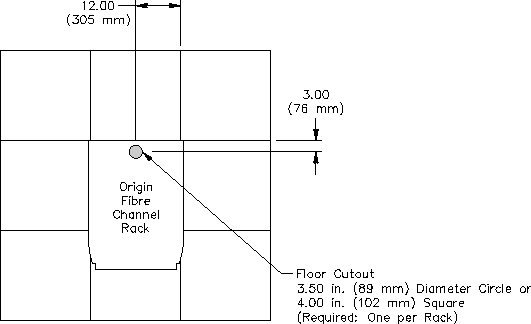
Each rack that you install on a raised floor requires a floor cutout. Figure 7 illustrates the floor cutout for a single Origin 2000 rack and a single Onyx2 InfiniteReality2 rack. Figure 8 illustrates the floor cutout for the MetaRouter. Figure 9 illustrates the floor cutout for the SCSI RAID rack. Figure 10 illustrates the floor cutout for the Origin Fibre Channel rack.
NOTE: SGI provides full-scale templates upon request for the location of system floor cutouts.
The computer room floor must support the weight of all the racks in your system configuration. Each component, with the exception of the SCSI RAID rack, rests on four leveling pads that concentrate the weight of the rack on a small surface area.
Additional floor support pedestals increase the floor-loading strength of the raised floor. If your computer site lies in an earthquake zone, you can secure the computer system components to the computer room subfloor for added stability. Refer to the section titled "Securing the Cabinets" for more information. You may remove the four leveling pads from the Origin 2000 rack, Onyx2 InfiniteReality2 rack, and MetaRouter and use the threaded holes as fastening points to stabilize the components. Contact your Site Planning representative for specific details.
If you have any questions about the structural capabilities of any floor, please contact a qualified structural engineer. If you do not install your system on a raised floor, SGI recommends that you install flat cable guides to protect cables from damage and computer room personnel from injury. Contact your Site Planning representative for ordering information.
Figure 7. Origin 2000 Rack and Onyx2 InfiniteReality2 Rack Floor Cutout
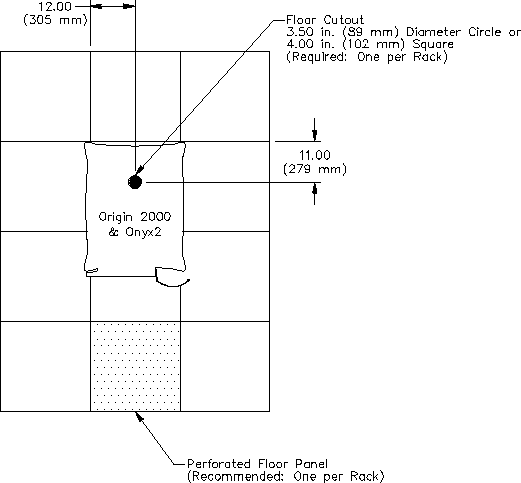
Figure 8. MetaRouter Floor Cutout
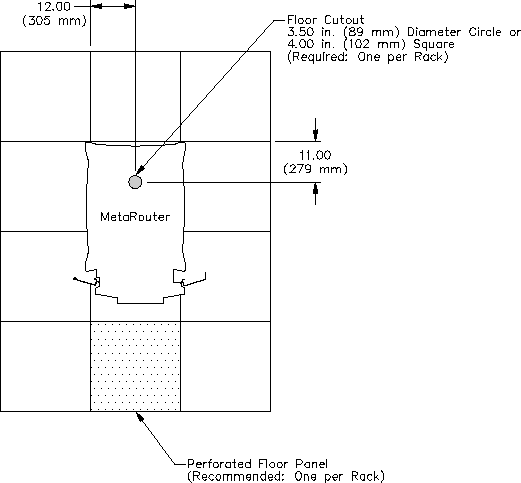
Figure 9. SCSI RAID Rack Floor Cutout
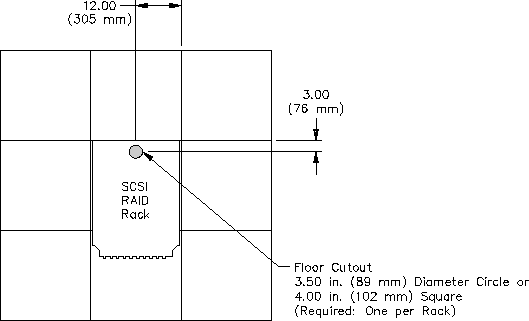
Figure 10. Origin Fibre Channel Rack Floor Cutout
|
This document or parts thereof may not be reproduced in any
form unless permitted by contract or by written permission. Silicon Graphics, Inc. Unpublished Proprietary Information - All Rights Reserved. |