| SGI Fibre Channel PCI Option Board and XIO Option Board Owner's Guide | ||
|---|---|---|
| About This Guide | Contents | Chapter 2 Fibre Channel Basics |
The SGI Fibre Channel option boards (host bus adapter boards) provide interconnect capability between SGI servers or workstations and various SGI Fibre Channel storage and interconnect options. Fibre Channel enclosures can be RAID or JBOD ("just a bunch of disks").
This chapter describes the Fibre Channel XIO and PCI option boards that interface between the host system and Fibre Channel peripherals as follows:
The half-size 33-MHz SGI PCI Fibre Channel option boards (PCI-FC-1PCOP-A, PCI-FC-1POPT-A, and PCI-FC-1POPT-B) support Fibre Channel sustained data transfer rates as fast as 100 MB/sec with half-duplex operation. The PCI Fibre Channel option boards provide a high-performance interface between SGI host systems and the following:
Fibre Channel storage (direct connection): one Fibre Channel arbitrated loop (FC-AL or FCAL) interface can control up to 110 Fibre Channel disks, such as SGI Fibre Channel storage option.s
SGI 8-port or 16-port switch.
SGI Fibre Channel Hub.
This section consists of the following:
The PCI-FC-1PCOP-A and PCI-FC-1POPT-A Fibre Channel option boards require IRIX version 6.5; version 6.5.4 or later is preferred. (Note that the SGI SAN product requires 6.5.5 with a specific patch or later.)
The PCI-FC-1POPT-B Fibre Channel option board requires IRIX version 6.5.13 or later, or 6.5.12 with a specific patch.
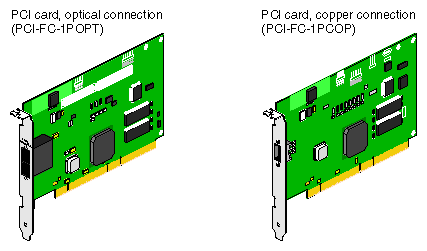
The PCI board is available in three versions, one with a copper Fibre Channel connector and two with an optical Fibre Channel connector. The PCI-FC-1POPT-B board is designed to be installed in SGI Origin 3000 or SGI Origin 300 systems, while the PCI-FC-1PCOP-A and PCI-FC-1POPT-A boards are designed to be installed in Silicon Graphics Octane, Silicon Graphics Octane2, Silicon Graphics O2, Origin 200, or Origin 200 GIGAchannel systems.
Table 1-1 summarizes the SGI FC PCI boards.
| Connection | Marketing Code | Part Number |
|---|---|---|
| Copper | PCI-FC-1PCOP-A | 9210190 |
| Optical | PCI-FC-1POPT-A | 9210191 |
| Optical | PCI-FC-1POPT-B | 097-0102-001 |
Figure 1-1 shows each Fibre Channel PCI board.
Figure 1-1 Fibre Channel PCI Boards
For the optical versions of the Fibre Channel PCI boards, there is a standard SC connector on PCI-FC-1POPT-A boards, and a standard LC connector on PCI-FC-1POPT-B boards.
Figure 1-2 shows pin assignments for the high-speed style-2 balanced cable connector (copper cabling interface) on the copper version of the single-channel PCI board.
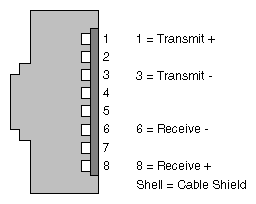
Figure 1-2 PCI Board Style-2 Cable Connector Pin Assignments
For information on installing PCI boards in a specific host system, see one of these manuals:
SGI Origin 3000 Series Owner's Guide
SGI Origin 300 User's Guide
Origin 200 and Origin 200 GIGAchannel Maintenance Guide.
Octane Workstation Owner's Guide
Octane2 Owner's Guide
O2 Workstation Hardware Reference Guide
SGI provides two types of Fibre Channel XIO option board:
Single-channel XIO boards for Origin 2000, Silicon Graphics Onyx2, and Origin 200 GIGAchannel systems (XT-FC-1PCOP-A and XT-FC-1POPT-A).
Dual-channel XIO boards for Origin 2000, Silicon Graphics Onyx2, and Origin 200 GIGAchannel (XT-FC-2P) and for Silicon Graphics Octane systems (X9-FC-2P)
These option boards and their installation are discussed in separate subsections:
This section describes the single-channel XIO option boards (XT-FC-1PCOP-A and XT-FC-1POPT-A) for Origin 2000, Onyx2, and Origin 200 GIGAchannel systems in the following subsections:
The single-channel XIO option boards (XT-FC-1PCOP-A and XT-FC-1POPT-A) require IRIX version 6.5; version 6.5.4 or later is preferred. (Note that the SGI SAN product requires 6.5.5, with a specific patch, or later.)
The half-size SGI single-channel Fibre Channel option boards (host bus adapter boards) provide a high-performance interface between an SGI host system and the following:
Fibre Channel storage (direct connection): one FC-AL interface can control as many as 110 Fibre Channel disks, such as those available from SGI.
SGI 8-port or 16-port Fibre Channel switch.
SGI Fibre Channel Hub or other hub.
These 33-MHz boards support Fibre Channel sustained data transfer rates as fast as 100 MB/sec with half-duplex operation.
Table 1-2 summarizes the SGI single-channel XIO boards.
| Connection | Marketing Code | Part Number |
|---|---|---|
| Copper | XT-FC-1PCOP-A | 013-2810-001 |
| Optical | XT-FC-1POPT-A | 013-2815-001 |
Figure 1-3 shows each single-channel XIO board.
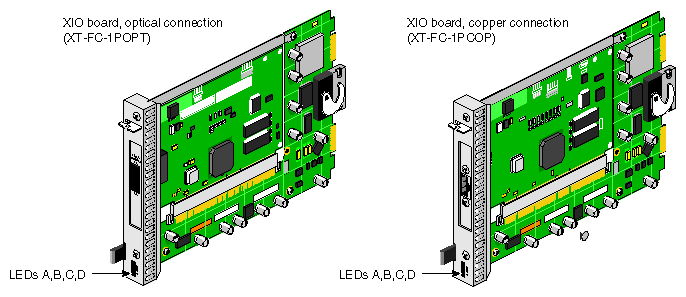
Figure 1-3 Single-channel XIO Boards
The connector on the optical version of the single-channel XIO board is a standard SC connector.
Figure 1-4 shows pin assignments for the high-speed style-2 balanced cable connector (copper cabling interface) on the copper version of the single-channel XIO board.
Figure 1-4 Single-channel XIO Board Style-2 Cable Connector Pin Assignments
Figure 1-3 points out the four LEDs on the outer part of the single-channel XIO option. When illuminated, the LEDs are green. Table 1-3 summarizes LED operation.
| LED | Purpose | Illuminated | Dark |
|---|---|---|---|
| A | 33-MHz PCI clock | PCI clock functioning at 33-MHz | PCI clock not functioning at 33-MHz |
| B | 100-MHz PCI clock | PCI clock functioning at 100-MHz | PCI clock not functioning at 100-MHz |
| C | Buffer status | Buffer full | Buffer not full |
| D | Maximum retry timeout status | Maximum retry timeout in process | Maximum retry timeout not in process |
This section describes the dual-channel XIO option boards for Origin 2000, Silicon Graphics Onyx2, Silicon Graphics Octane, and Origin 200 GIGAchannel systems in the following subsections:
Both dual-channel XIO option boards (XT-FC-2P and X9-FC-2P) require IRIX 6.5 or later, or IRIX 6.4.1 with the June 1999 patch set.
The half-size dual-channel XIO boards (XT-FC-2P and X9-FC-2P) provide the high-performance interface between an SGI workstation or server with an XIO slot and FC-AL interfaces, which connect to Fibre Channel disk enclosures or the SGI Fibre Channel Hub or another hub. (See Chapter 2, "Fibre Channel Basics", for an explanation of Fibre Channel topology and architecture.)
The dual-channel XIO boards support Fibre Channel Class 3 operations as a loop port (L_Port). The firmware supports Class 3 and FC-AL (arbitrated loop) transfers only. For details on ports and FC-AL, see Chapter 2, "Fibre Channel Basics".
The SGI dual-channel XIO board is available in two versions, as summarized in Table 1-4.
| Platform | Marketing Code | Part Number |
|---|---|---|
| Origin 2000, Origin 200, and Silicon Graphics Onyx2 | XT-FC-2P | 030-0927-00x |
| Silicon Graphics Octane | X9-FC-2P | 013-2119-00x |
The two versions have identical functionality and differ only in mechanical aspects appropriate to the platforms for which they are intended:
The version for Origin 2000, Origin 200, and Silicon Graphics Onyx2 servers and graphics workstations has the hook actuator for the compression connector on the system midplane.
The version for Silicon Graphics Octane workstations lacks the hook actuator, which is not needed for this platform and would prevent installation of the board.
Figure 1-5 shows the dual-channel XIO board and connectors (version for Origin 2000, Origin 200, and Silicon Graphics Onyx2 servers and graphics workstations). Figure 1-5 does not show the board version for Silicon Graphics Octane workstations, which lacks the hook actuator.
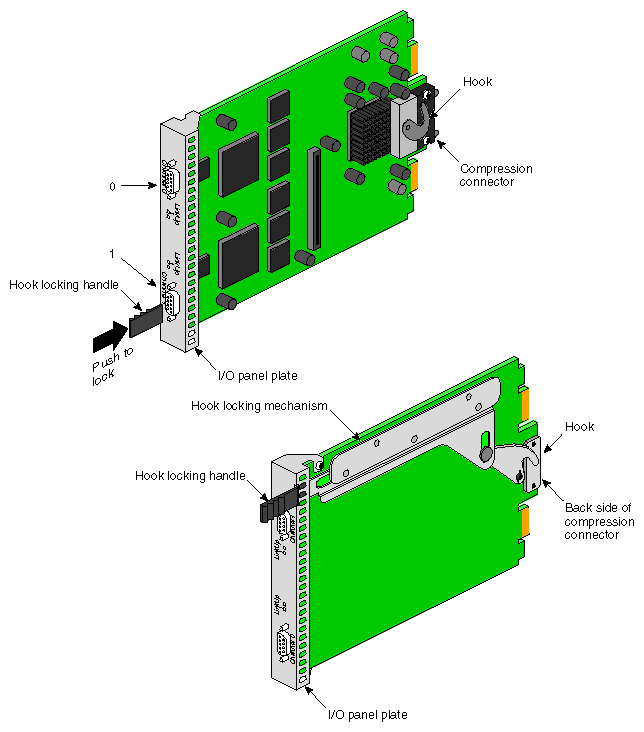
Figure 1-5 Dual-channel XIO Board and Features (Origin 2000, Origin 200, and Silicon Graphics Onyx2 Version)
Each dual-channel XIO board has two nine-pin (DB-9) female connectors, labeled Channel 0 and Channel 1. Each channel can control as many as 110 Fibre Channel disks. Figure 1-6 shows pin assignments.
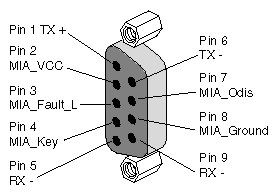
Figure 1-6 Dual-channel Board Connector Pin Assignments
Both a copper and an optical interface are supported. The native interface is copper, as is standard for FC-AL. To use an optical cable, you must attach a media interface adapter, which is described in "Optional Media Interface Adapter (MIA)".
Each connector on the board has a pair of LEDs. The LEDs have these functions:
The green LED (LinkUp) lights and remains on when the board is successfully initialized.
The orange LED lights and remains on when the loop is successfully initialized.
SGI provides an optional fiber optic media interface adapter (MIA) to enable a connection between the dual-channel XIO option board's DB-9 connectors and fiber optic cabling. For these connections, SGI supports optical cabling distances of 25, 100, or 300 meters. The MIA is used with 62.5 �m optical cable.
The marketing code for the MIA (X-F-OE-KIT) includes two modules (part number 9980952), one for each end of an optical cable.
The MIA uses a shortwave laser (CD-ROM laser) with a wavelength of 780 nm. A full-duplex module, it converts photons to electrons in one direction, and converts electrons to photons in the other direction.
An industry-standard duplex SC connection supplies the external fiber optic connection. This connection consists of two parts: the female part is in the MIA and the male part is on the fiber optic cable connector, as indicated in Figure 1-7. This connection is keyed.
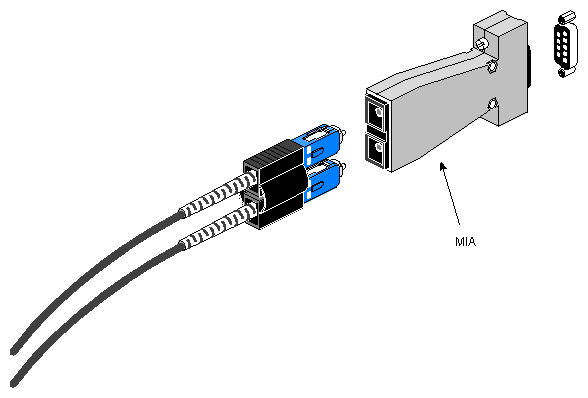
Figure 1-7 Media Interface Adapter (MIA) for Optical Cables
Transceivers (SerDes) embedded on each board convert 8-bit parallel user data to 10-bit differential serial signals (8B10) and vice versa. They also provide frame synchronization, word alignment, and clock recovery for incoming serial data.
For incoming serial data, two recovered clocks at 53.125-MHz for odd or even bytes are provided as outputs on two pins, 180 degrees out of phase. Any required equalization to compensate for high-frequency losses for copper cables (by attenuating the lower frequencies to match) is supplied externally to the Fibre Channel option board. Serial data in both directions between the transformer and the external connector is AC-coupled via a capacitor.
If the dual-channel XIO option board loses power or the physical Fibre Channel connection is broken, the link to which the board is attached to becomes inoperable. High-availability loop configurations require the use of a Fibre Channel hub.
The board installation process depends on the type of Silicon Graphics workstation or server you have.
For Origin 2000 and Silicon Graphics Onyx2 workstations and servers, contact your factory-authorized field service personnel.
For all other applicable SGI workstations and servers, such as the Silicon Graphics Octane and Origin 200 GIGAchannel, refer to the owner's guide, user's guide, maintenance guide, or installation guide. If you do not have these guides, see "Other Documentation" in "About This Guide."
For the dual-channel XIO board for Silicon Graphics Octane systems (X9-FC-2P), see OCTANE(TM) XIO Standalone Option Board Installation Guide, which is included with this option.
| SGI Fibre Channel PCI Option Board and XIO Option Board Owner's Guide | ||
|---|---|---|
| About This Guide | Contents | Chapter 2 Fibre Channel Basics |