This chapter contains an overview of VCP-Recorder, which is a software product used by application developers and systems integrators to enable a Silicon Graphics Origin server or O2 workstation to be used as a video server. VCP-Recorder provides real-time, frame-accurate recording and playback of broadcast-quality digital media data.
 | Note: The term Origin in this document refers to Origin200, Origin2000, and Onyx2 servers. Where there is a distinction, the pertinent product name is used. |
The following topics are discussed in this chapter:
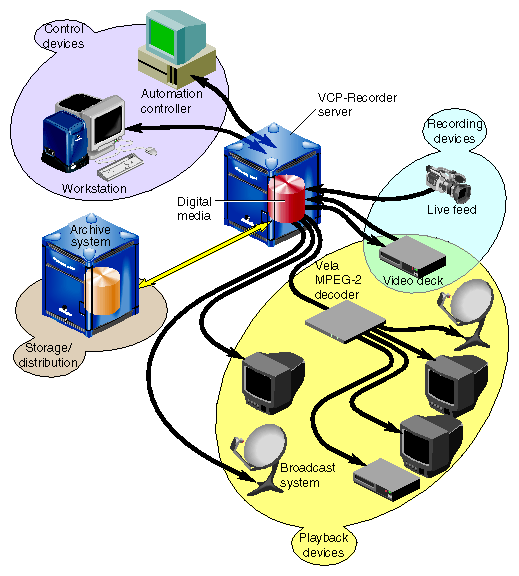
Digital media data is brought into VCP-Recorder by recording it from a live feed or a videotape deck, retrieving it from an archive system, or copying it from a file. The data can then be played out to a broadcast system, a video port, or a videotape deck; sent to an MPEG-2 decoder for playout; or transferred to an archive system for storage and distribution.
VCP-Recorder can be automatically controlled by an application program or through the use of a broadcast system automation controller. VCP-Recorder can also be manually controlled by using the VCP-Recorder graphical user interface or a telnet connection using the Multiple-Unit Video Computer Protocol (MVCP).
This functionality is shown in Figure 1-1.
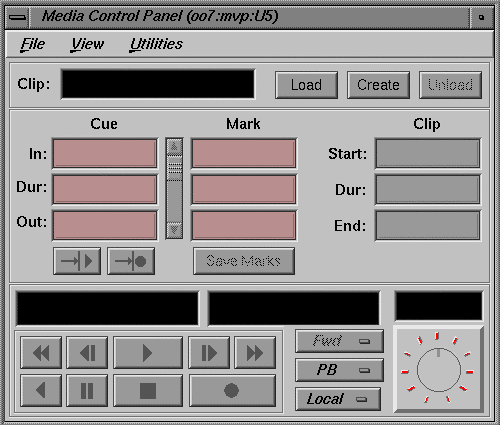
The graphical user interface (GUI), which is used to control VCP-Recorder, was designed as both a demonstration of the VCP-Recorder capability and a beginning point from which broader graphical applications can be developed. The GUI consists of screens that are used to record and play digital data, determine status information, and manage digital media data stored in VCP-Recorder.
The GUI screen that is used to record and play digital media data is the VCP-Recorder Media Control Panel, which is shown in Figure 1-2. The control panel is similar in function to a standard videotape player/recorder. For example, there are buttons in the control panel to cue the video, play it, stop the playback, and so on.
The graphical user interface is described in Chapter 2, “Using the VCP-Recorder GUI.” The MVCP protocol, which was used to implement the VCP-Recorder GUI, is described in Chapter 4, “MVCP Reference.”
The VCP-Recorder software provides scalability and maximum flexibility, while enabling real-time, frame-accurate control of digital media. The software includes the following:
Core software, which provides the basic VCP-Recorder functionality for playback and recording of digital data.
Control interface modules, which provide device-dependent code. For example, there is a control interface module that contains the code that is specific to a Louth automation controller.
Media device interface modules, which contain format-dependent code that provides access to the ports over which media is played and recorded. For example, there is a media device interface module that contains the code that supports the Vela Research SCSI-attached MPEG-2 decoder.
Format interface modules, which provide handlers for accessing specific digital media storage formats. For example, there are format interface modules for the VCP-Recorder variable-frame format and the MPEG-2 stream-based format.
Figure 1-3 shows the primary software components in VCP-Recorder.

The remainder of this section discusses the software components shown in Figure 1-3.
Digital media data that VCP-Recorder processes for playout and recording is stored in one or more clip caches. Each unit of data that is stored in a clip cache (for example, a movie) is called a clip.
Clips can be transferred into VCP-Recorder from an attached archive system, such as MediaHub, or they can be recorded by VCP-Recorder. Clips that are recorded by VCP-Recorder can then be transferred from the clip cache into an attached archive system for storage.
The core software provides the basic VCP-Recorder functionality for playback and recording of digital data. It utilizes the IRIX operating system as well as portions of the Silicon Graphics Digital Media Libraries.
The core software provides the following basic functionality:
archive management, which oversees the transferring of assets into and out of an attached archive system
clip cache management, which maintains persistent information about the media that is either stored in the clip cache or is in the process of being transferred into or out of it
controller management, which links one or more external control protocol modules (for example, Louth) to the internal VCP-Recorder processing logic
configuration management, which automatically configures the VCP-Recorder software according to the hardware capabilities of the system on which it runs
VCP-Recorder provides a core library that supports external interface modules, which are dynamic shared objects (DSOs) that contain the code that is specific to a given external entity. For example, the MediaHub archive interface module has the code that is specific to the MediaHub archive system. When VCP-Recorder is started, the VCP-Recorder software loads and initializes all external interface modules that it locates so that the modules can be used.
Archive interface modules contain the code that is specific to a given external archive system. These modules provide the support that is needed to locate a given clip in the archive system and bring it into VCP-Recorder, and to store a clip from VCP-Recorder in the archive system.
VCP-Recorder has an archive interface module for MediaHub, which enables VCP-Recorder to use the MediaHub Asset Transfer Service (ATS) to retrieve clips from, and store them in, a MediaHub site. VCP-Recorder transfers the media to and from MediaHub using the ATS protocol and TCP sockets in a manner that is similar to the File Transfer Protocol (FTP).
Control interface modules allow various automation controllers and digital media applications to control the use of VCP-Recorder. These modules translate to and from external control protocols.
The following control interface modules are provided:
The Louth Video Disk Communications Protocol, which is defined by Louth Automation. This control protocol provides control of VCP-Recorder over RS-232, RS-422, or TCP/IP. The VCP-Recorder's Louth interface module supports back-to-back play and record (subject to restrictions imposed by the video I/O port capabilities) and archive management.
Multiple-Unit Video Computer Protocol (MVCP), which is defined by Silicon Graphics. This control protocol provides full-featured control of VCP-Recorder through TCP/IP. This control interface module supports archive management, multiple-unit control, and event monitoring, and provides access to advanced features of Silicon Graphics devices.
Storage device interface modules provide access to the storage systems on which the clip cache resides. Currently, there is a storage device interface module for the IRIX XFS filesystem.
Format interface modules provide handlers for accessing specific digital media storage formats. VCP-Recorder currently provides format interface modules that support the following:
Media device interface modules provide access to the ports over which the media is played and recorded (that is, the media ports). Each type of I/O port typically has its own media device interface module.
VCP-Recorder has media device interface modules for the following:
Silicon Graphics Video Library. This media device interface module supports the Digital Video Option (DIVO) on Origin servers and the video port on O2 workstations.
DIVO enables broadcast-quality video and embedded audio, and is used for the recording and playback of uncompressed and Rice compression formats.
The O2 video port is used for playback and recording of the motion JPEG format, and is suitable for a test or development environment.
Note: The O2 video port is usually referred to as mvp (multiport video processor) or O2Video.
Vela Research 4-port analog decoders. This media device interface module enables the playback of MPEG-2 format data on Origin servers and O2 workstations.
VLAN transmitters. This media device interface module enables frame-accurate capture from, and lay-down to, videotape decks.
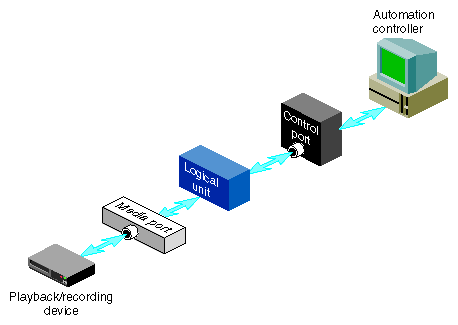
Logical units enable media ports to play and record clips. Each VCP-Recorder unit can be thought of as a logical videotape recorder (VTR) transport that is capable of loading, cueing, playing, and recording clips using a specific media port.
Logical units are created automatically by VCP-Recorder when the VCP-Recorder GUI or an automation controller is used. When the MVCP protocol is used, a command requests that a unit be created or that a unit created by another control connection be used.
There is normally a one-to-one relationship between a control connection to VCP-Recorder and a VCP-Recorder logical unit, and between a logical unit and a media port. This is shown in Figure 1-4.
A single unit can also be controlled by multiple control ports. For example, two tightly integrated applications might control a single unit, where each application would have its own control port. This is shown in Figure 1-5.
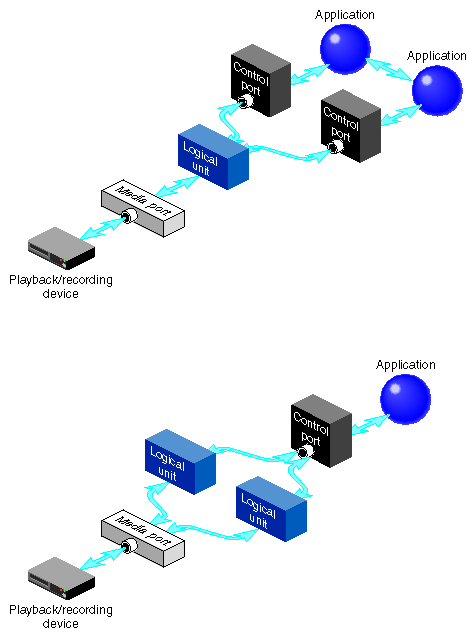
In addition, a media port can be controlled by multiple logical units. For example, an application with one control connection and two units could be cueing one clip while playing out another, enabling back-to-back playout of clips. This example is shown in Figure 1-6.
If a media port supports multiple logical units, the sharing is subject to the device-sharing characteristics of that port.

A VCP-Recorder hardware configuration consists of a server; disk storage for the clip cache; and various Silicon Graphics and select third-party external devices for recording and playing out clips and controlling VCP-Recorder. A typical hardware configuration is shown in Figure 1-7.

The VCP-Recorder server can be an Origin200 or Origin2000 Scalable Symmetric Multi-Processing (S2MP) server, or an O2 workstation.
The Origin servers provide massive processing, storage, and throughput capabilities to satisfy even the largest production requirements. They are built from a scalable node architecture, enabling small configurations that can be incrementally upgraded to the largest possible configurations. Each Origin server can be configured as a single module or as multiple modules with a single system image.
The Origin servers provide:
The O2 workstation provides a configuration that is an excellent evaluation, development, or test system, but is not recommended for use in a production environment.
The O2 workstation provides
The VCP-Recorder disk storage holds the XFS real-time filesystems that contain the movies, trailers, commercials, and other digital media data stored in the clip cache. The descriptive information about VCP-Recorder clips, for example, clip names, duration, edit points, and so on, are also stored on these filesystems.
The VCP-Recorder storage system supports the use of scalable storage to enable the total disk space to range from only a few gigabytes to hundreds of terabytes or more. The type of disk storage that is used depends upon several factors, including the number and size of stored clips, the use of RAID, and the required availability (uptime) of the system.
Three different types of disk storage are available:
Normal XFS filesystems residing on a single disk drive. This type of disk storage does not provide redundancy.
Standard disk storage, sometimes called RAID-0, in which several disk drives are striped into XLV logical volumes. This type of disk storage does not provide redundancy.
RAID storage, such as RAID-3 and RAID-5, which provides high-availability, redundant digital storage.
VCP-Recorder supports the use of the following external devices:
Vela Research 4-port MPEG-2 decoders, which are used for the playback of MPEG-2 format data. Vela decoders are connected to the VCP-Recorder server through a SCSI connection.
VLAN transmitters, which are used to control a videotape deck for frame-accurate capture and lay-down. A VLAN transmitter is connected to a VCP-Recorder server through an RS-422 serial port connection.
Broadcast system automation controllers that use the Louth Video Disk Communications Protocol, which is defined by Louth Automation. Automation controllers are connected to the VCP-Recorder server through an RS-422 serial connection or a TCP/IP ethernet connection.