This appendix contains information about MediaHub assets that can be brought into VCP-Recorder or that were created by storing a VCP-Recorder clip in the archive system. The following topics are discussed:
This chapter includes examples of MVCP commands, which are described in detail in Chapter 4, “MVCP Reference.” The examples assume that a telnet connection has been made to the VCP-Recorder server. (For an example of a telnet session, see “Establishing an Interactive MVCP Connection”.)
This appendix assumes that you are already familiar with the following:
the VCP-Recorder graphical user interface (GUI), as described in Chapter 2, “Using the VCP-Recorder GUI”
MediaHub assets, as described in the MediaHub User's Guide
In order for VCP-Recorder to be able to bring an asset into VCP-Recorder, the asset must be a MediaHub group asset that is known as a “clip group.” A clip group is an asset that has a ClipId attribute whose value is the name of the clip. The members of the clip group consist of the assets that contain different digital formats of the clip.
 | Note: When VCP-Recorder requests an asset from MediaHub, it requests the asset by sending MediaHub the value of the ClipId attribute. |
The DasAsset::Format attribute of the clip group can be /group/multiformat or /group/format.
Multiformat clip groups (that is, clip groups whose format is /group/multiformat) contain one or more formats of a clip. Each member of a multiformat clip group can be one of the following:
An atom, if the digital format does not require an index.
A group whose DasAsset::Format is /group/format, if the digital format requires an index. Members of each of these group assets are the atom asset that contains the clip's content and the atom asset that contains the index.
If the DasAsset::Format attribute of the clip group is /group/format, the clip group contains a single format of the clip. The clip group always has a member atom that contains the content. If the digital format requires an index, the clip group also has a member atom that contains the index.
Figure A-1 shows the structure of a multiformat clip group that contains the MPEG-2 and uncompressed Rice formats of a movie; each of these formats requires an index. The values of the MediaHub DasAssetId and DasAsset::Format attributes are shown, along with the value of the ClipId attribute. Notice that only the clip group asset has a ClipId attribute.
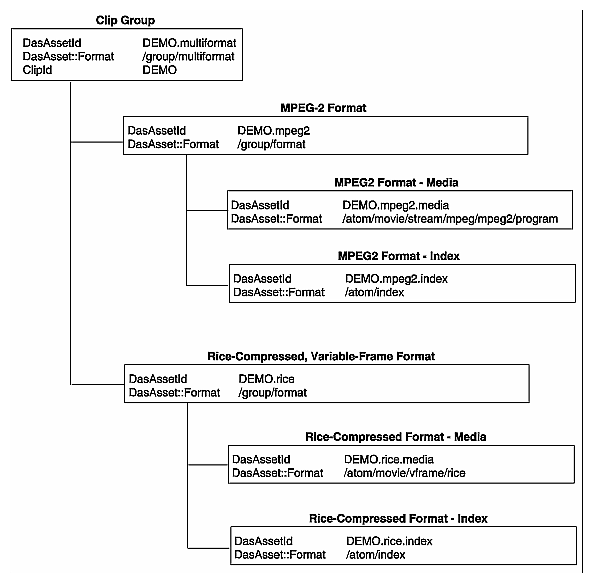
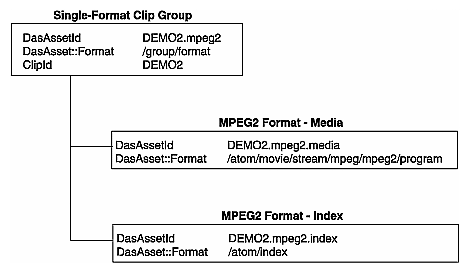
Figure A-2 shows the structure of a single-format clip group that contains the MPEG-2 format of a movie. The values of the MediaHub DasAssetId and DasAsset::Format attributes are shown, along with the value of the ClipId attribute. Notice that only the clip group asset has a ClipId attribute.
If a MediaHub clip group adheres to the structure described in “About MediaHub Clip Groups”, you can use the VCP-Recorder GUI or the MVCP AGET (Archive Get) command to request that the clip be brought into VCP-Recorder. When you make such a request, the following steps are performed:
Through the GUI or the MVCP command, you specify the value of the ClipId attribute for the MediaHub clip group. This clip group must contain a format that is compatible with the VCP-Recorder (for example, variable-frame, Rice-compressed for a VCP-Recorder that runs on an Origin2000 with DIVO).
VCP-Recorder sends a command to the archive system to determine whether an asset with a ClipId attribute containing the specified clip name exists. (VCP-Recorder communicates with MediaHub by sending it Asset Transfer Service commands.)
If the clip group does not exist, VCP-Recorder writes an error message to its log.
If the clip group exists, VCP-Recorder requests information about the formats of the members in the clip group.
If a compatible format does not exist, VCP-Recorder writes an error message to its log.
If a compatible format exists, VCP-Recorder copies the content and index (if it exists) from the archive system into its clip cache.
For example, assume that the clip group shown in Figure A-2 exists in an attached MediaHub archive system and that it contains a suitable format. The following example illustrates how the AGET command is used to bring that clip into VCP-Recorder:
AGET DEMO2 200 OK |
You can use VCP-Recorder to determine if a clip exists in an attached archive system using either the VCP-Recorder GUI or the MVCP AFND (Archive Find) command. The clip group must adhere to the structure described in this appendix and it should contain a suitable media format (for example, variable-frame Rice-compressed for a VCP-Recorder that runs on an Origin2000 with DIVO).
The following example uses the AFND command to determine that the clip named DEMO2 exists in the MediaHub host named mhub_host:
AFND DEMO2 mhub_host 201 OK mediahub mhub_host |
You can use the VCP-Recorder GUI or the MVCP APUT (Archive Put) command to request that a VCP-Recorder clip be stored in an attached archive system. When you make such a request, the following steps are performed:
Through the GUI or the MVCP command, you specify the name of the clip that you want to store in the archive system.
VCP-Recorder sends a command to the archive system to determine whether an asset with a ClipId attribute containing the specified clip name exists. (VCP-Recorder communicates with MediaHub by sending it Asset Transfer Service commands.)
If the clip group does not exist, VCP-Recorder creates a new multiformat clip group containing the new format[5] . It then copies the digital media content and the index file (if it exists) to the archive system.
If the clip group exists but it does not contain the targeted media format, VCP-Recorder creates a new single-format group that is added as a member of the MediaHub clip group. It then copies the digital media content and the index file (if it exists) to the archive system.
If the clip group exists and it contains the targeted media format, VCP-Recorder requests that the files that contain the content and index for that format be truncated. It then copies the digital media content and the index file (if it exists) to the archive system, replacing the originals.
If any MediaHub group assets were created, VCP-Recorder requests that the appropriate member assets be added to those group assets.
For example, the following uses the APUT command to store the clip named DEMO3 into the specified archive system:
APUT DEMO3 mhub_host 200 OK |