This chapter provides information about the components that are added to the base IRIS FailSafe product by the IRIS FailSafe Oracle option. It assumes that you are familiar with the basic components of IRIS FailSafe described in Chapter 1 of the IRIS FailSafe Administrator's Guide . This chapter also lists the steps you must take to add Oracle databases to the highly available services that are failed over on an IRIS FailSafe cluster.
The major sections in this chapter are as follows:
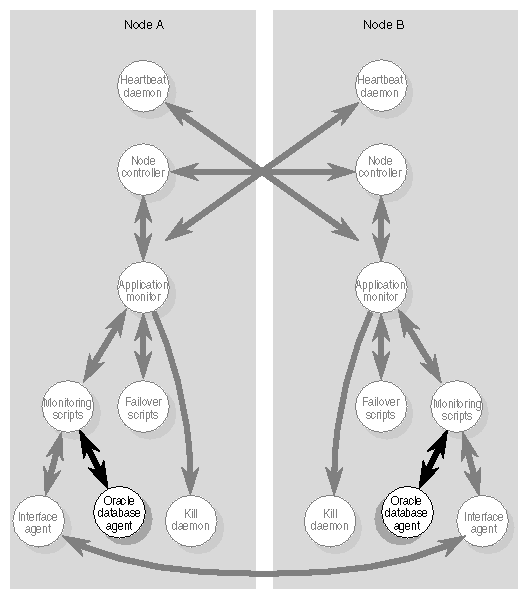
The IRIS FailSafe Oracle option adds a database agent, shown in Figure 1-1, to the IRIS FailSafe base software. The database agent, /usr/etc/ha_orcl, monitors Oracle databases. If ha_orcl detects a failure, it takes one of two actions, based on the value of the db-avail configuration parameter:
If db-avail is low, ha_orcl reports the failure with a message in /var/adm/SYSLOG.
If db-avail is high, ha_orcl exits. The application monitor detects that ha_orcl isn't running and reports a local monitoring failure to the node controller. Based on the states of the nodes in the cluster, the node controller determines the actions to be taken, which may include failing over the services on the node to the other node.
The standard Oracle startup and shutdown scripts, $ORACLE_HOME/bin/dbstart and $ORACLE_HOME/bin/dbshut, can't be used with IRIS FailSafe. You must use scripts that you develop by starting with the sample scripts /var/ha/samples/startup_oracle.sample and /var/ha/samples/shutdown_oracle.sample.
A key difference between the standard scripts and IRIS FailSafe scripts is that the standard scripts start up and shut down all Oracle databases. IRIS FailSafe scripts start up or shut down just one Oracle instance (one Oracle server accessing one Oracle database), the one identified by $ORACLE_SID.
For each type of script (startup and shutdown), you can use any combination of the following strategies:
Write one script that takes the database instance as an argument (which IRIS FailSafe passes as an environment variable). Use it to start up (or shutdown) each database instance.
Use different startup (or shutdown) scripts for different database instances.
Use scripts with the same pathnames on each node, but different contents. For example, the startup script for a CHALLENGE® XL that is a primary node might be different from the startup script on a backup node that is a CHALLENGE S.
To configure an IRIS FailSafe cluster for failover of Oracle databases, follow these steps:
Install, configure, and test the base IRIS FailSafe software as described in the IRIS FailSafe Administrator's Guide .
Install additional software if required. See the section “Required Software” in Chapter 2.
Choose how to configure Oracle software and databases on the disks. See the section “Planning Oracle Configuration” in Chapter 2.
Prepare the Oracle startup and shutdown scripts. See the section “Customizing the Oracle Startup and Shutdown Scripts” in Chapter 2.
Add Oracle information to the configuration file, /var/ha/ha.conf. See the section “Adding Oracle Information to the Configuration File.”
Install the Oracle startup and shutdown scripts and the new configuration files on each node. See the section “Installing Startup and Shutdown Scripts and the Configuration File” in Chapter 2.
Test Oracle failover. See the section “Testing Oracle Failover” in Chapter 2.