This chapter tells how to maintain, monitor, and troubleshoot the IRIS HIPPI subsystem.
IRIS HIPPI can be monitored and maintained with the commands shown in Table 3-1.
Table 3-1. HIPPI Command Summary
Command | Purpose | Page |
|---|---|---|
Displays, adds, or deletes entries from the in-memory HARP table, which maps HIPPI hardware addresses to IP addresses. | ||
Provides a variety of control and status functions for the IRIS HIPPI subsystem. | ||
Verifies IRIS HIPPI subsystem through the character device interface, without going through the IP network interface. | ||
Verifies IP network interfaces. Can be used to verify that a HIPPI network interface is functioning. | ||
Configures parameters of the HIPPI dynamic ARP (HARP) interface such as arpserver and myhipaddr. | ||
All the normal IP configuration options work with IRIS HIPPI IP network interfaces (that is, hip#), arp, and the specification of a destination IP address for setting up a point-to-point connection. | ||
All the normal network status information is available for IP interfaces to IRIS HIPPI. Non-IP interfaces are not displayed; however, if the IRIS HIPPI driver has been built with IP support, a disabled hip0 interface with no IP address is shown. |
This section describes some of procedures commonly used to monitor and maintain the IRIS HIPPI subsystem. All of the HIPPI utilities (hipmap, hipcntl, hiptest, and ifhipconfig) require the user to have superuser (root) privileges.
To shut down or disable the IRIS HIPPI board, use the command below. This command resets the board; all data (incoming or outgoing) that is on the board is lost. This event leaves the board in a non-operational state: incoming connection requests are rejected and applications attempting to transmit or receive over the device receive ENODEV errors.
# hipcntl [hippi#] shutdown |
To start or enable the IRIS HIPPI board (after a shutdown), use the command below. This command verifies that the versions of the firmware on the board and the driver in the operating system match. If they do not match, the driver loads a compatible version of firmware onto the board before starting the firmware.
# hipcntl [hippi#] startup |
To configure the IRIS HIPPI subsystem so that the transmit channel does not generate any connection REQUEST signals and so that the receive channel does not generate any CONNECT (accept) signals, use the command below:
# hipcntl [hippi#] reject |
To configure the IRIS HIPPI subsystem so that both the transmit and receive channels open connections, use the command below. This command results in the transmit channel generating connection REQUESTs when host applications send data, and in the receive channel generating CONNECT signals in response to connection REQUESTs.
# hipcntl [hippi#] accept |
To display status information for an IRIS HIPPI board and its source (SRC) and destination (DST) subsystems, use the command below. Most of the counted items are initialized to zero upon reset of the board and roll over to zero upon reaching 232 (that is, at 4,294,967,295); exceptions are explained in the tables. The displayed information is described in Table 3-2 or Table 3-3, depending on the system's hardware. Troubleshooting advice regarding this information is provided in “Interpreting Status Information”.
# hipcntl [hippi#] status |
Table 3-2. hipcntl Display Fields (Challenge and Onyx)
Status Item | Description |
|---|---|
FLAGS: |
|
DSIC | SRC sees the incoming INTERCONNECT signal from its destination. |
SDIC | DST sees the incoming INTERCONNECT signal from its source. |
ACCEPTING | DST is accepting connections. When this flag is not listed, the DST is rejecting connections. |
DST.PKT | DST sees that the PACKET input signal is asserted |
DST.REQ | DST sees that the REQUEST input signal is asserted |
SRC.REQ | SRC channel's REQUEST output signal is asserted |
SRC.CON | SRC sees that the CONNECT input signal is asserted |
SRC connections: | Count of total connection REQUEST signals issued by source. |
SRC packets: | Count of total packets sent by source. |
SRC rejects: | Count of SRC's connection attempts that were rejected by the remote destination. |
SRC seq errors (dm): | Count of sequence errors detected within the SRC's data state machine. |
SRC seq errors (cd): | Count of illegal sequencing of inbound control signals at SRC's connection state machine. The remote destination is believed to be at fault. |
SRC seq errors (cs): | Count of sequence errors detected within the SRC's connection state machine. |
SRC dsic lost: | Count of connections dropped due to lost DSIC signal. |
SRC time outs: | Count of connection attempts that timed out so that the SRC withdrew the request. |
SRC connects lost: | Count of connections that were dropped by the remote destination. |
SRC parity errs: | Count of SRC's parity errors.This error indicates that a local parity error (for example, on the IRIS HIPPI board) resulted in the transmission of invalid data. |
DST connections: | Count of connections accepted by DST. |
DST packets: | Count of total packets received |
DST rcv on bad ulp: | Count of packets discarded by DST due to unknown ULP-id. |
DST hippi-le drop: | Count of HIPPI-LE packets discarded by DST. |
DST llrc: | Count of connections dropped by DST due to LLRC errors. |
DST parity: | Count of connections dropped by DST due to parity errors in incoming data. Bit-error rates below 10-20 are not counted; for example, if the DST encounters 1 error after receiving 10-21 bits of correct data, it does not drop the connection. |
DST sequence err: | Count of connections dropped by DST due to sequence errors. Sequence errors are invalid combinations of HIPPI-PH signals (for example, an asserted BURST signal when the PACKET signal is not asserted). |
DST sync err: | Count of synchronization errors detected by DST. |
DST illegal burst: | Count of inbound packets of an illegal burst size. |
DST sdic lost: | Count of connections dropped by DST due to lost SDIC signal. |
DST null connections | Count of connections with zero-length packets. |
Table 3-3. hipcntl Display Fields (Origin and Onyx2)
Status Item | Description |
|---|---|
FLAGS: |
|
LOOPBACK | The board is operating in internal loopback mode. Packets are not being passed to the fiber; instead they are going directly from the board's SRC to its DST. When this flag is absent (not set), the board is operating in normal mode; packets are transmitted onto the fiber. |
DST.SIG_DET | HIPPI-Serial DST is detecting a signal on inbound fiber. Normal operation requires the presence of this flag. |
DST.LNK_RDY | HIPPI-Serial DST is in operational state (that is, it has successfully completed reset and is currently in HIPPI-Serial link state 2). This flag is absent (not set) only if the DST state machine transitions to state 0 or 1, caused by losing contact with the HIPPI-Serial (G-link) chip on the board or the fiber connection. Normal operation requires the presence of this flag. |
DST.FSYNC | HIPPI-Serial DST is seeing/interpreting the Flag (alternating 0/1) bit from the coding nibbles of the incoming data frames. Normal operation requires the presence of this flag. |
DST.OH8SYNC | HIPPI-Serial DST is synchronizing with the OH8 framing (alternating 0/1) overhead bit. Normal operation requires the presence of this flag. |
ACCEPTING | DST is accepting connections. When this flag is not listed, the DST is rejecting connections. Normal operation requires the presence of this flag. |
DST.PKT | DST sees that the inbound PACKET signal is asserted. |
DST.REQ | DST sees that the inbound REQUEST signal is asserted. |
SRC.REQ | SRC channel's outbound REQUEST signal is asserted. |
SRC.CON | SRC sees that the inbound CONNECT signal is asserted. |
SRC connections: | Count of connection REQUEST signals issued by source. |
SRC packets: | Count of total packets sent by local SRC. |
SRC rejects: | Count of SRC's connection attempts that were rejected by the remote destination. |
SRC xmit retry: | Count of attempts driver made to retransmit packets that were interrupted, either because the remote destination disconnected, or because there was a parity error while transmitting the packet. |
SRC glink reset: | Count of times that the firmware reset both the HIPPI-Serial (G-link) chips. A reset occurs when the firmware believes one of the HIPPI-Serial (G-link) chips is not responding. However, a reset can be caused by faulty cabling, ODLs, or connectors since the firmware cannot identify the true cause for an unresponsive HIPPI-Serial portion of the board. |
SRC glink lost; | Count of times that the firmware fails to see any one of the following flags for more than half a second: DST.OH8SYNC, DST.FSYNC, DST.LNK.RDY, or DST.SIG.DET. This event can be counted, at maximum, 50 times per second (at 25MHz). |
SRC time outs: | Count of connection attempts by SRC that timed out. |
SRC connects lost: | Count of connections made by SRC that were dropped by the other side. |
SRC parity errs: | Count of SRC parity errors. This error indicates that a local parity error (for example, on the IRIS HIPPI board) resulted in the transmission of invalid data. |
SRC number bytes sent: | Count of bytes transmitted. Maximum count, before starting over at zero, is 264 (that is, more than 18 quintillion). |
DST connections: | Count of connections that were accepted by DST. |
DST packets: | Count of total packets received by DST. |
DST rcv on bad ulp: | Count of HIPPI-FP packets that DST discarded due to unknown ULP-id. Some programs produce a few of these events when they are terminated unexpectedly (for example, doing a Ctrl-C to hiptest), because the receiver goes away before the transmitter. |
DST hippi-le drop: | Count of HIPPI-LE packets discarded by DST due to no accessible space on the receive packet queue. |
DST llrc: | Count of bursts received by DST with LLRC errors. |
DST parity: | Count of bursts received by DST with parity errors. Bit-error rates below 10-20 are not counted; for example, if the DST encounters 1 error after receiving 10-21 bits of correct data, it does not drop the connection. |
DST frame/state err: | Count of (1) framing (alternating OH8 overhead bit) errors that occurred while PACKET signal was asserted, and (2) illegal HIPPI signal states or transitions (for example, a PACKET signal was received without a preceding REQUEST signal). |
DST flag err: | Count of data frame alternating flag bit synchronizations that were lost while PACKET signal was asserted. |
DST illegal burst: | Count of packets with illegal burst sizes. |
DST link rdy lost in pkt: | Count of packets that were aborted due to the DST.FSYNC, DST.OH8SYNC, or DST.LNK.RDY flag becoming unset (not true) when the PACKET signal was asserted. |
DST null connections: | Count of connections over which no data was sent. |
DST ready errors: | Number of bursts received for which no READYs had been sent. |
DST bad packet starts: | Count of inbound HIPPI packets that encountered errors almost immediately (for example, a PACKET-BURST-no_PACKET sequence occurred for a HIPPI-FP connection but less than 12 bytes was transmitted, or a PACKET signal was asserted then deasserted without a BURST ever occurring). |
DST number bytes received | Count of bytes received. Maximum count, before starting over at zero, is 264 (that is, more than 18 quintillion). |
To enable/disable the IP network interface to the IRIS HIPPI board, use the standard /usr/etc/ifconfig command, as shown below.
# ifconfig [hip#] down # ifconfig [hip#] up |
Dynamic configuration of the IP network interfaces is done with the /usr/etc/ifconfig command, which is explained in detail in the command's reference (man) page. The command lines listed below are available for use with IRIS HIPPI:
# ifconfig [hip#] IPaddr # ifconfig [hip#] netmask ######## # ifconfig [hip#] metric # |
 | Note: Some of the standard ifconfig arguments are not supported for IRIS HIPPI (for example, broadcast and arp). |
The ifhipconfig command configures HIPPI logical network interfaces for HARP.
To display the HIPPI parameters for, say, hip0:
# ifhipconfig hip0 |
To configure interface hip0 to a HIPPI hardware address of 7:
# ifhipconfig hip0 myhipaddr 0x07000007 |
To set a hip1 HARP server address:
# ifhipconfig hip1 arpserver 0x07000FE0 |
Refer to the ifhipconfig(1M) reference page for more information.
The /usr/etc/hipmap command makes changes to the address resolution information (that is, the address lookup table) that is currently in memory. Any name or IPaddress used on the hipmap command line must already exist in the /etc/hosts database.
| Note: Any changes made to the lookup table using the command line will be lost when the /etc/init.d/network script is invoked. To make changes that endure, follow the instructions in “/usr/etc/hippi.imap File”. |
To add an entry to the lookup table, use this command line:
# hipmap name I-field_value [ULA_value] |
where name is an entry from the /etc/hosts database (either an IP address or its mnemonic).
To delete one entry from the lookup table, use one of these command lines:
# hipmap -d name # hipmap -d IPaddress |
To delete all the entries from the lookup table, use this command line:
# hipmap -D |
To concatenate new entries and/or replace already existing entries with new values from a file, use this command line:
# hipmap -f filename |
To clear the lookup table, then add a new set of entries from a file, use this command line:
# hipmap -D -f filename |
Use the command line below to display the currently-in-memory address resolution information (that is, the lookup table of IP addresses with their mappings to I-fields and ULAs):
# hipmap -a |
To dynamically change the timeout value used by the IRIS HIPPI source channel, use the command line below. The source timeout is the amount of time that the source channel waits for a CONNECT or READY signal from the destination before it aborts the request.
For the HIO board, the granularity for this timeout is a quarter of a second (that is, 250 milliseconds); a command-line timeout value that are not divisible by 250 is rounded up to the next quarter-second. For the XIO board, the granularity is 1 millisecond. In this command line, the timeout is expressed in milliseconds.
# hipcntl [hippi#] stimeo timeout_in_milliseconds |
| Note: It is possible to set the timeout to a value that is so small that the source closes its connections to one or more destinations before they have enough time to respond. The symptom of this is many SRC time outs and fewer than expected SRC bytes sent, as reported by hipcntl status. |
Use the command line below to display the hardware address:
# hipcntl [hippi#] getmac |
| Note: This functionality does not work for the copper-based HIO mezzanine board because that hardware does not store a hardware address. The ULA for an HIO board is configured in the hippi.imap file and can be displayed with the hipmap -a command. |
To install a loopback link, follow the instructions in “Loopback Link for Challenge or Onyx Systems” or “Loopback for Origin and Onyx2 Systems,” as appropriate.
To install a copper loopback link on an IRIS HIPPI board installed into a CHALLENGE or Onyx system, use any of the procedures illustrated below:
Use any standard HIPPI cable to connect the IRIS HIPPI DST and SRC ports on the IRIS HIPPI board's I/O panel plate to each other, as illustrated in Figure 3-1.
Use a special loopback (female-to-female) cable to connect the other end of the HIPPI destination and source cables to each other, as illustrated in Figure 3-2.


| Note: An alternate method for looping back the SRC and DST is to attach both IRIS HIPPI channels (SRC and DST) to the same port on a switch, and to add a HIPPI address mapping (for this connection) to the switch's address table. The hiptest utility can then transmit packets to itself by using an I-field that contains the host's own HIPPI address as the destination. This works because, unlike many IRIX drivers, the IRIS HIPPI driver does not automatically route self-addressed packets through the loopback interface (lo0). |
To install a loopback link for an IRIS HIPPI-Serial XIO board installed in an Origin or Onyx2 system, use any of these procedures:
Use the hipcntl loopback command (as demonstrated below) to configure the board for internal (board) loopback.
# hipcntl hippi# shutdown
# hipcntl hippi# loopback
# hipcntl hippi# startup
where # is the unit number for the board as displayed by hinv -d hippi.
Note: With this type of loopback, the optical transmitter and receptor (ODLs) on the board are not verified during the verification procedures. The card runs in loopback mode until it is reset (that is, until the hipcntl shutdown/startup sequence is invoked). Attach a dual-SC, multimode loopback connector to the system's I/O panel plate. This special device, illustrated in Figure 3-3, connects the IRIS HIPPI-Serial DST (receive) and SRC (transmit) fibers to each other.
Attach the IRIS HIPPI-Serial port to a switch and add a HIPPI address mapping for the port to the switch's address table. The hiptest utility can then transmit packets to itself by using an I-field that contains the host's own HIPPI address as the destination.
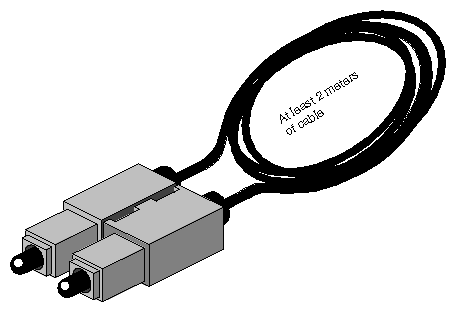
The most reliable method for verifying an IRIS HIPPI subsystem is to install a loopback link between the destination and source on the same system, then run the hiptest verification test described under the heading “Verify the Board and Its HIPPI-FP Interface” in this section. After the HIPPI subsystem has been verified, further upper-layer verification and interconnectivity tests can be run (for example, the test described under the heading “Verify an IP-over-HIPPI Interface” in this section) with the system attached to other HIPPI systems (for example, a switch or endpoint).
| Note: Unlike many IRIX drivers, the IRIS HIPPI driver does not automatically route self-addressed packets through the local loopback interface (lo0), so that even the IP stack can be verified with the loopback link in place. |
To verify that an IRIS HIPPI board has been located by the operating system during the last reboot, use any of the following commands:
% hinv -d hippi HIPPI-Serial adapter: unit #, in module # I/O slot # % hinv -mvv -d hippi ... Location: /hw/module/1/slot/io6/hippi_serial HIPPI-SERIAL Board: barcode ###### part 030-0968-00# rev # Group ff Capability ffffffff Variety ff Laser 0000000a0f8f HIPPI-Serial adapter: unit #, in module # I/O slot # % find /hw/module -name hippi /hw/module/#/slot/io#/hippi_serial/pci/0/hippi |
| Note: Each IRIS HIPPI board may have multiple full-path entries in the hardware graph; the pci/0/hippi entry is the main one. |
To verify the IRIS HIPPI board and its HIPPI-FP interface (without going through the IP stack), use the /usr/etc/hiptest utility. This test works for an IRIS HIPPI port that has a loopback link installed between its source and destination channels (see “Installing a Loopback Link” for instructions), or it can be invoked as sender or receiver alone, in which case 2 instances of the utility must be running to successfully exchange packets between the 2 processes. The utility requires the user to be superuser (root).
For a simple, quick verification test through a physical port that has a loopback link installed, use the commands below:
% cd /usr/etc % su Password: password # hinv -d hippi <use the displayed unit number in the next command line> <for my_ifield, use the port's own I-field from the hippi.imap file> # hiptest -I 0xmy_ifield -D /dev/hippi# hiptest: /dev/hippi#: sending 64 packets, size range [16..16777224] to I-field 0x00000001 ...................... <up to 64 dots> |
For a simple, quick verification test when a physical port is attached to a switch, use the commands below:
<in one UNIX shell> % cd /usr/etc % su Password: password # hinv -d hippi <use the displayed unit number for the # in the next command line> # hiptest -r -D /dev/hippi# hiptest: /dev/hippi#: reading 64 packets ...................... <up to 64 dots> hiptest(DST): received 64 <in a different UNIX shell> % cd /usr/etc % su Password: password <use the same or a different installed device/unit number as above> <use the port's I-field from the hippi.imap file> # hiptest -s -I 0xmy_ifield -D /dev/hippi# hiptest: /dev/hippi#: sending 64 packets, size range [16..16777224] to I-field 0xmy_ifield ...................... <up to 64 dots> hiptest(SRC): sent 64 |
The hiptest utility sends randomly-sized HIPPI-FP packets that contain randomly generated data for the D2 data set. The test then reads the received packets and verifies that the received data matches the data that was sent. The following items from the received packet are compared to those items from the transmitted packet: length of the header (FP header and D1 data area), length of the D2 area, and data integrity (word-by-word comparison) for the D2 data set.
The utility creates HIPPI-FP packets with the following non-configurable characteristics:
| FP header | 8 bytes of FP header where all fields contain valid values for the packet. Uses ULP-id value 0x89 (hexadecimal). | |
| D1 area size | 8 bytes. | |
| D1 data set | Zero. | |
| D2 area size | Randomly generated size, ranging from 16 up to the constraining byte count specified by maxsize. The absolute maximum size possible is 2MB for copper-based HIO cards or 16MB for fiber-optics XIO cards. The first words of the D2 area are included in the first burst of the packet. | |
| D2 data set | Randomly generated data ranging. |
The utility allows you to specify the following packet characteristics:
| -I | The I-field value (in hexadecimal format) to use for the source's connection request. The value must exist in the hippi.imap file. There is no default; user must specify an I-field. # /usr/etc/hiptest -I 0x07001002 | |
| -D | The IRIS HIPPI board (unit) to test: /dev/hippi0, /dev/hippi1, etcetera. The unit number can be displayed with the hinv -d hippi command. If the board is not specified on the command line, the command uses /dev/hippi0. # /usr/etc/hiptest -I 0x01000005 -D /dev/hippi3 | |
| maxsize | The maximum bytesize (in decimal format) for the packets. The value specified must be a number that is divisible by 8. The minimum is 16 (8 bytes of FP header and 8 bytes of D1 data). The maximum is 2 megabytes for a copper-based HIO board or 16 megabytes for a fiber-optics XIO board, plus 8 bytes (that is, 2097160 or 16777224 bytes). If maxsize is not specified on the command line, the command uses the maximum possible for the installed hardware. # /usr/etc/hiptest -I 0x00000001 8192 | |
| #packets | The number of packets (in decimal format) to send before dropping the connection and ending the test. The minimum is 1; there is no maximum; if #packets is not specified on the command line, hiptest uses 64. When #packets is specified, maxsize must also be specified, since the first argument is always interpreted as the maxsize and the second as the #packets. # /usr/etc/hiptest -I 0x01000002 8192 10 |
The command line usage for hiptest is summarized below. After the command is invoked, each successfully sent packet is indicated with a dot. To terminate the test at any point, press the <Ctrl> and <C> keys simultaneously.
hiptest [-I 0x<Ifieldvalue>] [-D /dev/hippi[0-N]] -r -s [maxsize [#pckts] ] |
Examples:
To run the test through the loopback mechanism using the default settings, use the commands below:
% cd /usr/etc
% su
Password: thepassword
# hiptest -I 0xmy_ifield
hiptest: /dev/hippi0:
sending 64 packets, size range [16..2097160],
to I-field 0xmy_ifield
...................... <up to 64 dots>
To send one minimum-sized packet through the loopback mechanism, use the command line below:
# hiptest -I 0xmy_ifield 16 1
To send 25 packets of up to 2 megabytes through the loopback mechanism, use the command line below:
# hiptest -I 0xmy_ifield 2097152 25
To run the test when the system is attached to a switch, open up 2 UNIX shell windows. The windows can be on the same system or on different system running IRIS HIPPI. In one window, invoke hiptest as a receiver/destination (-r option). In the other window, invoke hiptest as a source (-s option). For the source, specify the destination's I-field. You must replace dst_ifield shown in the example with the value in the system's hippi.imap file that identifies the destination. When using a switch, it is recommended that the I-field have the camp-on bit set to one and the PS bits set to zero for source addressing.
# hiptest -r
# hiptest -s -I 0xdst_ifield
To test four different IRIS HIPPI boards through their loopback mechanisms, invoke the command in four separate UNIX shell windows or execute it four times in the background, as in the example below:
# hiptest -I 0xmy_ifield_0 -D /dev/hippi0 &
# hiptest -I 0xmy_ifield_1 -D /dev/hippi1 &
# hiptest -I 0xmy_ifield_2 -D /dev/hippi2 &
# hiptest -I 0xmy_ifield_3 -D /dev/hippi3 &
To test four different IRIS HIPPI ports when they are attached to a switch, invoke four instances of the command in which 2 act as sources and 2 as receivers, as in the example below:
# hiptest -s -I 0xdst_ifield_1 -D /dev/hippi0 &
# hiptest -r -D /dev/hippi1 &
# hiptest -s 0xdst_ifield_3 -D /dev/hippi2 &
# hiptest -r -D /dev/hippi3 &
If the hiptest utility fails with an error message, locate the error message in the section “Alphabetical Error Message Listing” and follow the instructions.
Once you have verified the loopback connection works properly, you can run a test between two hosts. You need to do run two copies of hiptest that have the same arguments except one has a -r and one has a -s command-line option.
On the destination host, enter:
hiptest -r |
Then, on the source host, enter:
hiptest -I 0x01000009 -s 1024 10 |
for example, where 0x01000009 is the destination address that you are sending to. The source host should report that it has successfully sent 10 packets, and the destination host should report successfully receiving 10 packets.
To verify that each IP-over-HIPPI network interface is functional, follow the instructions in this section. This test assumes that the HIPPI subsystem has passed the hiptest verification, as described under the heading “Verify the Board and Its HIPPI-FP Interface” in this section.
| Note: Unlike many network software products, the IRIS HIPPI software does not loopback IP packets through the station's local loopback interface (lo0). All IP-over-HIPPI packets are passed to the IRIS HIPPI hardware, regardless of destination address. |
To accomplish this verification, use /usr/etc/ping -r (lower case -r, not -R) to make this station communicate with another HIPPI IP station (or itself) over the HIPPI subsystem. If desired, you can use hipcntl status to monitor the packet and byte count of this test.
Obtain the IP network addresses for all the IRIS HIPPI boards on this system. This information can be displayed with the netstat command shown below, or with hipmap -a. The network address is listed in the column labelled Network, as illustrated in Figure 3-4.
% /usr/etc/netstat -ina
Obtain the name (or IP address) of at least one station on each of these network addresses. Two methods for obtaining station names are described below.
For a system connected to a local area network that provides name lookup service (NIS), use the commands below to create a file of known hosts for each HIPPI network connection. Each file will contain the names and addresses of stations that share a particular network address:
% ypcat hosts | grep hip0_networkaddress > hip0.s
% ypcat hosts | grep hip1_networkaddress > hip1.s
<do this for each HIPPI IP network address>
where hip#_networkaddress values are the addresses from the Network column of the netstat display (illustrated in Figure 3-4).
Example:
% ypcat hosts | grep 253.5.28 > hip0.s
For a system that does not have access to NIS, use these commands to create a file of hosts that are known for each network connection. Each file will contain the locally-known names and addresses of stations that share a particular network address:
% grep hip0_networkaddress /etc/hosts > hip0.s
% grep hip1_networkaddress /etc/hosts > hip1.s
<do this for each HIPPI IP network address>
Example:
% grep 253.5.88 /etc/hosts > hip1.s
Communicate with one station located on the hip0 network. For the variable hip0_station, you can use any of the names or IP addresses from the hip0.s file.
% ping -r hip0_station
PING stationname (IPaddress): 56 data bytes
64 bytes from . . . time=x ms . . .
<Ctrl><c>
----stationname PING Statistics----
# packets trans,# pckts rcvd, x% packet loss
Note: If a loopback link is in place, use the system's own IP address for the hip0_station variable. If netstat lists more than one IRIS HIPPI (hip#) network interface, communicate with one station on each of those networks. For the variable hip#_station, you can use any of the names from the hip#.s file.
% ping -r hip#_station
PING stationname (IPaddress): 56 data bytes
64 bytes from . . . time=x ms
. . .
<Ctrl><c>
----stationname PING Statistics----
# packets trans, # pckts rcvd, x% packet loss
Note: If a loopback link is in place on any of the ports, use the system's own IP address for the hip#_station variable. If one ping on each network succeeds, you have completed the verification procedure. All the IRIS HIPPI network connections are functioning. Use the commands below to remove the files with the lists of stations:
% rm hip0.s
% rm hip1.s
<do this command line for each .s file created>
If the ping on a network fails, follow the instructions in the section “Troubleshoot an IP Interface.”

If the hiptest utility fails with an error message, locate the error message in the section “Alphabetical Error Message Listing” in Chapter 4 and follow the instructions.
If the ping verification tests fail for all the HIPPI network connections, your system probably has been configured incorrectly. Verify the configuration by performing the steps below.
Verify that IP networking is enabled with the following command line:
% /sbin/chkconfig | grep network
network  on
Use /usr/etc/netstat -ina to verify that the HIPPI network interfaces have been configured and enabled.
Refer to the online IRIX Admin: Networking guide for information about configuring and troubleshooting IP.
If using static ARP, verify that the /usr/etc/hippi.imap file has entries for the local system's network connection names (or IP addresses) and for the remote system names (or IP addresses). Verify that each entry is correct.
If using static ARP, verify that the /usr/etc/hippi.imap file has correct entries for the local and remote I-fields.
If using HARP, use /usr/etc/hipmap to verify the IP addresses and I-fields.
If using HIPPI source addressing, verify that each HIPPI cable is connected to the remote port that matches the HIPPI address (that is, the I-field).
If the system is connected to a switch, verify that the switch is operational.
If the ping verification tests succeed for one HIPPI network connection, but others fail, the IP stack is functioning, but one (or more) specific interfaces has a problem. To resolve the problem, follow the instructions below for each problematic network connection.
Make sure that you know which IRIS HIPPI board is associated with the HIPPI network interface (hip#) that you are troubleshooting.
Check that the HIPPI cables between the I/O panel and the other system (switch or endpoint) are tightly connected at both ends. Use the board's LEDs to verify that the physical link is functional.
If the system is connected to a switch, verify that the addresses and the physical ports on that switch are properly configured and operational.
If using static ARP, verify that the local /usr/etc/hippi.imap file has an entry for the problematic local interface (that is, the IP address or name of the hip# interface) and for the remote hostname (or IP address) that failed.
Verify that the other endpoint (IP host) is operational.
Or, as an alternate, select a different station on this LAN (network address). Try to ping -r that station using the numerical address (instead of the name). If the ping works, the network connection is functional. If the ping fails, proceed to the next step.
Verify that the network portion (leftmost digits) of the addresses you are attempting to ping match the local system's network address associated with the physical HIPPI connection you are troubleshooting. The local network address for each HIPPI network interface can be displayed by the /usr/etc/netstat -in command.
Follow the procedure described in “Troubleshoot an IP Interface”, but follow steps on the HARP server as well as on those clients having trouble.
Note also that you should not be using the HARP server to perform infinite or very large transfers (connections lasting more than 5 minutes) because HARP information cannot be updated during a transfer.
The hipcntl status command displays a number of status and performance counts. Table 3-4 and Table 3-5 suggest how to interpret and use this information for troubleshooting different IRIS HIPPI hardware products. All of the counted items are initialized to zero upon reset of the board. Most of the counted items roll over to (start again at) zero upon reaching 232 (that is, at 4,294,967,295); the exceptions are the bytecounts, which roll over at a little over 18 quintillion.
Table 3-4. hipcntl Command Status Information (Challenge and Onyx)
Item | Reasonable/Problematic Values |
|---|---|
SRC connections: | Value should constantly increase, as long as local applications are sending data. |
SRC packets: | Value should constantly increase, as long as local applications are sending data. |
SRC rejects: | Count should be 0. The most probable cause for this event is incorrect configuration (for example, the I-field is incorrectly formatted or has an invalid setting, such as a W-bit set to indicate 64-bit-wide HIPPI). |
SRC time outs: | Count should be 0. Each event indicates the remote system did not continue responding correctly after the initial connection was set up. This event can be caused by a timeout value that is too short. |
SRC connects lost: | Count should be 0. Each event indicates a problem with a remote HIPPI system. |
SRC parity errs: | Count should be 0. Each event indicates a problem with the local IRIS HIPPI hardware. |
SRC seq errors (dm): | Count should be 0. Each event indicates a problem with the local hardware. |
SRC seq errors (cd): | Count should be 0. Each event indicates a hardware problem with a remote HIPPI device. |
SRC seq errors (cs): | Count should be 0. Each event indicates a problem with the local IRIS HIPPI hardware. |
SRC dsic lost: | Count should be 0. Each event indicates a hardware or cabling problem located somewhere between the outbound port on the local panel plate connector and the inbound port on the adjacent HIPPI device (for example, the switch). |
SRC number bytes sent: | Value should constantly increase, as long as local applications are sending data. |
DST connections: | Value should constantly increase, as long as remote applications are sending data to this host. |
DST packets: | Value should constantly increase, as long as remote applications are sending data to this host. |
DST rcv on bad ulp: | Count should be 0. The most probable cause for this event is incorrect configuration (for example, the remote endpoint's HIPPI-FP layer is incorrectly configured or a local customer-developed application has not bound to its ULP-id correctly). Some programs can produce a few of these events when terminated unexpectedly (for example, doing a Ctrl-C to hiptest), because the receiver goes away before the transmitter. |
DST hippi-le drop: | Count should be 0 or low. Usually caused by co-existence problems between IP and HIPPI-FP. For example, a local HIPPI-FP application may not be reading its input queue fast enough or it may be hogging the DMA engine with large-sized packets. Both conditions can result in the board's receive FIFO being blocked, so arriving IP packets are dropped. In rare instances, this condition can be caused by ULPs using very small-sized packets that results in more time spent on overhead processing than on data processing. In this case, increase the packet size (MTU) used by the sources. |
DST llrc: | Count should be 0 or very low. The most probable cause is a high bit error rate along the physical link (for example, a dirty fiber end, a loose connector, a length of cable that is too long). |
DST parity: | Count should be very low. The most probable cause for a high count is dirty fiber-optic ferrule tips, loose connectors, or too-long cabling. |
DST null connections | May indicate a problem with a remote HIPPI system. Usually indicates that a remote application is opening and closing connections without sending data or has an intermittent hardware problem. |
DST illegal burst: | Count should be 0. Each event indicates a hardware problem with a remote HIPPI device. |
DST sequence err: | Count should be 0. Each event indicates a hardware problem with a remote HIPPI device. |
DST sync err: | Count should be 0. Each event indicates that DST lost synchronization with its source. |
DST sdic lost: | Count should be 0. Each event indicates a hardware or cabling problem located somewhere between the inbound port on the local panel plate connector and the outbound port on the adjacent HIPPI device (for example, the switch) |
DST frame/state err: | Count should be 0. Each event indicates a hardware problem with a remote HIPPI device. |
DST flag err: | Count should be 0 or very low. Each event indicates a hardware problem with a remote HIPPI device, except immediately following a local reset of the IRIS HIPPI hardware. |
DST ready errors: | Count should be 0. Each event indicates a hardware problem with a remote HIPPI device. |
DST bad packet starts: | Count should be 0. Each event indicates a hardware problem with a remote HIPPI device. |
DST number bytes | Value should constantly increase, as long as a remote system is sending data to this host. |
Table 3-5. hipcntrl Command Status Information (Origin and Onyx2)
Item | Reasonable/Problematic Values |
|---|---|
SRC connections: | Value should constantly increase, as long as local applications are sending data. |
SRC packets: | Value should constantly increase, as long as local applications are sending data. |
SRC rejects: | Count should be 0. The most probable cause for this event is incorrect configuration (for example, the I-field is incorrectly formatted or has an invalid setting, such as a W-bit set to indicate 64-bit-wide HIPPI). |
SRC glink reset | Count should be 0. Each event indicates a problem with the local IRIS HIPPI hardware and/or cabling. |
SRC glink lost | Count should be 0. Each event indicates a problem with the local IRIS HIPPI hardware and/or cabling. |
SRC time outs: | Count should be 0. Each event indicates the remote system did not continue responding correctly after the initial connection was set up. This event can be caused by a timeout value that is too short. |
SRC connects lost: | Count should be 0. Each event indicates a problem with a remote HIPPI system. |
SRC parity errs: | Count should be 0. Each event indicates a problem with the local IRIS HIPPI hardware. |
SRC number bytes sent: | Value should constantly increase, as long as local applications are sending data. |
DST connections: | Value should constantly increase, as long as remote applications are sending data to this host. |
DST packets: | Value should constantly increase, as long as remote applications are sending data to this host. |
DST rcv on bad ulp: | Count should be 0. The most probable cause for this event is incorrect configuration (for example, the remote endpoint's HIPPI-FP layer is incorrectly configured or a local customer-developed application has not bound to its ULP-id correctly). Some programs can produce a few of these events when terminated unexpectedly (for example, doing a Ctrl-C to hiptest), because the receiver goes away before the transmitter. |
DST hippi-le drop: | Count should be 0 or low. Usually caused by co-existence problems between IP and HIPPI-FP. For example, a local HIPPI-FP application may not be reading its input queue fast enough or it may be hogging the DMA engine with large-sized packets. Both conditions can result in the board's receive FIFO being blocked, so arriving IP packets are dropped. In rare instances, this condition can be caused by ULPs using very small-sized packets that results in more time spent on overhead processing than on data processing. In this case, increase the packet size (MTU) used by the sources. |
DST llrc: | Count should be 0 or very low. The most probable cause is a high bit error rate along the physical link (for example, a dirty fiber end, a loose connector, a length of cable that is too long). |
DST parity: | Count should be very low. The most probable cause for a high count is dirty fiber-optic ferrule tips, loose connectors, or too-long cabling. |
DST frame/state err: | Count should be 0. Each event indicates a hardware problem with a remote HIPPI device. |
DST flag err: | Count should be 0 or very low. Each event indicates a hardware problem with a remote HIPPI device, except immediately following a local reset of the IRIS HIPPI hardware. |
DST illegal burst: | Count should be 0. Each event indicates a hardware problem with a remote HIPPI device. |
DST link rdy lost in pkt: | Count should be 0. Each event indicates a problem with the local IRIS HIPPI hardware (for example, dirty fiber-optic end, loose connector, too-long or too-short cable, kinked/cracked cable) or possibly with a remote source. Use the various loopback tests to isolate the problem. |
DST null connections | May indicate a problem with a remote HIPPI system. Usually indicates that a remote application is opening and closing connections without sending data or has an intermittent hardware problem. |
DST ready errors: | Count should be 0. Each event indicates a hardware problem with a remote HIPPI device. |
DST bad packet starts: | Count should be 0. Each event indicates a hardware problem with a remote HIPPI device. |
DST number bytes received | Value should constantly increase, as long as a remote system is sending data to this host. |